


Participant
March 4, 2016
Question

Flash on chromebook not even showing built-in microphone or camera... HELP.

  • March 4, 2016
  • 1 reply
  • 5080 views

So here is my problem.

I just bought a new ACER Chromebook 15, and I think that it's great, but my flash player isn't working properly!

There is a built-in microphone and camera in this unit, and the ability to link with my USB microphone.

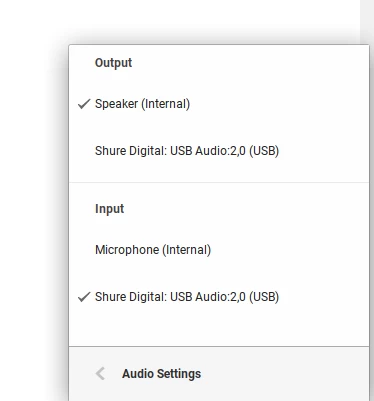
And when I go to the audio settings, both microphones show up perfectly. As such:
HOWEVER

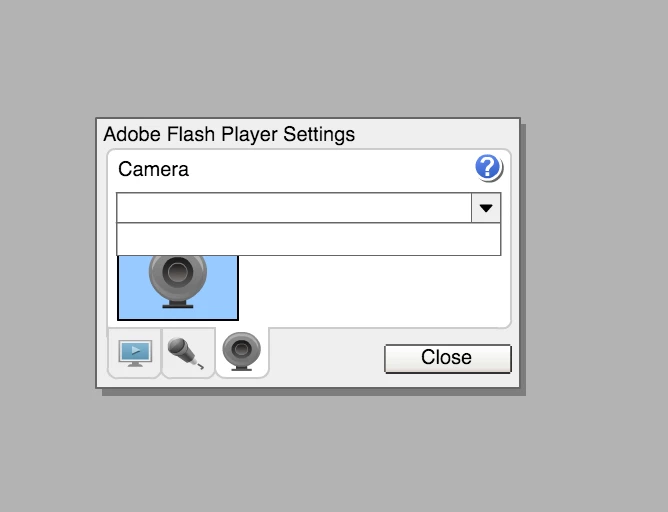
when trying to record from flash, it doesn't even show up with the built-in parts.

It looks exactly the same for the mic and camera sections.
Please help me. I really need this to work, or I need to know if I need to return this device and get a new one. It's a chomebook so I can't uninstall. I've tried restarting, disabling and enabling flash again, I've tried updating it - but I can't. And I've tried everything I can think of (or find online) in the settings!

Thank you so much for your help.

Please reply if you can.

This topic has been closed for replies.

1 reply

Community Manager
March 4, 2016

Hi,

Please go to below link and click on check now button to see the flash player version:

https://helpx.adobe.com/flash-player.html

Also please upgrade your chrome browser to latest.
Check on other browsers and see if the issue exist.

Participant
March 4, 2016

Hi there Kratika Agarwal,

Here is what shows up:

Unfortunately, on chromebook I cannot use any other browsers, or even attempt to download an update of chrome as it claims to update automatically.

I am just a little frustrated, as I used this function perfectly on the chromebook that I had before this, but it got water damage, so I bought this new one today and it isn't working. It's part of my job, so this is really setting me behind...

Thank you so much for your help, and I hope you may have another idea.

jeromiec83223024
Community Manager
Community Manager
July 12, 2017

If this is intentional, I am a little confused to why it works on the stable version of the ChromeOS, and why I don't have a choice to bypass the setting on the beta/dev versions where it doesn't work.

Is stable version of ChromeOS not secure or is the allow popup not properly working on the beta versions?


I would have to defer to the folks at Google.  You're more than welcome to file a ChromeOS-specific bug in their bugbase if you want a detailed answer.  Features are vetted through the stability channels, and features will typically show up in Canary and Beta before landing in the release channel.  I also do not see an option in chrome://flags that might control this, and one has not been communicated to me.  I *am* aware that this restriction is in the pipeline, and believe that it has already landed on desktop.  Again, this is feedback that would be best directed at Google.

That said, if you read Anthony's comments in the bug I posted, the feature is more about privacy than security (Google's stance is that sending your camera feed in the clear across the Internet has terrible privacy implications), and by breaking content in this way, Content Providers are motivated to change their code to align to Google's requirements.

My intuition based on similar experience says that bringing features to ChromeOS is more complex than the traditional desktop environments, and that the ChromeOS team may choose to prioritize new feature development differently based on real-world complexities present at any given point in time.  If the goal is simply to encourage content developers to better protect user privacy, a graduate rollout of the constraint doesn't really matter in terms of effectiveness.  They're just ramping up the pain over time instead of turning it up full-blast on day one.