


Participating Frequently
October 7, 2011
Answered

Flash Player 11 constantly crashing on every Website with Flashcontent...

  • October 7, 2011
  • 7 replies
  • 38739 views

Hi,

I am having problems with the latest Update of Adobe Flash Player to release 11. I am on a Mac(10.6.8) running the 64bit kernel. At the moment I installed Flash Player 11, every Website with Flashcontent is crashing. This also happens in Chrome, not only Safari or Firefox. I did everything Adobe provides as possible solutions. Do an uninstall with the uninstaller, then install fresh. I had a look in both of the Internet Plugins folder to make sure everything got removed correctly. But the new install won't work.

What works is uninstalling Flash Player 11 and installing Flash Player 10.3 again. Everything works like a charm then. Well... except in Chrome of course.

Just as a last bit of information: I never had any beta or alpha versions of the player installed.

Can anyone please help me? Does anyone else encounter this problem?

Regards

Alex
This topic has been closed for replies.
Correct answer

Hi Ken,

I will give the terminal magic a try in the morning.

If you have any idea what I can do to give you more informations with which you might find out what causes the crashes... I have just no idea which information might be useful. I would never have thought that something like fonts might cause such problems.

Thanks

Alex


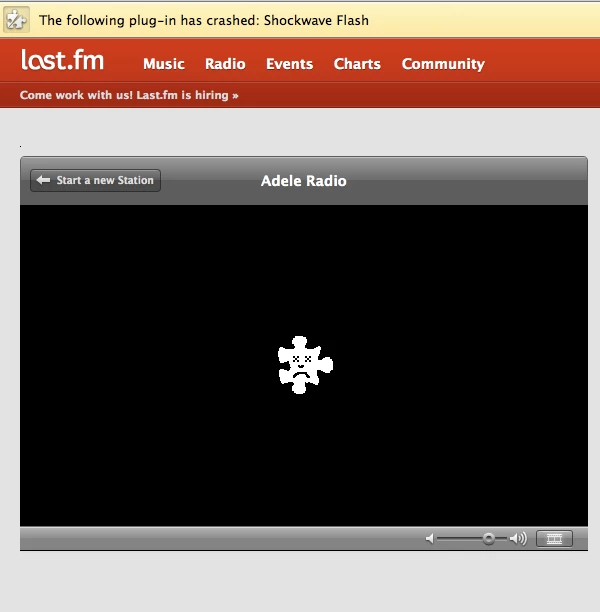
Many thanks, Alex, for providing the fonts to me. I am not on the Flash team, but am in Type Development, thus my interest in fonts, and my experience that "unknown" fonts may be malformed. I am using a MacBook Pro 17-inch running Mac OS X 10.6.8. I installed the fonts into my ~/Library/Fonts folder, and Flash now crashes on a regular basis. Attached is a screenshot of what I am experiencing in Chrome. So, if you simply remove the KozGo*.ttf files (use "% rm ~/Library/Fonts/KozGo*.ttf" to remove them), the problem may go away.

7 replies

New Participant
May 20, 2012

I am currently experiencing this problem in Windows 7 64-bit. Adobe Flash 11 Crashes everything that uses it. It first occured in Chrome. I opened the Flash Settings from Control Panel and proceeded to clear all caches. No fix. I then tried to use Internet Explorer. Still crashes immediately with any site using Flash. I download the Flash Player Uninstaller. Used it, and verified that Flash was removed from IE. Downloaded the latest standalone installer (64 bit) and used it. My browser opened upon installation, where it states that it was installed successfully; however, Flash still crashes in the exact same manner.

If bad font files are responsible, where do I go to remove them from my system? Any help with this is highly appreciated.

chris.campbell
Community Manager
Community Manager
May 23, 2012

Tronyc,

Since this post was originally about the Mac OS, could you create a new topic and detail what you're experiencing along with the output you receive when you type "about:flash" in Chrome's address bar?

Thanks,

Chris

January 19, 2012

So I was running into a similar issue on Lion but with a different cause. I had previously installed the Flashug add-on for Firefox. I removed it a while ago but the mm.cfg file was still pointing to it in preloadswf - although I could have sworn I've changed it before this. This cause adl to break as well as FP11. I set it back to the default and now everything is working fine. Hooray!  

gfmucci
Known Participant
October 29, 2011

Adobe Flash 11 crashes website using IE 8 on System 7.  The FOX NEWS.com site crashes.  When I remove Flash 11 that site works fine on IE 8.  That site works fine also on Chrome and Firefox.  All other sites work with Flash 11 except the Fox site on IE8.

How can I download a previous version of Flash that does not have this problem?

________________________________________________________________________________________ Fuji HS50EXR, Samsung S9+. Nikon Coolpix P950. Just transitioned from PSE and PE 9 to 2021
Participating Frequently
October 20, 2011

I have noticed that the fonts issue has found an entirely new bug - this is insane - the fonts are no longer being recognizd when published from flash. so if i export a font from flash with actionscript, it shows up until I restart flash, I then have to go in and remove those fonts, re-insert those fonts and republish for them to be seen.

There appears to be a serious issue with fonts.

I do not understand why Adobe and Flash have never been able to sort out their fonts - having used flash from the start it blows my mind the fact that every edition you promise to sort out fonts, create something entirely new every edition and fail every edition.

TLF is from hell.

Guys - take the time, put in the effort, and make one final, concerted effort to fix fonts.

The reality is that to get fonts working you need a degree in philosophy, masters in physics, Doctoroate in Linguistics - its ridiculous.

October 20, 2011

It would be useful to know which specific fonts are being affected by the issue that you described. Keep in mind that fonts are developed by many companies and individuals, in different formats, and using different tools. It represents a variable no doubt, but most font-related issues can be traced to a genuine issue in the affected fonts. The more useful details you provide to us, the greater the chances that we can figure out what is going on.

Participating Frequently
October 20, 2011

Any font. Arial in this instance.

I simply have to unclick and then re-click the export font dialogue in the actionscript tab in the font properties from the library.

I will be taking the fonts out and creating a dynamic loading library - so dont worry about me - but for others WOW.

New Participant
October 19, 2011

Removing bad fonts resolved the problem!! So happy!

Using Mac OS X "Font Book" application, selected File / Validate Fonts

Removed any fonts that did not pass as safe to use

Yes!!

Participating Frequently
October 10, 2011

Hi,

I tried also the Flash player 11 and Flash Player Debugger 11 Standalone Players on my mac and they both also crash...

Regards

Alex

libflashplayer_so
Adobe Employee
Adobe Employee
October 10, 2011

we've tested several of the same machine that you have and are having difficulty reproducing the crashes you are experiencing.

when do the Standalone players crash?  at launch? or when content is loaded?

would you mind to forward me your crash logs from Firefox?  if you type about:crashes in the address bar it will list your crashes.  please send me the ones prepended with "bp-"  these are the ones that were submitted to Mozilla.

Participating Frequently
October 10, 2011

should I send you the link? Or should I just copy & paste all of it?

October 7, 2011

I have the same problem with Mac OS X (10.7.1) , it constantly crashes on every website with Flash content in any browser I tried. Adobe, any comments??

P.S. Downgrade to 10.3 helps.

libflashplayer_so
Adobe Employee
Adobe Employee
October 8, 2011

can you post your system overview information?  also state your Graphics/Display information.  ii'm wondering if it is harware specific.

Participating Frequently
October 10, 2011

Sorry, that is just the adobe one.

I have read lots of these in my travels over the past couple of days - ALL of which are relating to MAC and the drivers for the GPU cards.

I can not see any reason at all why the flash player would crash on your system between the two players other than GPU issues. Especially since it is the primary variation is known

to be the cause.

I would suggest installing a virtual machine - windows etc, as this has been shown to work, if it is indeed successful then you know you need to speak to Apple about keeping up to date with their drivers.


Yeah, you are probably right. I just thought that there was a statement i have overread saying, crashes on blablabla... Maybe I was to optimistic about my mbp/specs not being explicitly in the list..

Thanks a lot for following these posts...