


Mozi2015
Participant
April 21, 2015
Answered

Flash player download: download manager is blank

  • April 21, 2015
  • 6 replies
  • 72854 views

Hi everyone,

I'm running in circles here trying to find a solution - not getting anywhere...

I'm trying to update my Flash Player for Firefox on Win7.

When I download the installer and the Adobe Download Manager opens, it shows nothing and is blank, nothing happens.

Here a screen shot:
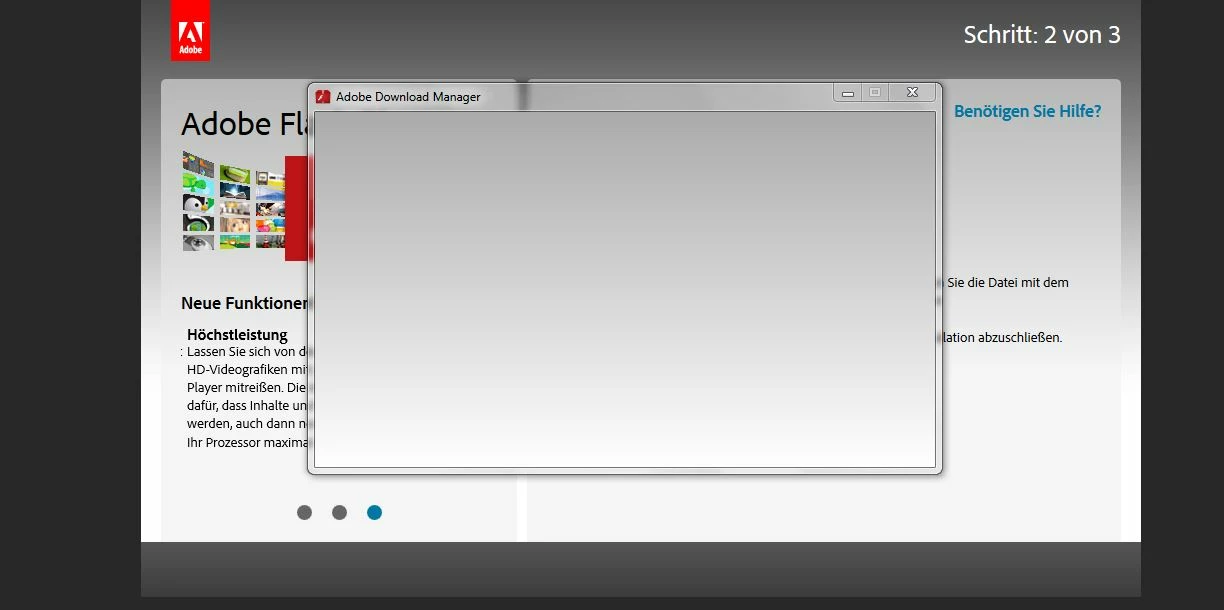
I have tried uninstalling Flash Player, but the same thing happens when reinstalling.

JavaScript is active, I've checked that. Any other solutions I have googled don't apply.

Thanks in advance!

Correct answer

WE HAVE A WORKAROUND:

Apparently, the Adobe engineers that popped into my computer and discovered the problem did not post the workaround...

So here it is:

1. Right click on the downloaded installer and select "Properties"

2. Select the "General" tab

3. At the very bottom, you will see a section called "Security" with the following text:

"This file came from another computer and might be blocked to help protect this computer."

4. Click the "UNBLOCK" button to the right of that text.

5. Click "OK"

6. Run the installer!!!

That's it!!!

Somehow file permissions get mucked up for some people and the installer can't cope with that.  Hopefully they will fix it soon.

6 replies

Participating Frequently
October 11, 2017

Not correct enough !!!

Unblocked (all versions PPAPI, NPAPI and ACTIVE X ARE STILL BLANK !!!

BOT SOLVED (VERSIONS FOR 2017/Oct./11

ANSWER PLEASE !!!

Participant
August 24, 2016

Someone posted this:

1. Right click on the downloaded installer and select "Properties"

2. Select the "General" tab

3. At the very bottom, you will see a section called "Security" with the following text:

"This file came from another computer and might be blocked to help protect this computer."

4. Click the "UNBLOCK" button to the right of that text.

5. Click "OK"

6. Run the installer!!!

My question is:   right click on downloaded installer....  when / where do i see that?

thanks. 

mathewt03
Participant
April 24, 2017

Your method didnt work. unblocking it does not do nothing.

heres my screen shot

_maria_
Community Manager
Community Manager
April 24, 2017

Hi mathewt03

Please provide the following information:

  • Operating System, including version
  • Name of the file you are using to install Flash Player
Participant
July 23, 2015

I am experiencing the exact same issue as the original poster. I'm running Win7 64-bit with Firefox v.39.0.

When I attempt to update Adobe Flash Player to the newly patched current version 18.0.0.209,

after I save & download the installer, give all permissions for it to run, the "Down Load Manager" just

sits there forever with an empty blank white window. 

Correct answer
July 23, 2015

WE HAVE A WORKAROUND:

Apparently, the Adobe engineers that popped into my computer and discovered the problem did not post the workaround...

So here it is:

1. Right click on the downloaded installer and select "Properties"

2. Select the "General" tab

3. At the very bottom, you will see a section called "Security" with the following text:

"This file came from another computer and might be blocked to help protect this computer."

4. Click the "UNBLOCK" button to the right of that text.

5. Click "OK"

6. Run the installer!!!

That's it!!!

Somehow file permissions get mucked up for some people and the installer can't cope with that.  Hopefully they will fix it soon.

Participant
February 18, 2016

Clicking UNBLOCK for Windows 7 Pro 32 Bit on IE 11 does not work. This does nothing. The DLM still renders a grey screen as above, and no further processing occurs. Not even "run as administrator" works, (even though I am the admin account on this machine)

I cannot find ANY of the "uninstaller" apps, or "standalone installer" apps that are referenced throughout this forum.

June 28, 2015

I am having the exact same problem... This post is definitely not to be considered "Answered" until Adobe fixes this..  Have had this issue for a long while now.  Having to resort to the offline installers every time there is a new update to Flash AND Acrobat.  Really annoying.

Running Win 7 Professional 64-bit on a 15" Mid 2012 MacBook Pro with 16 GB RAM. No proxy configured, AND the installer works fine on Mac OS.  This problem is only affecting Windows users it seems.

Here is the LOG FILE: Shared Files - Acrobat.com

Please fix this!  It has been going on for a couple of monthsnow...

jeromiec83223024
Community Manager
Community Manager
June 28, 2015

Unfortunately, there's no "Waiting on Reply" status.  I abuse Assumed Answered so that the dozen or so people looking at posts don't all look at the same posts, because they would otherwise appear unanswered.  It lets us help a lot more people at once.  Once I respond to a thread, replies land in my email inbox, so they grab my attention for follow-up.

While I hear about the issue that you're describing occasionally, it's pretty rare.  With the old installer, it was actually related to graphics driver issue.  We completely changed installer technologies back in April -- the new installer was written by an entirely different group, and while the symptoms sound the same, I don't have enough data on the new installer to tell you that it's the same root-cause.

I'll pass along the logs to the installer team, thanks for taking the time to share them.  Hopefully we can get some traction on this.  In general, the problems that linger do so because there's some underlying issue that we're dependent on a third-party to resolve, or we simply lack sufficient data on how to reproduce it.  With 1.5 billion installed clients, anything conceivable that can go wrong does (and in every flavor of multiple, varying combinations), but this isn't something we're being inundated with reports about.  If there's anything that jumps out at you as being particularly unique, that might help.  Are you running BootCamp, VMWare or something else for Windows on your Macbook?

Just to confirm, is it the actual installer that's rendering blank, or is it the download webpage?  *That* issue is generally caused by anti-tracking or ad-blocking plugins -- ghostery, adblock plus, privacy badger, etc.  Those types of plugins will frequently block the hostname that serves the static javascript libraries, presumably because the same host serves the analytics libraries.

June 28, 2015

Hello Jeromie,

Thanks for the reply.

To answer your questions:

I am using BootCamp to run Win 7.

It is the Download Manager itself that is rendering the blank page... just like the original poster's screenshot.  The download webpage works just fine.

Only thing I can think of is that Adobe's installers were working fine until a few months ago when they stopped working out of the blue.  Since then, I have had to manually download the offline installers to update anything by Adobe.

Suggestion:  Have a link to the offline installers on the main download page as an option so people don't have to go searching all over your site for them.  Give the option right on that page to download a variety of installers.

Participant
June 20, 2015

I also am having the exact same problem on my windows 7 so maybe though multiple people having this issue we can get an anser

_maria_
Community Manager
Community Manager
April 21, 2015

Hi mozi2015,

Thank you for posting the screenshot.  I'll forward this to the folks who handle the online installer.  To help us troubleshoot further, please provide the 2 log files saved at C:\Users\YourUserID\AppData\Local\Temp\Adobe_ADMLogs using the instructions here How to share a document.  In the mean time, you can use the offline installer posted at the bottom of the Installation problems | Flash Player | Windows page in the 'Still having problems' section.  There are three install files.  If you use multiple browsers you'll want to install the ones for the browsers you use.

--

Maria

Mozi2015
Mozi2015Author
Participant
April 21, 2015

Hi Maria,

thanks for the quick answer.

There was only one log file in the ADMLogs folder: https://files.acrobat.com/a/preview/51ab9773-289f-4ca7-af6a-fbf79af5841e

Mona

dakabero
Participant
June 23, 2015

@Mozi2015,

Thank you for providing the Adobe_ADM.log file. I do see an error in the file and will forward it to the online installer team for review.

@loduswars,

What OS, including version, are you observing this behaviour on?

Please provide the 2 log files saved at C:\Users\YourUserID\AppData\Local\Temp\Adobe_ADMLogs using the instructions here How to share a document.


@Mozi2015, and loduswars,


Do either of you use a proxy server, configured either via the browser or a .pac file?


Thank you in advance.

--

Maria


I have exactly this problem with Win 7 Home Premium SP 1  64-bit.  Machine has 16GB installed RAM  Below is link to my uploaded ADMlogs folder

Shared Files - Acrobat.com