March 13, 2017
Answered

Flash Player downloaded but not working

  • March 13, 2017
  • 1 reply
  • 64895 views

I am unable to watch certain media rich content on the internet because it says my Flash Player is disabled. I have tried everything from resetting the chrome browser settings to uninstalling and reinstalling flash player. Flash player does not work on either safari or chrome. However, it says that it is successfully downloaded and up to date on my computer and I can view the tree on the adobe flash help site. For whatever reason, when I try to enable the flash plug-in, it won't let me select it and no enable option appears on the security tab.
    This topic has been closed for replies.
    Correct answer

    No, flash content did not appear in Chrome after either of those steps.

    The link to how plugins work for safari doesn't have any new information that is useful.


    Ok I actually figured it out! I went to a website with media content that I could not previously see (hgtv.com) and control + clicked on the blank space where the video should be playing but wasn't, and clicked inspect source. From there I could read the code that said my DNS from my old Unlocator account (from when I was out of the country) was being blocked. So I deleted my unlocator account permanently, deleted my unlocator DNS from network preferences, and typed in 8.8.8.8 instead (general Google DNS that works worldwide). Then refreshed the hgtv page and the video worked!

    Thanks for all your help!

    1 reply

    _maria_
    Community Manager
    Community Manager
    March 13, 2017

    Hi kathrync15289802 ,

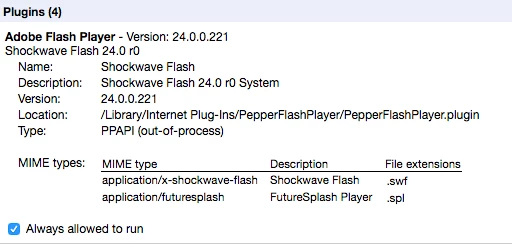
    You do have the latest version of Flash Player NPAPI plugin for Safari and PPAPI plugin for Chromium-based browsers. 

    For the first screenshot, which browser is the screenshot from?

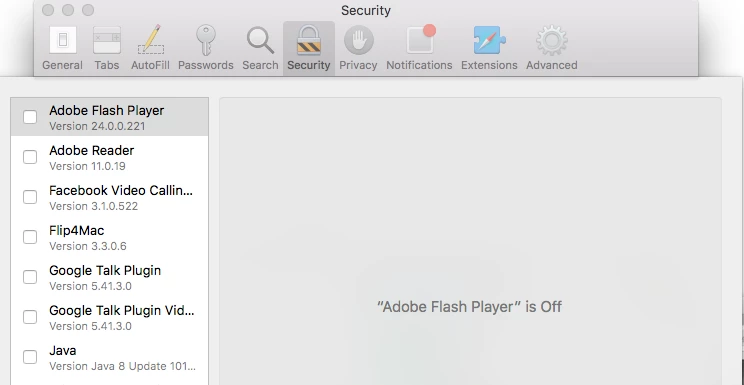
    For the second to last screenshot (Safari Security preferences), what happens when you click on the check-box next to Adobe Flash Player?  The expected behaviour upon selecting the check-box is as follows:

    • If Safari is open to a site that requires Flash content, that site will be listed so you can manage Flash Player how Flash Player behaves on a per-domain basis by selecting Ask/Off/On options for the individual site, and you also have the option to manage how Flash Player behaves when visiting other sites, by selecting Ask/Off/On for this setting.
    • If Safari is not open to a site that requires Flash content, no configurable sites will be listed and you can manage Flash Player how Flash Player behaves when visiting websites by selecting Ask/Off/On

    The options are self-explanatory:

    • Ask - always ask whether or not to display Flash content when visiting a site containing Flash content
    • Off - never play Flash content
    • On - always play Flash content.

    --

    Maria

    March 14, 2017

    Hi there,

    The first screenshot is from Google Chrome; I don't see the image in Safari.

    For the second to last screenshot, nothing happens when I select the box next to Adobe Flash player. It gives me no options to enable or manage.

    So basically, Google Chrome says that Flash is downloaded and enabled but it doesn't work, Safari says it is either not downloaded or not enabled, and my computer says it is both installed and enabled and working properly.

    _maria_
    Community Manager
    Community Manager
    March 14, 2017

    Hi kathrync15289802 ,

    For Chrome, you may be encountering Chrome's new Site Engagement Index score issues.  See Flash Roadmap - The Chromium Projects for more information.  For issues with this feature, please contact Google Chrome Help for assistance.

    For Safari,  I've not seen the behaviour you describe.  Using OS X 10.11.6 and Safari 10.0.3, when I go to Safari > Preferences > Security > Plug-in Settings "Adobe Flash Player" is off displays if the Adobe Flash Player check-box is not selected (1st screenshot below), but when I put a check-mark in the box the right pane changes allowing me to manage Flash Player (2nd screenshot below).

    It's displaying "No Configurable Websites" because I didn't navigate to a site that requires Flash, else it would display the domain for that site.

    You can try the following:

    • Reset Safari:
      • Safari > Clear History
      • Select to clear all history
        • Note this will delete all browsing history, cache, cookies, etc
      • Click Clear History button
    • Disable/Enable Internet Plug-ins:
      • Safari > Preferences > Security
      • Uncheck the 'Allow Plug-ins' check box
      • Recheck the 'Allow Plug-ins' check box
      • Then go to Plug-in Settings...
      • Select the Adobe Flash Player check-box
      • Does the right pane allow you to manage Flash Player settings?

    If these options don't work, please contact Safari - Official Apple Support  as it is their product that is not allowing you to enable the plugin.  You can also go to Safari - Official Apple Support Communities (user-to-user forum) for assistance.

    --

    Maria