


New Participant
September 26, 2016
Answered

Flash player is not working in chrome how do i fix it?

  • September 26, 2016
  • 5 replies
  • 331744 views

Flash player is not working in chrome.

I have reinstalled chrome and i have selected the option so flash always can run from following this guide Enable Flash Player for Chrome

Still not working. I can watch youtube but not twitch if that helps

This is the PC i'm using Core i7-6850K 3.6GHz 6-Core, GeForce GTX 1080 8GB GAMING X 8G, Define S ATX Mid Tower - My first PC - zautos's Saved Par…

I'm using windows 10 education

How do i get it to work?
This topic has been closed for replies.
Correct answer _maria_

I just discovered something which may be very important.

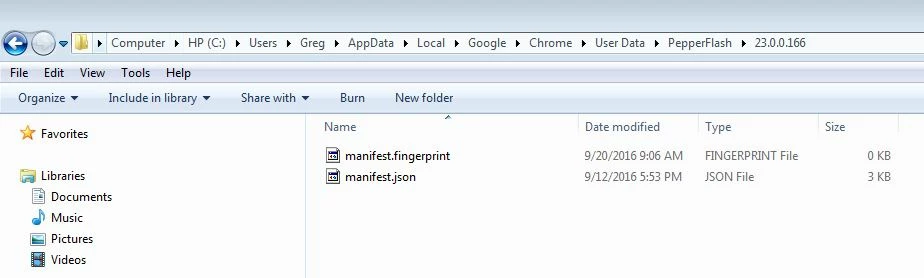
I do not have a pepperflash.dll file on my computer

Could this be the cause of my issue with flash player?

Here is my screenshot of this:


@gregk13186206 ,


Thanks for posting that screenshot.  Very helpful.  Yes, indeed the pepflashplayer.dll file should be there.  That is the Flash Player file for Chrome. Please try the following:

  • delete the 23.0.0.166 directory
  • launch chrome and navigate to Flash content
  • does it download and install Flash Player, in the same ~\AppData\Local\Google\Chrome\User Data\PepperFlash directory?

Note: AppData is a hidden directory, if you don't see it see https://support.microsoft.com/en-us/help/14201/windows-show-hidden-files to display hidden files/folders.

We have escalated this to Google and your screenshot will be very helpful.  I'll forward it to them.

--

Maria

<edited to include link to show hidden files/folders>

5 replies

New Participant
November 15, 2017

After you update flash to a new version and still not working.

1) ... Open a webpage you want to use flash

2) ... Click on ...." View Site Information " ... on TOP LEFT in front of   URL ..( https:// )

3) ... Click at .. FLASH ...  + ALWAYS ALLOW ON THIS SITE ... That's it .... !!!

New Participant
May 23, 2017

May 23, 2017

Yesterday, all computers in our Office starting having Flash in Chrome Issues.

The dialog  box is frozen, unable to scroll this is in Salesforce.

I followed, read and deleted the pepperflash folder current Flash Version. Then downloaded the latest from Adobe.com, still having Issues.https://forums.adobe.com/thread/2213951

Please help Adobe Flash not working in Chrome very good.

New Participant
May 12, 2017
New Participant
October 3, 2016

OK.  I am having the same issue but need help fixing it. This is where the plugin is supposed to be (user/kjtwist/appdata) but I dont even have that (appdata) in my system (under user). NO appdata there..It is in my Program files directory though. Please tell me how to correct this. I dont follow the explanation here.

_maria_
Community Manager
Community Manager
October 3, 2016

Hi kjtwist ,

AppData is a hidden folder.  See https://support.microsoft.com/en-us/help/14201/windows-show-hidden-files  to display hidden files/folders.  One of the first things I do when I get a new system is display hidden files/folders so I forget that this is a hidden file and forgot to include that in my previous instructions.  I've edited the instructions to include this info.


Alternatively you can copy the Location path from chrome://plugins and paste it into Windows Explorer address field.


Even if the file is there, delete the 23.0.0.166 directory (in the AppData file path) and force Chrome to download the Plugin again.  This should work.  Please post back whether or not pepflashplayer.dll was in the AppData directory path and if this solution worked.  I'll forward this info to our contact at Google.


Thank you,

--

Maria

New Participant
October 4, 2016

Wow.  I have tried everything but that worked.  It was there and I deleted the file and it works now. In Windows 10 though there is no way to enter "folder" in the search, Cortana has taken over.  I simply opened File Explorer and hit "view" then "Show Hidden".  There it was.  I uninstalled Chrome, after deleting the file and reinstalled.  Its working. THANKS

_maria_
Community Manager
Community Manager
September 26, 2016

I'd like to get a few screenshots from you.  Launch Chrome and do the following:

  • Navigate to chrome://help:  What is the version installed?
  • Navigate to chrome://plugins click the '+Details' link at the top right to display the plugin details
    • Take a screenshot of the Flash Player plugin entry details
  • Navigate to chrome://components and look for pepper_flash).
    • Take a screenshot of the pepper_flash entry details

See How do I attache a screenshot for information on taking and posting screenshot.

Thank you.

September 26, 2016

I am having the same issue with Flash Player 23 and Chrome.

Keep getting the same error message:  "Couldn't Load Plugin"

I am using Windows 7.

Note:  I am able to play videos on Internet Explorer.  They will not play on Google Chrome.  (I use Google Chrome.)

I have followed your advice from this forum and nothing seems to work:

I have enabled Adobe Shockwave Flash 23 and checked the box:  Always allowed to run.

I have removed and reinstalled Google Chrome.

Nothing seems to work.

Here are my screen shots including the error message I see on many websites & videos:

September 26, 2016

i'm not sure why your post was rejected as there was nothing wrong with it.

I don't have any suggestions for Chrome at the moment, aside from using a browser other than Chrome.  I have escalated the issue and am awaiting a reply. 


Thank you.

Please keep me and everyone else updated when you get an answer/solution.

In the meantime, could you please comment on the following ideas for correcting this FlashPlayer issue.  Some of these ideas have been discussed on your site:

  1. Should I try and possibly install an older version of Flash Player?
  2. I have also suggestions to rename the file:   pepflashplayer.dll        Is this an option?
  3. Could the program "AdBlock" be causing an issue with FlashPlayer?  I have had AdBlock installed on my computer for over a year and never had this problem until the latest FlashPlayer update.
  4. Lastly, could Java be causing an issue with FlashPlayer?  Again, I have had Java installed on my computer for many years and never had an issue playing videos with FlashPlayer.