Copy link to clipboard
Copied
Hi,
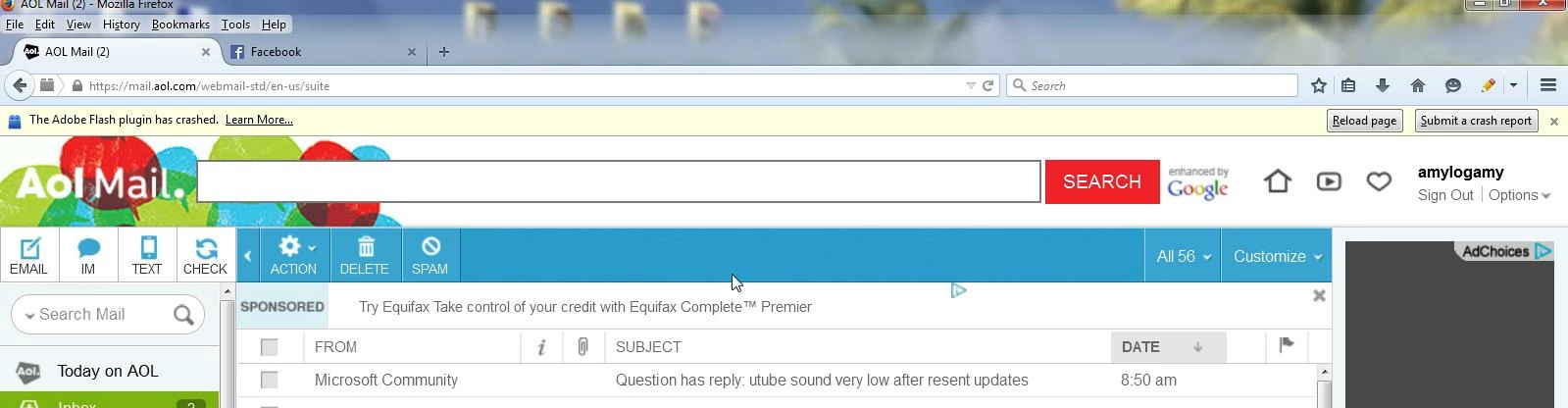
I have been having problems with adobe plugin crashing constantly in Firefox, mainly when I am looking at my email and the side bar with the advertisements pop up. Also was having problems in Firefox and Internet Explorer with the audio in YouTube been very low for a few days. This problem with the audio I was able to fix by following one of your posts form 2012:
Go to Start -> Control panel -> Flash Player -> Advanced
I deleted all "Site Data and Settings".
I have the latest Flash version 17.0.0.169.
I have Windows 7, 64-bit but when I go into my Control Panel the Flash Player shows 32-bit. Why is this? Could this be what is causing the problems.
I would appreciate your answer.
Thank you
Amy
Hi Jeromie,
Thank you for your response. I use the downloader from Real Player to download videos. It is very easy to use so I want to keep it. I still think there is something going on with the Flash Player and Firefox. I guess I just to deal with the problem. Only the side bar where the advertisement are crashes like I showed you in the picture above.
The low sound on the YouTube videos was bothering me a lot because I watch a lot of short videos posted on Facebook about dogs and could not hear
...Copy link to clipboard
Copied
The bit-ness isn't the issue.
Firefox has good crash reporting. I should be able to give you a reasonable answer with a few crash reports.
Go to about:crashes in Firefox
Click the first few links (or right-click and open them in a new tab).
Refresh the about:crashes page, and the link names should have changed to start with "bp-"
Just copy those into a reply here and I'll be happy to take a look.
For volume issues, make sure that all of the volume sliders are up. Flash Player gets it's own slider in the windows mixer when videos are playing.
Copy link to clipboard
Copied
Hi Jeromie Clark,
About the volume on the YouTube videos I fixed it like I said above by deleting the "Site Data and Settings". YouTube does not have a slider for the volume. I don't know where to look for the Flash Player slider other wise. Can you tell me how to see it? Thank you.
Here is a copy of the crash reports:
Submitted Crash Reports
Report ID Date Submitted
bp-1dd76e14-5c95-484f-a634-da1782150419
4/19/2015 12:12 PM
bp-221d9e76-6781-43f7-bdbb-09ad52150419
4/19/2015 12:11 PM
aecef3e5-62de-41a6-b01a-e547766db005
4/19/2015 12:05 PM
bp-2eb0e897-2615-4828-a1d9-e3cc22150419
4/18/2015 5:10 PM
bp-ad0f30aa-330b-40f1-a834-b51142150418
4/18/2015 12:46 PM
bp-f20d93e8-dc57-4c38-a030-8e1c82150418
4/18/2015 11:35 AM
bp-558ddd62-e9d9-47a8-ae1f-d9db82150418
4/18/2015 11:07 AM
7196ebea-68b0-4be8-a55b-06dcfea21d2c
4/18/2015 11:05 AM
bp-5537a9f0-ad8e-45ee-8fe3-70b432150418
4/18/2015 11:05 AM
bp-d7747b12-9132-4ab4-a754-fecfe2150417
4/17/2015 4:55 PM
2a218894-94c8-4caf-a995-cb3fe3acf01c
4/17/2015 1:56 PM
bp-152a6426-dceb-473f-a7c0-fc0ff2150417
4/17/2015 1:47 PM
bp-89b89d55-ac4b-40b2-abb0-2e7252150416
4/15/2015 5:26 PM
bp-88b48096-67d5-4a63-a918-6c24a2150416
4/15/2015 5:22 PM
bp-23e2445c-2d28-4d9a-a539-0c8792150416
4/15/2015 5:17 PM
bp-0bccaffa-5f4d-472d-8053-ba03b2150415
4/14/2015 9:29 PM
bp-b7f3da66-e4d0-4715-bcd4-392552150415
4/14/2015 8:25 PM
bp-e365038d-bb75-48e6-b3ae-2b6e22150413
4/12/2015 7:43 PM
bp-aad24893-5dff-456e-ab52-2efdf2150412
4/12/2015 2:14 PM
Copy link to clipboard
Copied
These are actually all crashes in RealDownloader/Real Player Download and Record plugin. You might just want to uninstall it.
bp-1dd76e14-5c95-484f-a634-da1782150419
bp-221d9e76-6781-43f7-bdbb-09ad52150419
bp-2eb0e897-2615-4828-a1d9-e3cc22150419
bp-f20d93e8-dc57-4c38-a030-8e1c82150418
bp-558ddd62-e9d9-47a8-ae1f-d9db82150418
bp-5537a9f0-ad8e-45ee-8fe3-70b432150418
bp-152a6426-dceb-473f-a7c0-fc0ff2150417
bp-89b89d55-ac4b-40b2-abb0-2e7252150416
This is the generic "some communication between Flash and Firefox got lost" crash signature.
We're actively working with Mozilla to address these, but that effort is ongoing and we expect to see incremental improvement over the coming months:
bp-ad0f30aa-330b-40f1-a834-b51142150418
bp-d7747b12-9132-4ab4-a754-fecfe2150417
The rest were taking a long time to load, so I got bored. It looks you'll see a huge improvement by getting rid of the RealDownloader plugin though. It probably attempts to hook into Flash Player unsuccessfully. We don't have an engineering relationship with them, but they try to scrape Flash video streams as a value-add for their product.
Copy link to clipboard
Copied
Hi Jeromie,
Thank you for your response. I use the downloader from Real Player to download videos. It is very easy to use so I want to keep it. I still think there is something going on with the Flash Player and Firefox. I guess I just to deal with the problem. Only the side bar where the advertisement are crashes like I showed you in the picture above.
The low sound on the YouTube videos was bothering me a lot because I watch a lot of short videos posted on Facebook about dogs and could not hear them at all. I never saw the volume slider on these videos only the slider for On/Mute. The problem was fixed by deleting all the "Site Data and Settings".
Thanks for all of your help,
Amy

Copy link to clipboard
Copied
This "solution" doesn't do anything!!!!!!
Get ready! An upgraded Adobe Community experience is coming in January.
Learn more