


October 25, 2013
Question

Flash Player Prompting to Update with Auto Updates Disabled

  • October 25, 2013
  • 5 replies
  • 70631 views

My scenario:

Windows 7 x64

Flash Player 11.7

mms.cfg located in C:\Windows\Syswow64\Macromed\Flash

mms.cfg settings:

AutoUpdateDisable=1

SilentAutoUpdateEnable=0

I opened the Flash Player Settings Manager and under Advanced tab, verified "Never check for updates" is enabled.

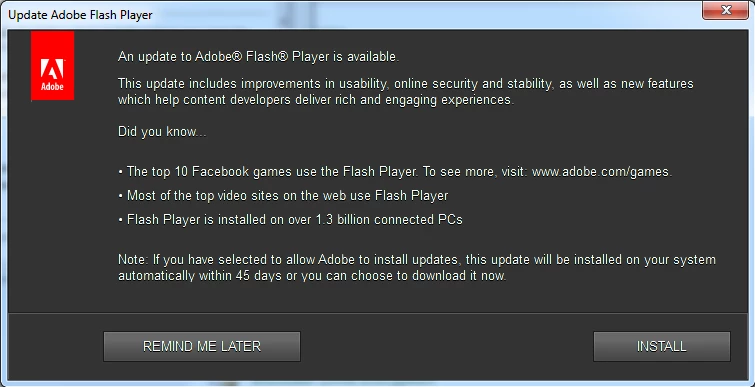
I have both Standard and Administrative users receiving the following warning to update Flash player. Again, I have verified the settings are correct and auto update is showing as disabled.
This topic has been closed for replies.

5 replies

New Participant
April 19, 2015

I just edited the file C:\Windows\SysWOW64\Macromed\Flash\mms.cfg from this:

  • AutoUpdateDisable=0 (notification update is disabled)
  • SilentAutoUpdateEnable=1 (silent auto-update is enabled)

To this:

  • AutoUpdateDisable=1 (notification update is disabled)
  • SilentAutoUpdateEnable=0 (silent auto-update is disabled)

Note that using Notepad, etc. to save the file did not work, since access was denied.

Since on Windows 7 64 bit both edit and edlin are missing, I just downloaded vim for windows and used 'vi' from the command window (cmd.exe).

From a command line editor you can save the file.    I restarted the computer to make sure it took effect.

Message gone.

New Participant
August 4, 2015

As well as what gaiusg99716536 has posted we do the following in our environment.

Using a batch file for the install add the following line:

SCHTASKS /Delete /TN "Adobe Flash Player Updater" /F

This will remove the actual scheduled task in Windows that runs the auto updater service for Flash.

This will stop any kind of updating checks for Adobe Flash.

You can double check that this task already exists using task scheduler in Windows.

We also copy the mms.cfg to the following locations on our x64 systems:

C:\WINDOWS\System32\Macromed\Flash

C:\WINDOWS\SYSWOW64\Macromed\Flash

Hope this helps.

_maria_
Community Manager
Community Manager
August 4, 2015

Hi 90520388,

The scheduled task is only for Background Updates.  It is not involved in any way with Notification Updates.  To completely disable Background and Notification Updates, put the following in the mms.cfg file:

AutoUpdateDisable=1

SilentAutoUpdateEnable=0

This does not delete the scheduled task, and the task will still wake up periodically to check the mms.cfg file settings to see if it should query the Adobe servers for an update, but it'll see that Background Updates are disabled and go back to sleep.  It will never actually send a request.

Also, the bug requiring the mms.cfg file to also be saved at C:\WINDOWS\System32\Macromed\Flash on 64-bit OS has been fixed and this work-around is no longer required.

--

Maria

wt1
New Participant
September 17, 2014

Hi everybody,

I also have the same problem, "never check for updates" is selected but still the user is prompted to update.

When you go to Adobe - Flash Player : Settings Manager - Global Notifications Settings Panel  you can uncheck the box for “Notify me when an update to Adobe Flash Player is available. Strangly enough this seems to be a user setting and not a computer setting for all users. Adobe should uncheck this setting when administrators disable to check for updates, if you ask me.

Kind regards,

Wikke

electric_grape
New Participant
July 16, 2014


I have exactly the same issue with some users. MMS.CFG has:

AutoUpdateDisable=1

SilentAutoUpdateEnable=0

Flash player settings panel advanced tab reads  "Never check for updates (not recommended)", but user is still prompted to update.

I look forward to Adobe's resolution of this issue; it makes Flash player impossible to manage in a corporate environment.

New Participant
June 23, 2014

Great news ALL!

I have had an open case with Adobe Support for a better part of June and I just received confirmation the Adobe Engineering team is able to replicate the issue.

They have logged a high priority bug, bug number #3759054.  I'll provide confirmed solution once provided.

September 8, 2014

Hi KevinBach,

Did Adobe provide an update to your issue?

I am experiencing the same problem.  I have placed the MMS.CFG file into both x86 and x64 director and it seemed to resolve the issue for a little while and now it has come back.

I can't find that BUG ID you quoted in your post.  Any help guys?

Cheers.,

Luke

New Participant
September 8, 2014

@Luke

Adobe responded to me on a follow up email on 8/4 confirm that "the product team is able to reproduce this issue, but only on an older version of IE11. The workaround is to deploy the mms.cfg file to the following two locations on the systems:

C:\Windows\SysWOW64\Macromed\Flash\

C:\Windows\System32\Macromed\Flash\"

I'm not sure I believe the only version is IE11 because I can replicate all day long on IE10.  In any case, we have added the mms.cfg file to both locations for WIN7 x64 OS and problem is resolved.

No update on when they will update their admin guide to reflect this requirement or when they intend on updating the code but this is a must for that OS moving forward in conjunction with IE10 or higher.

pwillener
Brainiac
October 26, 2013

There have been many reports of fake update pop-ups, but the screenshot you posted looks genuine.

When you get that pop-up again, could you check the Task Manager's Processes tab, and see if you can identify which process is issuing it?

P.S. hopefully someone from the Flash Player team will also have a look at your post.

November 5, 2013

The message popped up again today. The process was FlashUtil32_11_7_700_202_ActiveX in C:\Windows\SysWOW64\Macromed\Flash

I again verified in the Flash Player Settings Manager that 'Never check for updates (not recommended)' is selected.

I don't know if the processes the first time was ActiveX or Plug-in.

I also want to point out that not everyone is receiving this message, only some are.

November 18, 2013

We are seeing the same thing. I was going to post about it but it suggested I read this post. Which has not been answered. I am following all of the documenation for disabling flash updates and the control panel icon is showing that checks are disabled. I even went as far as disbaling the Flash Updater Service and removing the scheduled task Flash creates for whatever reason. As far as I can tell i have disabled this updater in 4 different places and some users are still getting prompted. Is this a bug? It used to work up until the last few months. Thanks.