Participating Frequently
July 31, 2016
Answered

High CPU Usage on Win10

  • July 31, 2016
  • 1 reply
  • 11233 views

I have extremely high CPU usage in all browsers I use (FF, Opera, Opera Beta and Chrome). Every page with Flash Player and every images-heavy page causes my CPU to go wild. Until my upgrade to Win 10 at least my PC didn't block from that. Now after the upgrade I suffer from this too. I have PC blocking 3-4 times in a week when the high CPU usage happens. I wonder why Adobe is so silent about this very serious issue. Probably if there was an alternative to Flash Player they would be more willing to solve it so people not to choose the other one.

PS. Changing Always Activate to Ask to Activate in FF didn't help.

    This topic has been closed for replies.
    Correct answer Carm01

    I installed FFx64 and removed x86 one. Profile was kept but unfortunately the CPU issue still persists. You helped me much with telling me about about:performance, I didn't know it. Here is a screenshot of what happens while I opened this page here. As if it is true my suspicion that AdBlock+ and NoScript are a part of the problem?
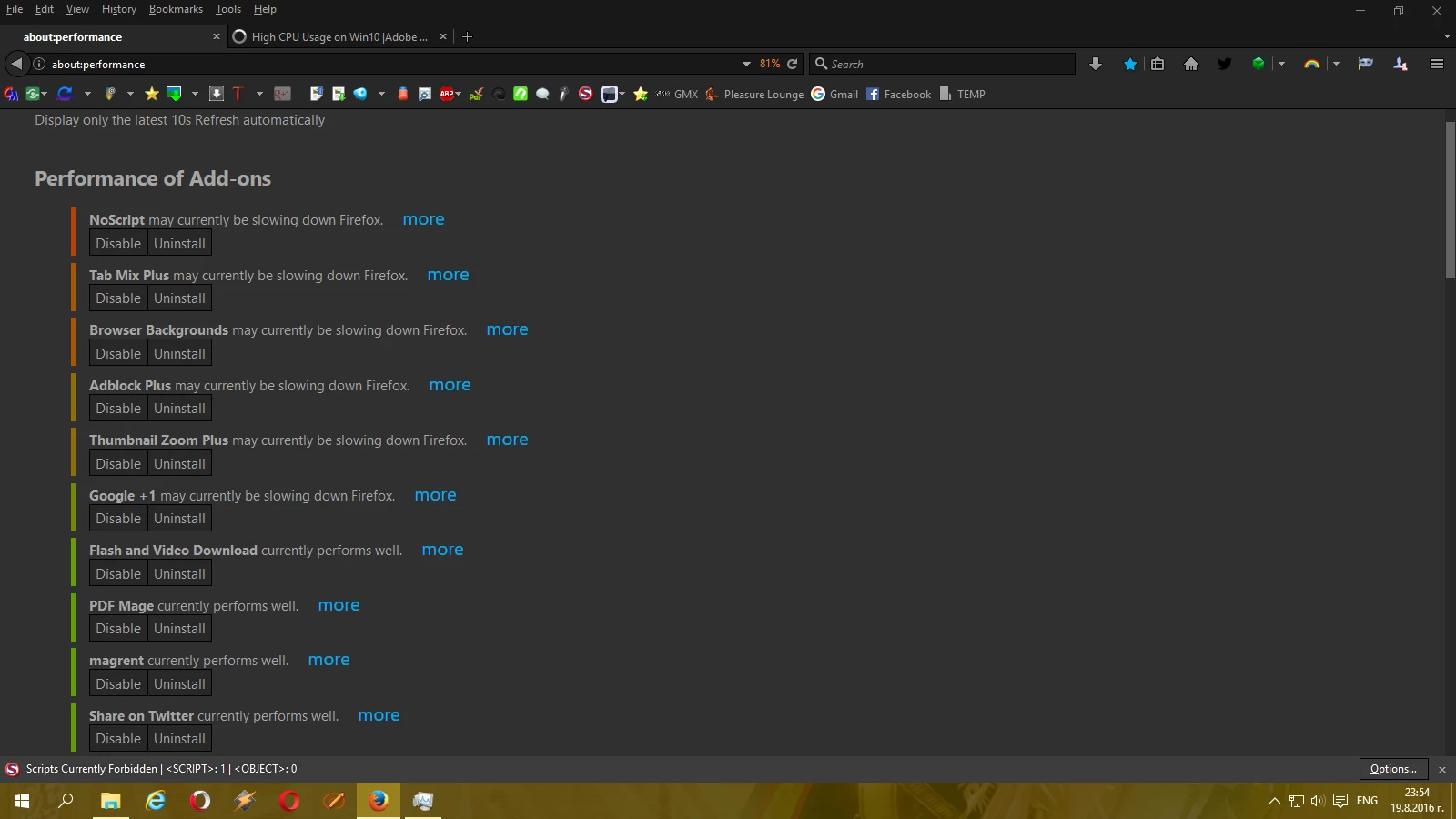

    You need to try a new profile without any addons. I suspect that one of those addons or several are competing with other things. Add you addons back one by one until you narrow the problem down. On top of that you mentioned in you OP that you have a celeron processor. I have dealt with those processors and they are a budget/low end processor, and this could be a huge part of your issue after seeing other things.

    I use ABP and suffer no issues, I see that it shows has high at times, but does not really hinder my performance in Firefox, I doubt that the bookmarks are an issue. I went to that site and performed the function shown in the screenshot and only maxed out at 44% cpu; however that is an i-7 6700 cpu w/16BG of mempory to use + 4 BG of Video.

    I would suggest going to google and typing in ' processhacker ' it might give you a better breakdown on what is using what. I think that your CPU is struggling to keep up what i suspect.

    Best Regards

    Please be sure to mark my post here helpful or answered if I assisted you

    Thanks

    1 reply

    jeromiec83223024
    Community Manager
    Community Manager
    July 31, 2016

    I've branched your thread into a new post so that we can offer you personalized advice.  My guess is that we're unable to leverage hardware acceleration on your system.  There are a number of reasons for why this could happen.

    In order to investigate, I need some specifics:

      • Can you provide links to one or more  pages where you consistently see very high CPU usage?
        • In order to effectively debug it, we need to be able to examine the problem.

      • In general, high CPU usage comes down one of a couple things:


        • Misbehaving or inefficient content (a poorly written Flash ad) that you're seeing a lot, or content that doesn't enable hardware acceleration.  (This is a choice that the content provider has to make, and comes down to performance vs. compatibility.)

        • Hardware/Driver Issues.  It's possible that we need to do something to take advantage of the hardware if it's really new, but more commonly, some Win10 drivers for older hardware are problematic.  An inventory of the hardware and drivers will let me find a comparable machine in our labs.

          The output of chrome://gpu would be informative in this regard, and will show us if Chrome is explicitly disabling the hardware on their end.  (If they're seeing instability in their aggregate telemetry for a particular driver, they'll note that and the workaround they've employed in the Problems section).  Alternatively, the output of dxdiag would be useful

          The video troubleshooting guide is here:
          https://helpx.adobe.com/flash-player/kb/video-playback-issues.html

    Thanks!

    vessto74Author
    Participating Frequently
    August 4, 2016

    Thank you for the reply!

    I can't recall when exactly the issue started but it was probably after my upgrade from Win 8 to Win 8.1 and now persists in Win 10. Not sure if the event is connected thought.

    My drivers are up-to-date, checked manually in Device Manager. But my manufacturer Lenovo probably customized the graphic driver as the driver Intel suggests as the newest is not the one I have but my system tells me mine is the newest I need.

    My CPU is Intel Celeron 2.5 GHz

    I though AVG Free Watchdog service is the problem but when removed AVG and  installed Avira the problem remained.

    Here are 3 of the sites that reach almost 100% CPU, my fan goes wild and after the upgrade to Win 10 I suffer PC blocks which at least didn't happen in Win 8.1.

    Silk – Interactive Generative Art

    sumopaint.com

    Ninja Kiwi - Free Online Games, Mobile Games & Tower Defense Games   (all games here)

    An article says I should change a setting in Time Broker in Registry after upgrading from 8.1 to 10.

    I had hardware acceleration enabled in Flash Player until I forbade it yesterday but no success with CPU usage.

    I use Chrome very rarely, my default browser is Mozilla and Opera/Opera beta the next choice.

    I also have problems with high CPU when download with fast speed and when open images heavy sites (even Facebook albums). But I dunno if this is Flash Player related.

    What to do to provide detailed information (inventory) about hardware and drivers? Is DxDaignose I should do?

    I have AdBlock+ on all browsers and NoScript in Mozilla.

    PS. I just found that CPU is extremely high when watching FB videos too. Not sure about YT but the local video portal VBox7 also causes high CPU.

    vessto74Author
    Participating Frequently
    August 9, 2016

    You might want to check out this regarding Firefox  64 bit as i mentioned above:

    Re: Flashplayer crashes using firefox with Windows 10

    This will answer your questions regarding 32 or 64 bit flash players, as you get both on a 64 bit system automatically.

    There are also articles related to certain sites not allowing or using video hardware acceleration thus causing the cpu to do all the work. being you have a celeron, its going to amplify that issue.

    I use a 64 bit of Firefox and i never see that flash process anymore since I switched some time ago. It is handled within the plugin container, so hopefully you should see that disappear in the 64 bit version.

    Best Regards

    Please be sure to mark my post here helpful or answered if I assisted you

    Thanks


    Just a quick reply. I'd be more than happy to solve this installing FF x64. But according to their site (Question section) many of the FF add-ons doesn't work on x64 version. I have around 60 active add-ons which I use every day. I must think how to check which one I could lose and to install x64 version separately if there's any danger.

    Before the issue I could watch online TV (from national TVs sites) in both Opera and FF.

    Should I install Opera x64 too (if available)?

    I'd rather try your other guide first, to uninstall Flash Player and to install again from offline installer.

    PS. Is Driver Booster Free ok when the manufacturer made own change in the drivers? I already had conflict when tried to update driver directly from Intel, the writing became slow. The driver was rejected from the system and the writing went ok after the PC restart.
