


Known Participant
April 13, 2013
Answered

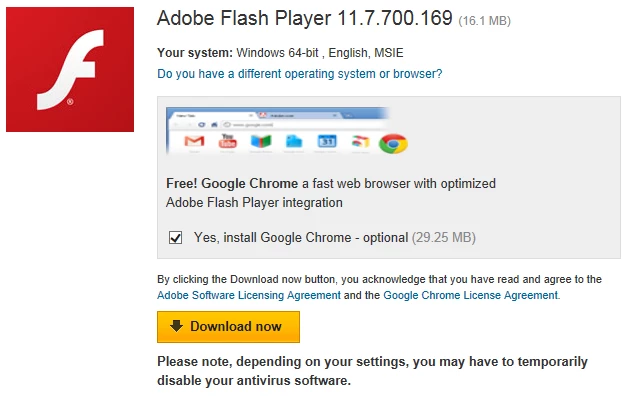
How can I stop the Google downloads when doing a Flash player update?

  • April 13, 2013
  • 1 reply
  • 695 views

Whenever I do a Adobe Flash Player update the Google Chrome and Toolbar download with the Flash Player update. Is there anyway to stop this from happening before the fact, rather than  having to remove the two Google programs after the download? It is very annoying and also sneaky on Adobe and Google's part! I am using Windows 7 with IE10. I do not have Google Chrome.

Thank you,

     TomS
This topic has been closed for replies.
Correct answer pwillener

Uncheck the optional programs on the download page

or use the offline installers from http://helpx.adobe.com/flash-player/kb/installation-problems-flash-player-windows.html#main-pars_header

1 reply

pwillener
pwillenerCorrect answer
Brainiac
April 14, 2013

Uncheck the optional programs on the download page

or use the offline installers from http://helpx.adobe.com/flash-player/kb/installation-problems-flash-player-windows.html#main-pars_header

Known Participant
April 14, 2013

Pat Willlener,

     Thank you. I see you have that opion when you go straight to the download on the Adobe website, but I do not recall haveing that option when I got an automatic update notice from Flash Player and used the "update now" button. Is that right?

Thanks again,

    TomS