December 9, 2015
Answered

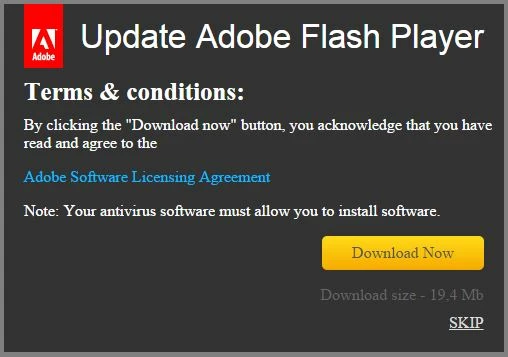
I'm getting an "Update Adobe Flash Player" message that won't let me log into my wordpress admin page. Is this a legit adobe thing or is it a scam?

  • December 9, 2015
  • 2 replies
  • 1383 views

This thing keeps coming up so that I can't log into my blog admin panel. I downloaded the file but the whole thing smalls like malware. The "Adobe Software Licensing Agreement" is a bunch of writing in a forign language. What is this? When I click "Skip" the image goes away... and nothing happens.

This topic has been closed for replies.
Correct answer jeromiec83223024

That does not look to ME like a valid Adobe link

-first, it is http not https

-second I have never heard of roboframework.com

The links I found via Google are valid


Yeah, that looks like a fake popup.  Adobe would never use Times New Roman in a dialog.  It's all sans-serif around here. 

Seriously though, don't believe popups or links in email.  Always manually navigate to the developer's site and download software there.

For Flash Player, you can go to http://get.adobe.com/flashplayer to get an authentic installer.  

For Google Chrome on all platforms, and Internet Explorer and Edge on Windows 8 and higher, Flash Player is a built-in component of the browser, so there's nothing separate to install or update.  If a website is telling you that Flash isn't installed on those targets, most of the time it's because the website's logic for detecting Flash is flawed, or it's a malicious actor trying to trick you into downloading malware (and in some instances, getting you to pay them for the privilege first...).

Please do yourself a favor and set Flash Player to automatically update.  Keeping Flash, your browser and your operating system automatically updated is your best line of defense against malware in 2015.   The occasional inconvenience incurred when things break is a small price to pay in comparison with the pain of identity theft and fraud.  The thread landscape has change, and the philosophies behind avoiding updates are really hard to support at this point.


2 replies

_maria_
Community Manager
Community Manager
December 18, 2015

Hi jamess60334459,

Adobe actively goes after sites that attempt to distribute malicious installers.  If you have the full URL from where this pop-up is coming from you can private message it to me and I'll forward it to our fraud department.

--

Maria

John T Smith
Community Expert
Community Expert
December 9, 2015

This pre-populate [link removed] has information on where to go to update your Flash Player... the 1st 2 links are the ones you need (1st 2 when I just searched)

Ed. note: Please always download Flash Player from http://get.adobe.com/flashplayer

December 9, 2015

What I really wanted to know is whether or not this is really from Adobe, or if it's malware

John T Smith
Community Expert
Community Expert
December 9, 2015

Since I am not at your computer to see the original popup (not the JPG you posted here) to MAYBE be able to view the link behind the popup, there is no way to know

Click the Google link I posted to find the secure (https) pages for a Flash Player update