


June 19, 2016
Question

Keep getting "Update Adobe Flash Player" popup even when have newest version

  • June 19, 2016
  • 3 replies
  • 15235 views

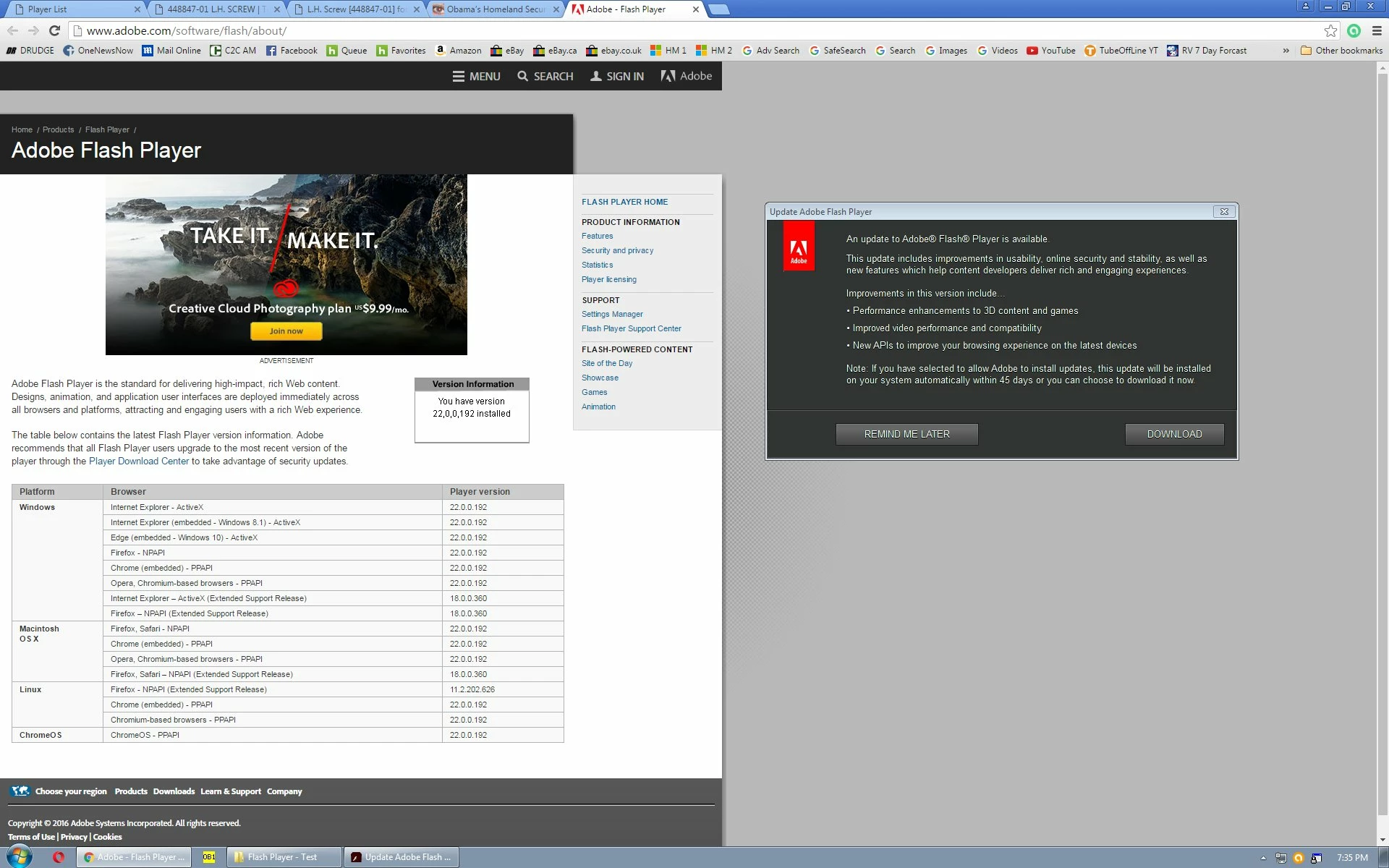
I constantly keep getting a popup "Update Adobe Flash Player" even when I have the latest version installed. It just keeps popping up. Here is a screen shot of the adobe version test page showing I have the latest version installed and the popup. OS is Windows 7, Google Chrome Version 51.0.2704.103 m
This topic has been closed for replies.

3 replies

Participant
November 25, 2018

"Also, as you update, to avoid this situation in the future, just check  "Allow Adobe to Install Updates (recommended)".  This will remove the hassle factor of having mulitple distinct Flash instances installed for each of your browser, and will ensure that you're getting critical security updates quickly and easily."

This is redicilous.

I want controll over my system and not automatic updates. The "hassle" is that dumb popup I can't turn off and guess whose fault that is. Yours.

Americans.

jeromiec83223024
Community Manager
Community Manager
June 22, 2016

Also, as you update, to avoid this situation in the future, just check  "Allow Adobe to Install Updates (recommended)".  This will remove the hassle factor of having mulitple distinct Flash instances installed for each of your browser, and will ensure that you're getting critical security updates quickly and easily.

_maria_
Community Manager
Community Manager
June 20, 2016

Google integrates Flash Player in Chrome as such the update notification is not for the integrated Flash Player version.  Based on your screenshot, you also have Opera installed.  This update could be for Opera, or if you use other browsers it could be for that browser, as different browsers use different variants of Flash Player:

Opera, and Chromium-based browsers use the PPAPI plugin

Firefox uses the NPAPI plugin

IE uses the ActiveX Control

You'll want to update Flash Player for all the browsers you use.  Launch each browser you use to the page you have in your screenshot to see if you have the latest version, 22.0.0.192.  If the latest version is not installed, go to get.adobe.com/flashplayer to download, and install, the latest version.

Participant
July 15, 2018

I only get the popup about updates when using IE, not Edge or Firefox,  When I check at Adobe about updates it blows me off with a message that Flash is pre-installed in Windows 10. I have the latest Windows 10 updates and that supposedly includes the Adobe updates. Firefox blocks usage while it fiddles with updates almost every time I use it. I am not at all sure that the popup is not malware trying to trick me into authorizing a payload. Since having the updates doesn't get rid of the message, is there any way to determine if it is fake? 

_maria_
Community Manager
Community Manager
July 16, 2018
I only get the popup about updates when using IE, not Edge or Firefox,

On Windows 10, you will NOT get the update notification for IE, or Edge, as Microsoft embeds Flash Player ActiveX in IE and Edge and Flash Player ActiveX for IE/Edge updates are release by Microsoft via Windows Updates.

Please post a screenshot of the Flash Player Settings Manager > Updates tab

Control Panel > All Control Panel Items > Flash Player

If you do not see the Flash Player item, select to View items by small icons

Thank you.

--

Maria