


Participant
March 25, 2020
Question

Out of date version of Flashplayer for Linux (.tar.gz)

  • March 25, 2020
  • 1 reply
  • 1836 views

My browser prompted me to update to Adobe Flash Player 11.2 or above.
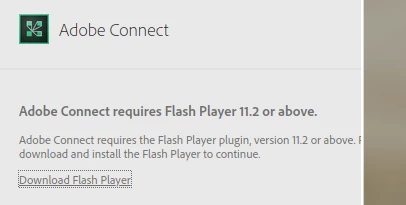
2 big issues:

1. The "APT for Debian/Ubuntu" should provide text for the command to issue in the terminal instead of highlighting the "Download Now" button, which is antithetical to installing via apt.

2. I installed via the ".tar.gz for Linux" option, downloaded the file and issued the following:

  cd ~/Downloads

  tar -xzf flash_player_npapi_linux.x86_64.tar.gz

  sudo cp libflashplayer.so /home/joe/.mozilla/plugins/libflashplayer.so

  sudo cp libflashplayer.so /usr/lib/firefox/browser/plugins/libflashplayer.so


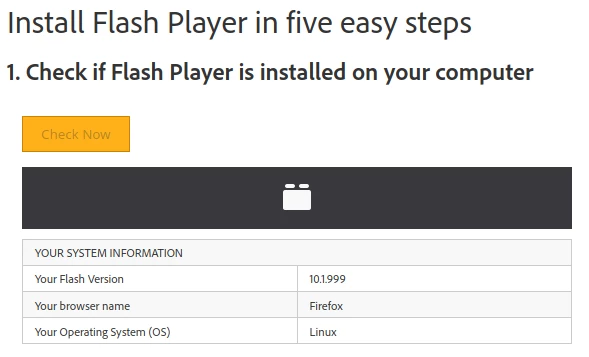
This did install and enable Flash Player for my Firefox browser, but https://helpx.adobe.com/flash-player.html indicated that I had version 10.1.999, not 11.2.
    This topic has been closed for replies.

    1 reply

    _maria_
    Community Manager
    Community Manager
    March 25, 2020

    Thank you for the feedback.


    The recommended option to install Flash Player is to use the distro's package manager.


    For the version being reported - it isn't correct.  I'm not sure where it's getting version 10.1.999 from, but it's certainly not the version installed.  The most recent version of Flash Player for Linux available for download is 32.0.344.  What version is returned when you enable Flash, right-click on Flash content to display the context menu?  E.g.


    Which Linux distro and version are you using?

    Which version of Firefox are you using?


    josephw64Author
    Participant
    March 26, 2020

    Yes, my version is listed as version 32.0.0.344 when I right-click on the lego-brick icon and allow Flash. Version # checks out in Firefox itself too. Very strange. I guess the 10.1.999 is some kind of default until Flash is enabled. The link asking me to upgrade to Flash Player 11.2 is still there, but it must not be a version issue.


    That original link was taken down so I won't be able to test this again until our next Connect meeting. For the time being, my only complaint is that the instructions for installing via apt (the package manager) should appear instead of the "Download Now" button being highlighted.


    Per my browser: