


Participant
July 12, 2012
Question

"Adobe Flash Player has stopped a potentially unsafe operation"

  • July 12, 2012
  • 2 replies
  • 5937 views

Hi!

This is the message that Iget when I click on the banner that I created whis a link to a web page.
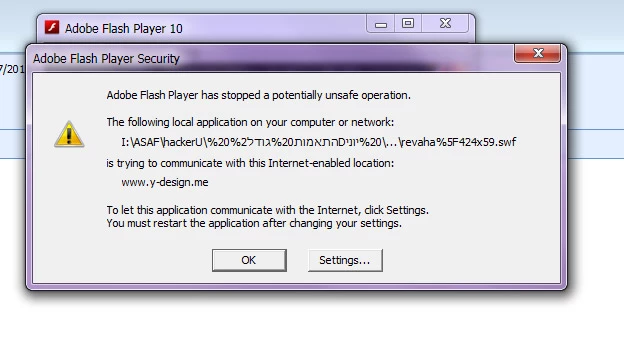
It is blocking any connection to web.

But in side the FLASH link works.

How can I stop it?

Please H_E_L_P!

    This topic has been closed for replies.

    2 replies

    adninjastrator
    Inspiring
    July 12, 2012

    This is a security message generated when locally testing a .swf that has some internal links to the Internet.

    If you follow the dialog box you can "Add" the location of that file to the security list... more here:

    http://www.macromedia.com/support/documentation/en/flashplayer/help/settings_manager04.htmlread

    read the page carefully and "Edit locations" to add your file.

    But this is ONLY an issue when testing on your local machine. Post the page/file online on your Web server and then test.... no warming pops up.

    If it's too much hassle to get past this warning message, just test on-line.

    So once online, this is no longer an issue.

    Best wishes,

    Adninjastrator

    SuhasYogin
    Adobe Employee
    Adobe Employee
    July 19, 2012

    Moving this thread to the Using Flash Player forums.

    Gojak
    Inspiring
    July 12, 2012

    I hear you! Everything went crazy on me with this latest update. Any flash content that has links or feeds from internet is blocked, Flash Pro crashes in SWF preview, etc. I have adjusted local settings, but flash crashes a lot anyway.

    Not cool...