


Participating Frequently
March 6, 2011
Answered

Unable to click the "Adobe Flash Player Settings"

  • March 6, 2011
  • 5 replies
  • 14511 views

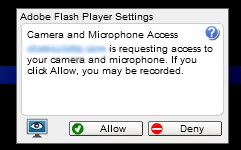
Whenever the following window pops up, regardless of browser I use, I click click and click and nothing happens:
On the other hand, when I try installing a screensaver I just got:
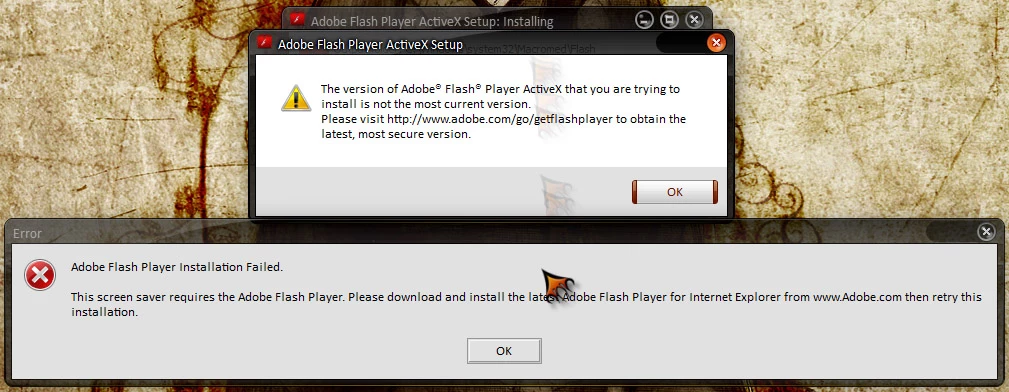
Something is certainly wrong with Flash on my PC. I've installed, uninstalled, re-installed, re-uninstalled it multiple times, restarting and all that. Same old. Windows 7 64 and stuff. Kinda need a hand here.

    This topic has been closed for replies.
    Correct answer

    Hi Shonendo,

    Did you follow the info in my Post#8 to you? If none of that solved the issue, then I think what I would do is go back to the Global Settings and make sure all of the Settings are as you want them. You can also, enter this website in a "trusted" zone.

    Not sure if that's the exact wording, but the effect is the same.

    Make sure you didn't click a Setting to NOT allow the Setting that you now want. The Global Settings are not easy to select. One must do a lot of reading and some of the Individual Settings work with the others. Some can even overrule others.

    Other than that, you could contact the website and perhaps they would have information on their end.

    That is all I would be able to suggest.

    Thanks and I hope you get it solved.

    eidnolb

    5 replies

    Participant
    November 24, 2011

    Screenshot at 2011-11-24 17:02:37.png

    I am running Ubuntu 11.10, and I have upgraded to Adobe Flash 11.1.102.55.  I have tried this in Mozilla, Google Chrome, and Chromium, but have always encountered the same problem.  It is usually a game site such as kongregate or notdoppler, but I am unable to click Allow, Deny, or anything.  I have right-clicked, and checked settings, global settings, and even added the websites to the trusted list, still no dice.  Please help, this is driving me insane!!!!

    Participant
    March 9, 2011

    try to use another browser, such as mozilla firefox, maybe it helps you

    ShonendoAuthor
    Participating Frequently
    March 9, 2011

    Firefox makes no difference. Same exact problem.

    March 7, 2011

    On the Global Settings, See if you access any from the main site:

    http://www.macromedia.com/support/documentation/en/flashplayer/help/settings_manager.html

    Also I don't know for sure, but you may need to set this Setting also:

    http://www.macromedia.com/support/documentation/en/flashplayer/help/settings_manager03.html

    Then you may want to take a look at this thread: Post#25

    http://forums.adobe.com/thread/128188

    I've never had any problems using the Global Settings and don't really know why some users can't.

    Hope that is some help.

    eidnolb

    ShonendoAuthor
    Participating Frequently
    March 9, 2011

    Thanks, I have seen to get around the screensaver issue, but so far no change regarding being able to click the "Allow" or "Deny" pop up box thingy...

    March 9, 2011

    If your problem is as you wrote:

    but so far no change regarding being able to click the "Allow" or "Deny" pop up box thingy..."

    then you are reading the wrong thread.

    March 7, 2011

    Hi Shonendo, frustratedfrequently pointed out that the website is asking permission. As long as that is ok with you, then that's fine. You are having a problem either allowing or denying. That has to do with your second screenshot.

    It appears to me that even tho you have the latest version of FP Installed, it is not working. That is why you received that message from Adobe at that site.

    Using IE, go to Tools, Manage addons and look under "Show"(very light text) in All addons for Shockwave Flash Object. Make sure it is Installed and Enabled.

    Let me know,

    Thanks,

    eidnolb

    ShonendoAuthor
    Participating Frequently
    March 7, 2011

    But I don't even use IE... But I did what you said anyways, and there's nothing Flash/Shockwave related in the list. Only things listed under Adobe are some Contribute thing and other PDF thing...

    March 7, 2011

    You didn't mention any browser at all actually. Had you not mentioned Win7, I would not even have known what OS you were using:-)

    Since Flash Player works thru the browsers it is helpful to know which browsers are Installed.

    So, then what browser or browsers are you using?  And you don't have Flash Player Installed in IE? How then do you Update Windows?

    A Service Pack 1 came out recently, did you Install that for Win7?

    Regardless, that message from Adobe tells you you need Flash Player Installed. So whatever browser you were using when trying to Install that Screensaver isn't working, since it needs Flash Player.

    Also you may want to check and make sure any Screensaver you want to Install is compatible.

    thanks,

    eidnolb

    March 7, 2011

    The alerts you posted beg a couple of questions.  The second includes what version of Flash are you trying to install?  Did you make sure that you've uninstalled any older versions?  I just downloaded and installed the "latest" version and it appears to be 10,2,152,32.  http://www.adobe.com/software/flash/about/  will tell you what version is currently running on your computer.

    The first alert you posted is more disturbing.  Adobe Flash Player Settings is simply advising you that some other something or other is requesting access to your camera and mic.  Whatever that is is blued out.  Something is missing in translation; the screen is requesting one click, either on the ALLOW or DENY button.  So the question is, what is trying to get access and what are you clicking, and what started all this?

    ShonendoAuthor
    Participating Frequently
    March 7, 2011

    "You have version 10,2,154,12 installed"

    I'm pretty sure the version I've installed is the latest one. Uninstalled everything flash related and re-installed.

    The first alert gives me the option  to ALLOW or DENY, with the problem that no matter how many times I click either option, absolutely nothing happens and the alert remains there. This example uses nothing more than a simple chat room, but I've also seen this alert elsewhere with the same problem.