

Participating Frequently
June 23, 2020
Answered

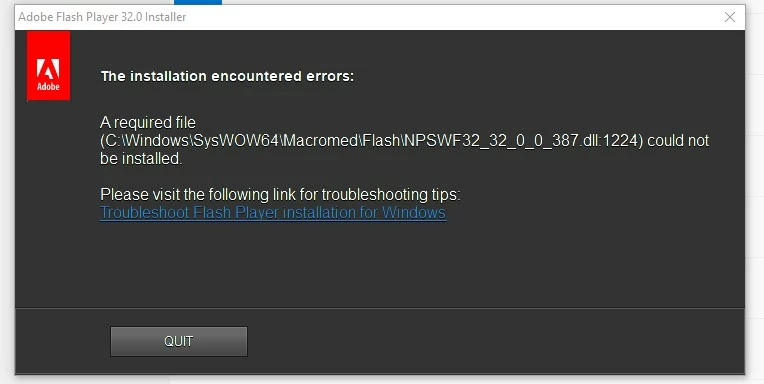
unable to install flash 32 in my windows 10

  • June 23, 2020
  • 2 replies
  • 2162 views

I am unable to install flash 32 in my windows 10 properly because one of the file is prompted that it could not be installed.what to do next

    This topic has been closed for replies.
    Correct answer _maria_

    Hi,


    Sorry for the late reply on the log files you provided.  The reason for the failure is there is a lock on one of the files (possibly in use by some other process).  Please try the following:

    1. Download the Flash Player uninstaller posted at https://helpx.adobe.com/flash-player/kb/uninstall-flash-player-windows.html
    2. Download the NPAPI plugin posted at the bottom of the https://helpx.adobe.com/flash-player/kb/installation-problems-flash-player-windows.html
    3. Reboot your system
    4. Run the uninstaller downloaded in step 1
    5. Reboot your system
    6. Run the installer downloaded in step 2


    If the above fails, please provide new Flash Player installation log files.


    Thank you.

    2 replies

    _maria_
    Community Manager
    Community Manager
    June 23, 2020

    We'll need to review the installation log files to troubleshoot further.


    Please upload the following files to Document Cloud or some other file sharing service of your choice that doesn't require account login:

    • C:\Windows\system32\Macromed\Flash\FlashInstall64.log
    • C:\Windows\syswow64\Macromed\Flash\FlashInstall32.log


    Post the link to the uploaded files in you reply.


    Thank you.

    samar369Author
    Participating Frequently
    July 1, 2020
    _maria_
    Community Manager
    _maria_Community ManagerCorrect answer
    Community Manager
    July 8, 2020

    Hi,


    Sorry for the late reply on the log files you provided.  The reason for the failure is there is a lock on one of the files (possibly in use by some other process).  Please try the following:

    1. Download the Flash Player uninstaller posted at https://helpx.adobe.com/flash-player/kb/uninstall-flash-player-windows.html
    2. Download the NPAPI plugin posted at the bottom of the https://helpx.adobe.com/flash-player/kb/installation-problems-flash-player-windows.html
    3. Reboot your system
    4. Run the uninstaller downloaded in step 1
    5. Reboot your system
    6. Run the installer downloaded in step 2


    If the above fails, please provide new Flash Player installation log files.


    Thank you.

    Legend
    June 23, 2020

    If you have Internet Explorer or Edge do not install Flash. It is included with Windows 10 and you cannot install it or updated. It is available for use, if you enable it, for a few months yet.