


Participant
March 22, 2013
Question

Why won't YouTube embedded video play from PowerPoint?

  • March 22, 2013
  • 14 replies
  • 77172 views

I have followed the normal process to embed video in PowerPoint 2010 (32 bit), and playback worked without issues a couple of months ago.  Now it does not.  I have completed all of the troubleshooting tips, and reinstalled latest FlashPlayer 32-bit, etc.  When I go to play the embedded video in PPT, the following message appears:

"To play the selected item, you must install a later version of the Adobe Flash Player. To download the Adobe Flash Player, go to the Adobe website."
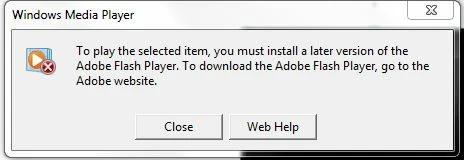
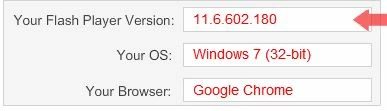

There does not appear to be any settings changed in browser (IE / Chrome), Windows Media Player, or PowerPoint.

Need a solution.

    This topic has been closed for replies.

    14 replies

    boneclod
    Participant
    June 3, 2013

    I'm having the same issue.  I uninstalled every version of Adobe Flash/Shockwave and reinstalled them.  I tried deleting any code after the question mark behind the link to the end of version=3 and it no longer works.  I just did that fix last week and it worked and now it doesn't.

    I hope there is some sort of fix soon.

    Participating Frequently
    June 3, 2013

    As do I. I'm glad I'm not the only one. I have tried even at work today

    on multiple different computers and same effect. Something must have

    changed. What exactly I don't know exactly. How do you go about either

    emailing Microsoft or Adobe directly. Both of their support websites could

    be improved.

    Participating Frequently
    June 1, 2013

    I have been working on Powerpoints over the last few months to get ready for a course I have to start teaching in July.  Previously embedding Youtube videos with the version=3 removed x 2 worked.  I was reviewing all the previously finished presentations that were working at one point and now the Youtube clips no longer show.  Anyone else having this same problem.  I even tried to create a new powerpoint presentation and have the same issue.  It is prompting again to download the latest version of Flash, which I tried again.  What's happening here?

    Participant
    June 3, 2013

    Thanks Avrilley81, it looks like we're experiencing the same issue. Please let me know if you come across a fix. Best regards.

    Participating Frequently
    May 30, 2013

    I seem to have the same problem. JSRWilson's fix no longer seems to be working. Any updates?

    The old way using 'Developer tab > More Controls > Shockwave Flash Object' works, but autoplay doesn't seem to work in this manner...no way to have a PPT run with timings.

    Participant
    May 31, 2013

    Having the same issue, used old code, deleted version3, added ampersand aftrer en_US, not getting the popup anymore but video won't play automatically or when clicked.

    If anyone has been able to resolve this issue, please advise. Thanks!

    Participating Frequently
    June 1, 2013

    see the comment below

    pwillener
    Legend
    March 22, 2013

    You need the Flash Player ActiveX (Internet Explorer), not the embedded player in Google Chrome.

    Participant
    March 23, 2013

    Thanks for the above.  I removed Chrome, installed ActiveX.  Restarted.  The same problem exists - cannot play embedded video in PPT.

    Any other suggestions / fixes?

    Participant
    March 25, 2013

    Did you delete both instances.

    Can you post the corrected code?


    I went back to the embedded video code from YouTube, captured it and pasted it into the "insert video from Web site" and then deleted both "version=3" instances in the code:

    <object width="420" height="315"><param name="movie" value="http://www.youtube.com/v/od8cUvPyvsg?hl=en_US&version=3&rel=0"></param><param name="allowFullScreen" value="true"></param><param name="allowscriptaccess" value="always"></param><embed src="http://www.youtube.com/v/od8cUvPyvsg?hl=en_US&version=3&rel=0" type="application/x-shockwave-flash" width="420" height="315" allowscriptaccess="always" allowfullscreen="true"></embed></object>

    That seemed to do the trick! 

    Many thanks for that help.  Not sure what caused prior embedded videos to no longer play - that still is baffling, because I hadn't done anything with the code until today.

    Gracias!