


December 28, 2016
Question

Flash Player will not install past 50%

  • December 28, 2016
  • 3 replies
  • 3025 views

OS Windows 7 Home Premium ver 6.1.7601 SP1,  Mozilla Firefox ver 50.1, download link as below:
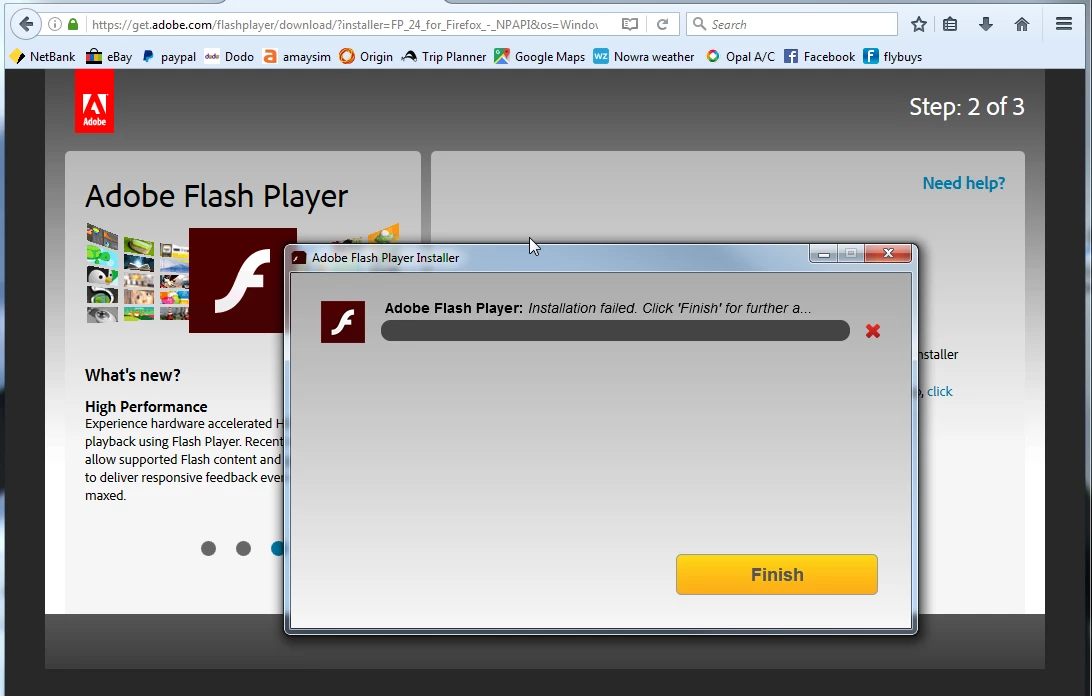
Problem started when attempting to update (as above). Proceeded to delete all traces of Flash Player as per detailed instructions. No change. Several more attempts to download/install with the same result, download stops at 50% and reports as failed. Have been using this app for a long time and never had a problem with updating until now. There have not been any changes to my system (as far as I know), that could contribute to this problem. Any help resolving this problem would be appreciated!

This topic has been closed for replies.

3 replies

scottl10434801
Participating Frequently
January 11, 2017

I have a similar problem installing Flash 24.0.0.194 on Windows 7 64-bit Enterprise. Both ActiveX and NPAPI versions install to approximately 50% in about 2 seconds (determined 50% using interactive install) and then hang at 50% for 5 to 6 minutes then eventually complete successfully. I started with my usual silent install script, then tried interactive by clicking on the .msi files. I've done this several times now with the same results. Outcome is the same whether a previous version is installed or uninstalled before running the new install.

NPAPI install: InstallPlugin_20_0_0_194.exe *32 runs at 0 to 2% CPU during the 5 minute pause, then InstallFlashPlayer.exe kicks in in the end  before the install completes.

ActiveX install: InstallAX_24_0_0_194.exe *32  runs at 0 to 2% CPU during the 5 minute pause, then InstallFlashPlayer.exe kicks in in the end  before the install completes.

I've downloaded the .msi files from the link provided in the Runtime Software Distribution License Agreement.

I will send the log files if requested, but I get the feeling a fixed version will be available soon. Every so many releases of Flash the installer is just crapped up.

Thank you.

_maria_
Community Manager
Community Manager
January 11, 2017

Hi scottl10434801 ,

This post is referring to the online installer, which is not recommended to be used by enterprise customers.  Are you using the offline EXE installer downloaded from the distribution page, or the online installer, downloaded from get.adobe.com/flashplayer?

Thus far, we haven't been provided with log files to investigate further.

--

Maria

_maria_
Community Manager
Community Manager
January 11, 2017

Maria,

I'm using the offline .msi installer. I can't share the link because it's private, but supplied by Adobe in the Runtime Software Distribution License Agreement. Here is the link to my latest log files.

[Content deleted by Mod at subsequent user request]


Hi scottl10434801

Please provide the following information:

  1. Is this the first time you have experienced this issue, or have you seen it in previous releases?
  2. How many systems reproduce the issue?
  3. Does the hang occur when running the standalone EXE installer?
  4. Create a Process Monitor log file during the execution of the ActiveX MSI installer (let’s just focus on the ActiveX installer for now).
    1. Download Process Monitor from: https://technet.microsoft.com/en-us/sysinternals/processmonitor.aspx
    2. https://technet.microsoft.com/en-us/sysinternals/processmonitor.aspxRun Process Monitor and set the filter to "Process Name is InstallAX_24_0_0_194.exe".
    3. Then reproduce the issue using the ActiveX MSI installer
    4. Upload the Process Monitor log file to cloud.acrobat.com/send and post the link in your reply

Thank you.

--

Maria

_maria_
Community Manager
Community Manager
January 10, 2017

If the issue persists, we'll need to get the install log files to troubleshoot further.  The files are as follows:

  • Adobe_ADM.log and Adobe_GDE.log files saved at C:\Users\<YourUserID>\AppData\Local\Temp\
  • FlashInstall.log file saved at C:\Windows\System32\Macromed\Flash.  If this is a 64-bit OS, the FlashInstall.log file saved at C:\Windows\SysWow64\Macromed\Flash is also required.  Please include append 'system32' and 'syswow64' to the FlashInstall.log file name so I'll know which file is from which directory

Upload the log files to cloud.acrobat.com/send using the instructions at How to share a document and post the link to the uploaded files in your reply.

--

Maria

January 11, 2017

Thank you for your interest in this problem. After numerous attempts to download and install with the same negative result, I used the    " Flash Player Installer Link " from the Mozzilla Support Site, and this downloaded and installed version 24.0.0.186 without any problems.

Once again, thanks for your input.

_maria_
Community Manager
Community Manager
January 11, 2017

Hi wilhelmt76900539

24.0.0.186 is not the latest version.  24.0.0.194 was released yesterday.  We recommend updating to the latest version.  I checked, and confirmed, that Mozilla's plugin checker (Keep your Firefox healthy with a quick checkup — Mozilla ) still has 24.0.0.186 as the latest version.  I've escalated this internally.

--

Maria

divya010193
Adobe Employee
Adobe Employee
January 10, 2017

Hi,

Please try rebooting the machine, and download the latest released Flash Player version 24.0.0.194.

Let us know if the problem persists.

Thanks!

January 11, 2017

Thank you for your reply to my problem, please read my comments to m_vargas.