


- Home
- FrameMaker
- Discussions
- FrameMaker 12 book error "Couldn't open document b...
- FrameMaker 12 book error "Couldn't open document b...

Copy link to clipboard
Copied
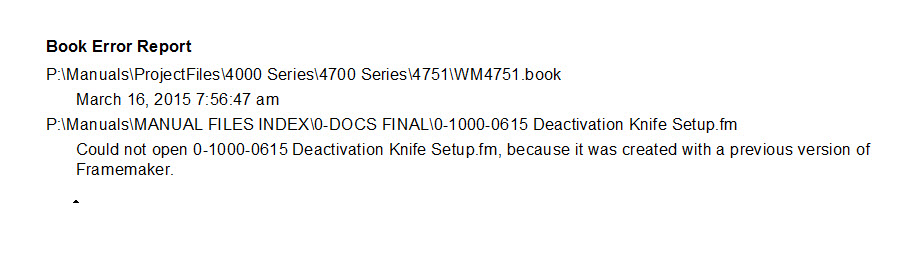
We recently updated our unstructured FrameMaker 11 to version 12, and now when I update a book using files created in Frame 11, I get this error, "Could not open X document because it was created with a previous version of FrameMaker." I get the error even after I have opened, saved, and closed the file in question in FrameMaker 12, so it is "converted" to the new version.
Here's a screenshot of the error I'm getting when updating the book:
Thanks for your help!
Becky


 1 Correct answer


Hi William,
When you have a book with files, and one of the files is from an older FM version, then FrameMaker cannot open the file during the update. Therefore this message.
The fix is easy: Open all files in the book, (to open all files with one command: Press SHIFT while you click File; then open all files in the book). Save the files. Then update the book. Now this should work.
No reply? Almost all who help here are just regular users. We do what we can, but we also have our regular jobs
...
 7
Replies
7
7
Replies
7


Copy link to clipboard
Copied
I am having the same problem with FM 16.0.0.754
Why was there no reply posted?

Copy link to clipboard
Copied
re: Why was there no reply posted?
Perhaps because it would require someone from Adobe R&D to tell us if that's even an expected error message from FM.
I've never see it.
The more usual case is that, on manual opening of an older version file, you get a dialog about how continuing will update it to the present version.

Copy link to clipboard
Copied
Do you use Textinsets?
when a document has a textinset from a previous version this could happen.
FrameMaker doesn't save unasked to another version.
So make sure, that your textinsets are in the same version
Copy link to clipboard
Copied
Hi William,
When you have a book with files, and one of the files is from an older FM version, then FrameMaker cannot open the file during the update. Therefore this message.
The fix is easy: Open all files in the book, (to open all files with one command: Press SHIFT while you click File; then open all files in the book). Save the files. Then update the book. Now this should work.
No reply? Almost all who help here are just regular users. We do what we can, but we also have our regular jobs and private issues. Therefore some messages might slip away.
Best regards
Winfried

Copy link to clipboard
Copied
I'm adding my notes to @Winfried Reng's correct answer. He said:
- Open the book file. With the book window active,
- Shift + File > Open All Files in Book
My addition, with the book window still active, - Shift + File > Save All Files in Book
- Shift + File > Close All Files in Book
- Then update the book
You need to do this once, each time you update to a newer version of FrameMaker, but the shortucts make it easy.
~Barb

Copy link to clipboard
Copied
Thank you so much. you made my life simple 🙂
Copy link to clipboard
Copied
I discovered this fix on my own, though I unfortunately did it one file as a time, not realizing you could select all files in the book at the same time. Next time it'll go MUCH quicker! Thanks to all.


Find more inspiration, events, and resources on the new Adobe Community
Explore Now
 AdChoices