


- Home
- FrameMaker
- Discussions
- Re: FrameMaker 9 spell check problems
- Re: FrameMaker 9 spell check problems
FrameMaker 9 spell check problems

Copy link to clipboard
Copied
I cannot get FrameMaker 9 to "Learn" or "Allow in Document" the name of a product my company makes; iCOMM. Spelled that way, lowercase "i" followed by upper case "COMM."
When I spell check the book, document or current page it always goes to this term. No matter how many times I click on Learn or Allow in Document it keeps on finding fault with the term.
What is especially crazy is the exact same term shows up in the list of possible corrections, so I try clicking on the "Correct" button with the term from the list of possible corrections and that doesn't work either.
Help!
Bluzmann


 56
Replies
56
56
Replies
56



Copy link to clipboard
Copied
I am seeing this same issue. Spell checker is tripping over words including "Board" but when I click "Learn" it's not learning.
Also, I tried to bring forward my FrameMaker 8 dict file, but that's not recognized.
Will investigate further but assistance is appreciated.
Cheers,
Sean

Copy link to clipboard
Copied
I am also having this same problem. Frame 9 seems to be pretty glitchy.

Copy link to clipboard
Copied
"... but when I click 'Learn' it's not learning."
Goes to show you: You can't command someone to learn; they have to want to learn.
Sorry.

Copy link to clipboard
Copied
Sean,
How are you adding your user.dct file? FM9 does things differently than FM8.
In the Dictionary functions, click on the Personal Dictionary and select Import Dictionaries...
This will then bring up a file browser window and you can point to the user.dct file that you want to import.
FM then stores these terms here:
C:\Documents and Settings\[username]\Application Data\Adobe\Linguistics\Dictionaries\FMUserDictionary\all\added.txt
You can check this file with a text editor to see if your terms have been imported in there.
Copy link to clipboard
Copied
Hi,
Did that, used the import. By viewing the text file, I can see the words from my FM8 dict seem to be added. However, when spell checking on the book, the spell checker is tripping over words that I imported and common words like Ethernet.
What's going on? Spell check is fine in FM8. Is anyone having success with FM9 spell check on a book basis?
EDIT: The problem seems to be with generated files. I cannot learn, add, or get through generated files because spellchecker doesn't seem to recognize my imported dictionary. Words like Ethernet and Board are flagged by the spell checker and I cannot find a way to make them acceptable.
(Also, how do I set a site dictionary?)
Cheers,
Sean
Copy link to clipboard
Copied
Looking in maker.ini, what should I do with these lines if I want a site dictionary? Or, are these unused by FM9 and should be left blank?
UserDictionary=
SiteDictionary=
Cheers,
Sean
Copy link to clipboard
Copied
Sean,
There is a Site dictionary location under the Adobe\Linguistics folder. Specifically in the \Dictionaries\FMSiteDictionary folder. However, the FM9 User Guide states:
"The site dictionary is normally in the site.dict file in the FrameMaker dict folder."
I think the settings in the maker.ini should be left blank for the user.dct and set to dict\site.dct for the site dictionary.
FM9 is picky about these. I tried pointing explicitly to another (differently named) file for my user.dct and FM9 consistently crashed during startup. I haven't played with the site dictionary though.
This is one area that really needs more testing with FM9. I really don't understand why there is that FMSiteDictionary folder in each user's Documents and Settings folder, since these would be exclusive to different users on the same machine with different logins.
Copy link to clipboard
Copied
This is one area that really needs more testing with FM9. I really don't understand why there is that FMSiteDictionary folder in each user's Documents and Settings folder, since these would be exclusive to different users on the same machine with different logins.
Agreed. Agreed it's borked, too. Am here if testing is needed (will be doing it anyway).
Cheers,
Sean
Copy link to clipboard
Copied
Thanks to Arnis, I figured out why FrameMaker 9 would crash on start today.
Internal Error 9004, 6920460, 9676766, 0 is caused by not having sitedictionary set to anything in the maker.ini.
So, the following crashes FrameMaker:
UserDictionary=
SiteDictionary=
The following allows FrameMaker 9 to start, even if the location does not exist:
UserDictionary=
SiteDictionary=dict\anyname.dct
Cheers,
Sean
Copy link to clipboard
Copied
Still have no idea how to use a site dictionary in 9, though.
Copy link to clipboard
Copied
Hi Sean,
I'm getting this same error from FM9 today. I am using a Dell Latitude 630 laptop w/Windows 7.
I checked, and the .dict file that the maker.ini file was pointing to doesn't exist. I searched the entire FM9 installation, and there are NO .dict files anywhere; I also checked the Recycle Bin just in case FM deleted it, and there are no .dict files there, either. So I tried changing that reference in maker.ini to your suggestion of anyfile.dict, saved the INI file, but I'm still getting this same error message when I try to open FM9.
FYI, my installation of RoboHelp 8 won't open this morning, either. I used both programs successfully all day yesterday, shut down my laptop last night, and rebooted this morning. Now I'm getting these errors.
Do you know if this is only a Windows 7 problem?
BTW, I ran into a similar problem about a month ago, and Adobe's "Technical Support" took almost 2 WEEKS to fix it. Of course, their solution after 2 weeks was for me to completely uninstall and reinstall the TC2 SW. Before I do that (I kept all of my notes and their uninstall script), any help you guys can give me would be greatly appreciated. I am under the gun to get some docs completed by COB tomorrow (as most of us probably are).
Cheers,
Marlo
Copy link to clipboard
Copied
Marlo, what specific version of FM are you using, from Help About, including the "pxxx" numbers?
I notice there seems to be two spellings of the extension name in this thread, ".dct" vs. ".dict". In my FM9 installation the site file is named "site.dct" but the directory its in is named "dict".
Had you added words to your site dictionary at all, at any time prior to the problem(s) in the past weeks, or to the personal dictionary? If not, it would be possible to recreate the original files or put a copy from another FM installation onto your system.
fwiw, my site.dct which has never been altered since FM9p250 installation is dated 12/9/2008 6:40pm and it's in
C:\Program Files\Adobe\FrameMaker9\dict
Sheila
Copy link to clipboard
Copied
Hi Sheila,
I can't give you the Help > About FM version because FM9 won't open. I've also already uninstalled it. Thank you!
Copy link to clipboard
Copied
Ah. Please do let us know if the uninstall / reinstall solves the problem --
Copy link to clipboard
Copied
Well, nothing has worked. I've uninstalled (using Revo Uninstaller), and manually removed all files, then reinstalled as Administrator while NOT logged onto a domain TWICE. Then I went to the Adobe Support page for this error and followed all of those steps.
NOTHING WORKS!!!
I have now wasted another 2 days of unproductivity, thanx to Adobe.
If anyone has any other suggestions / solutions, then I will have to demand that my boss go with another company's software. Any suggestions out there for that would also be greatly appreciated.
Cheers,
Marlo
Copy link to clipboard
Copied
It seems that some of the FM dictionaries have got corrupted. I request you to please try the following:
1. Site dictionary: located at <fm installation directory>\dict\site.dct. Please ensure that there are no words without "-" (hyphen). FrameMaker expects hyphenation information in all words in site dictionary.
2. Please make a copy of dictionaries (for backup) located at (C:\Documents and Settings\<username>\Application Data\Adobe\Linguistics\Dictionaries) FMDocDictionary, FMSiteDictionary, FMUserDictionary and remove these.
Please try launching FrameMaker after these 2 steps.
FM9 Dictionaries and their location is also explained in the following blog: http://blogs.adobe.com/techcomm/2009/12/dictionaries_in_fm9.html
Regards,
Rajat Bansal
Copy link to clipboard
Copied
Hi Rajat,
I've already started uninstalling all of the TCS2 SW via RevoUninstaller, and I'm almost finished.
If reinstalling
- While logged in as Administrator,
- While not connected to a Domain, and
- Following the instructions at http://kb2.adobe.com/cps/405/kb405970.html
(all have been stated by the previous 3 experiences w/Adobe Technical Support as advice/the reasons why the SW doesn't work), then I will try your suggestions.
Thank you for your input. I will post whether your suggestions work. BTW, it doesn't explain why RoboHelp 8 also doesn't work and is giving the same error messages regarding the licensing not working.
Cheers,
Marlo
Copy link to clipboard
Copied
What message were you getting when you launched FrameMaker? If that was about "Licensing has stopped working", than the steps suggested by me will not work. Somehow I interpreted the issue as crash during FM launch and the steps suggested by me are for cases when you face crash during launch of FrameMaker (with startup screen in the Localization phase). "Licensing has stopped working" has nothing to do with dictionary related issues.
If you are unable to solve the issue using the kb article, I request you to send the amt.log file created under "C:\Documents and Settings\<username>\Local Settings\Temp" to my mail id rabansal@adobe.com.
Regards,
Rajat Bansal
Copy link to clipboard
Copied
Rajat - Yes, it was "Licensing has stopped working". Will do, it will be a while because, after installing everything, I will have to run the Check Updates several times. FYI, I posted my messages on this AND the "Licensing" problem post because both included a message (or 2?) about these licensing issues.
BTW, while I'm waiting, do you know if Adobe has any plans to fix this licensing problem in a patch anytime soon?
Cheers,
Marlo
P.S. In the last year, I've experienced BOTH of these issues, so I'm bookmarking your post for when I experience THAT one again. Sorry to be so negative, but I've never experienced so many problems with any other SW in my 35 years working w/computers.
Copy link to clipboard
Copied
I'm running Frame 9, fully patched, on a Windows XP VM on a MacBook Pro.
I am afraid to trust the spell checker. I was proofreading a document when I noticed a misspelled word. I opened the file and ran spell check on the document, expecting it to find the word. It did not.
I tried spell checking the book. It did not find the misspelled word.
I placed the cursor in the same paragraph, prior to the word. The spell-checker now finds it as expected. The word was include, misspelled as imclude.
I have repeated this over and over and it's totally reproducible.
I have gotten caught by some bad typos in the past few months, and I have been proofing and spell-checking compulsively. Now, I think it may have been that the spelling checker missed obvious typos.
Anyone else notice this problem?
Thanks.
Jenny
Copy link to clipboard
Copied
I'm back on an XP Windows Laptop - I never got TCS2 to reinstall and RUN on the Windows 7 laptop.
Yes, but only when I was on the Win7 machine. Now on the XP machine, spellcheck is actually "learning". Check and make sure you have an English .dict or .dct file in your installation. My Win7 installation didn't. And I don't know why installing the TCS2 onto Win7 doesn't install the English dictionary.
Copy link to clipboard
Copied
Hi Jenny,
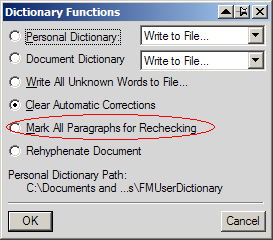
Are any of these misspelled words in paragraphs that have already been spell-checked? When FM first runs the spell-checker it internally flags all checked paragraphs so in future runs it won't have to check these again (old performance tweak?). If you click on the "Dictionaries" button (intuitive place to hide a spell checking option...) of the Spell Checker window, the panel will give you the option of resetting all paragraphs for spell-checking. This might help provided the word isn't actually entered into either the document or personal dictionaries incorrrectly.
Copy link to clipboard
Copied
Been there, done that. Someone on the Frame Users mailing list made those suggestions.
I reset all paragraphs for checking.
I also made sure the paragraph was set to US English.
I know it's not in the dictionaries because it can find it if I place the cursor in the paragraph with the offending word.
I posted this problem to the Frame Users list and at least two other people have mentioned that they've seen the same issue. One recommended exporting to Word for spell checking. Ick. I really don't have time for that.
I'll try to find the place to report it as a bug. This seriously sucks, though.
Jenny
Copy link to clipboard
Copied
Jenny, if you have time to do this as a test, could you try making a brand new document, using FM's default "Portrait" style, and just typing in a few paragraphs including the mystery mis-spelled word, save the document, close FM, open FM and see if the spell check does or does not find the word?
What I'm wondering is whether there's "something" about your existing file that is interfering with the spellchecker, some setting that's not accessible from FM's dialogs but can still clog up the works.
Was the content in the existing file typed into FM directly, or was it brought in from an older FM file, or brought in from another source (e.g. Word), or ... ?
Sheila


Get ready! An upgraded Adobe Community experience is coming in January.
Learn more
 AdChoices
