


Participant
August 7, 2019
해결됨

FrameMaker could not find Adobe PDF Printer

  • August 7, 2019
  • 2 답변들
  • 5256 조회

Hi,

FrameMaker downloaded via Creative Cloud on Aug. 7th and installed on the same day.

OS is Windows 10.

When I opened a book file in FrameMaker and want to "Save as PDF", it always failed.

The error message is :
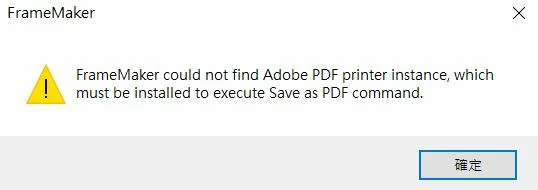
I have tried solution 1 in Adobe PDF printer is missing | Manually install PDF printer​ . It didn't work.

And for solution 2, I couldn't find  Documents\*.pdf (Adobe PDF) in the drop-down list.

The following picture shows the content of distiller.zip in the FrameMaker_15_x64_LREFDJ(1) zip file I downloaded.
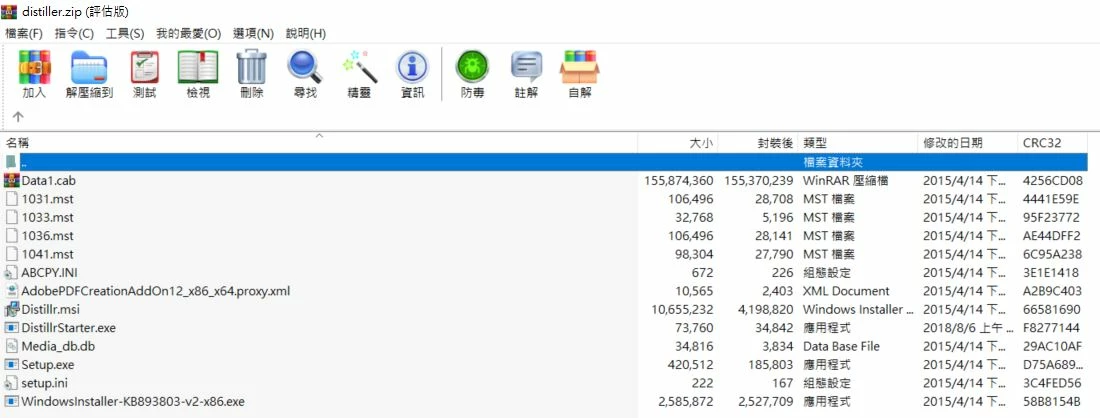
I only have Adobe Acrobat Reader DC (not Pro), I'd like to know if this error comes from only having Acrobat Reader DC instead of Pro DC?

Looking forward to your replies and help.

    이 주제는 답변이 닫혔습니다.
    최고의 답변: Barb Binder

    Hi changm98205895:

    I'd recommend reaching out to the Adobe Tech Comm team at  techcomm@adobe.com to see if they can help with the installation issue.

    ~Barb

    2 답변

    Participant
    August 14, 2019

    I reached out to Adobe Technical Communication <techcomm@adobe.com> and with their help this problem is solved.

    Barb Binder
    Community Expert
    Community Expert
    August 14, 2019

    Great news! What was the issue?

    ~Barb

    ~Barb at Rocky Mountain Training
    Participant
    August 16, 2019

    I guess the problem was with the PDF distiller since they helped me update the distiller.

    Barb Binder
    Community Expert
    Community Expert
    August 11, 2019

    Hi changm98205895:

    FrameMaker downloaded via Creative Cloud on Aug. 7th and installed on the same day.

    Purchasing and installing Adobe Acrobat Pro DC will solve this issue (free if you actually have a Creative Cloud subscription as per your question—but note that FrameMaker is not part of the Creative Cloud so perhaps you meant you downloaded it from Adobe's server).

    However, when you install FrameMaker, if no copy of Acrobat is installed, the FrameMaker installer creates an Adobe PDF printer driver instance for use of FrameMaker to create PDF. Since that doesn't appear to have happened, you might try uninstalling FrameMaker and re-install it, carefully reading each alert box that pops up, and choosing yes when asked about installing the PDF printer driver.

    ~Barb

    ~Barb at Rocky Mountain Training
    Participant
    August 13, 2019

    Hi,

    Thank you for your reply. I downloaded the FM from a link Adobe sent me via email after my company purchased it. It was not through creative cloud, a mistake I made in last post.

    I uninstall FM and re-install again. But there was no alert boxes at all. And I sill couldn't do "Save book as PDF".

    Barb Binder
    Community Expert
    Community Expert
    August 13, 2019

    Hi changm98205895:

    I'd recommend reaching out to the Adobe Tech Comm team at  techcomm@adobe.com to see if they can help with the installation issue.

    ~Barb

    ~Barb at Rocky Mountain Training