

K.Daube
Community Expert
Community Expert
March 6, 2021
Question

Script FMfindRepl version 0.8 - questions concerning regular expression handling

  • March 6, 2021
  • 1 reply
  • 228 views

Dear friends,

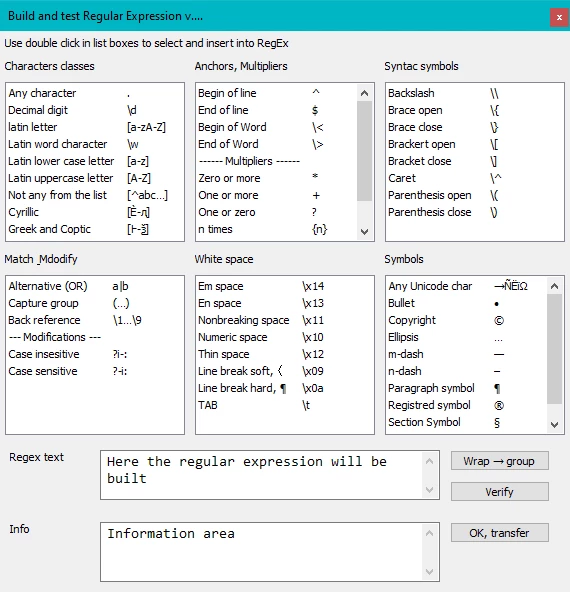
In my project FMfindRepl i want to build RegEx by selection items from drop-down lists. Experiments show that there are more capabilities in the FM Find process than documented in Help:

  • Character classes \D (non-digit), \w (word character) and \W (non-word-character)
  • Anchor \< for beginning of word, but not \> for end of word.
  • 'lazy' multipliers *?, +? and ?? to get the shortest possible match
  •  DOTALL mode (?s)
  • Case mode (sensitive, insensitive) by ?-i: and  ?i-:
  • Named capture groups and hence also named back references by ?<name> and \k<name>

About the replacement function we only know about the 'back reference' $0 … $9, but not of any (useful modifier such as upper-casing the match.

→ Where the heck can we get a complete description of the implemented RegEx engine?

Of course I know the phrase from the Help: 

«FrameMaker uses the boost engine for Regex. For more information on Boost, see http://www.boost.org/.

You can write the regular expressions using the following syntax: Perl (default): See Perl doc – Regular expressions»

But this is only of limited value:

  • The boost library can be implemented in various ways. What is the result for the end user in case of FM?
  • There are many 'levels' of PERL syntax defined. Which one is implemented in FM?
  • PERLprovides Regex features, which obviously are not implemented in FM. Some which one fare and which one aren't? 


The UI for this secondary panel will look something like this:
  •  
This topic has been closed for replies.

1 reply

Participating Frequently
March 18, 2021

I have also been fighting with FMs Find function recently.


Did you enable the escape characters by using the wildcard flag in the "FS_FindCustomizationFlags" prop?
I've tried putting wildcards and regex directly into the string Ive used for the "FS_FindText" prop, but I can't get it working.


You mentioned the "replace" function. Is this avaialable via scripting?
So far I've had to use the TextRange returned by Find to do my own replacements.


I am assuming the regex engine you are reffering to is FrameMakers one?
You may have better luck using ExtendScripts built-in regex support. It uses standard "JavaScript" style regexes.
(https://developer.mozilla.org/en-US/docs/Web/JavaScript/Guide/Regular_Expressions)


Also, check out https://regex101.com/. It is my go-to resource for building and testing regular expressions.

K.Daube
Community Expert
K.DaubeCommunity ExpertAuthor
Community Expert
March 18, 2021

Hi Dan,

Thank You for your ideas on this subject.

I've tried putting wildcards and regex directly into the string Ive used for the "FS_FindText" prop, but I can't get it working.

→ These two flags are exclusive. Either you are working with Wildcards or with Regex - not with both at once.


You mentioned the "replace" function. Is this avaialable via scripting? So far I've had to use the TextRange returned by Find to do my own replacements. I am assuming the regex engine you are reffering to is FrameMakers one?

You may have better luck using ExtendScripts built-in regex support. It uses standard "JavaScript" style regexes.

→ Since the Regex flavour in FM is Perl (in most cases) - and the Regex flavour within ExtendScript (AKA ECMA Script 1999) are assumingly not the same in all detials, I decided to postpone the Replacement function to the original FM-dialogue.

The final killer was the unavailabilty of the items returned by the Regex enginge: $0 … $9. There is no access to these objects via ExtendScript. Using the JS enginge would have requried to rebuild the whole process for all the various FM objects.

Please watch my coming announcement for FMfindRepl v0,80 or later.