
Exit
  • Global community
    • Language:
      • Deutsch
      • English
      • Español
      • Français
      • Português
  • 日本語コミュニティ
  • 한국 커뮤니티
0

[How To] Giving each animation layer its own frame rate

Community Beginner ,
Nov 19, 2022 Nov 19, 2022

Hello everyone, 

Imagine I'm trying to loop a 8 frame loop of a simple sea background animation, that would play at 8 frame/sec

Now imagine I want to create a longer animation of a character, that would play above this layer, and its frame rate would be 12 frame/sec. 

In AfterEffects I'd just set the global framerate to 12 frame/sec and posterize time on the one I want to play at 8 frame/sec

How would you do it in Fresco ? 

Have a nice day !


[Renamed by Mod]
TOPICS
Layers , Tools
317
Translate
Report
Community guidelines
Be kind and respectful, give credit to the original source of content, and search for duplicates before posting. Learn more
community guidelines

correct answers 1 Correct answer

Community Expert , Nov 20, 2022 Nov 20, 2022

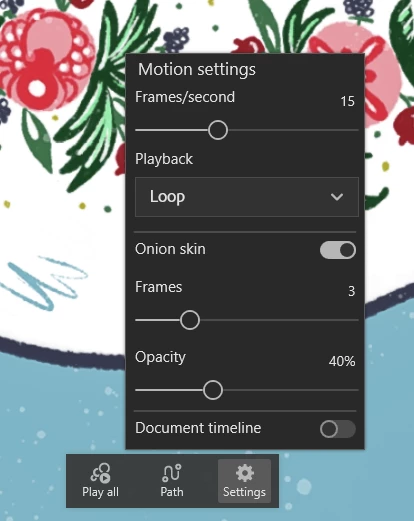
There is a frame rate setting for each layer that you can access through the cog wheel in the animation contextual menu:

Imaginerie_0-1668952576156.png

It can be set individually...

Translate
Community Expert ,
Nov 20, 2022 Nov 20, 2022
LATEST

There is a frame rate setting for each layer that you can access through the cog wheel in the animation contextual menu:

Imaginerie_0-1668952576156.png

It can be set individually...

Translate
Report
Community guidelines
Be kind and respectful, give credit to the original source of content, and search for duplicates before posting. Learn more
community guidelines