Exit
  • Global community
    • Language:
      • Deutsch
      • English
      • Español
      • Français
      • Português
  • 日本語コミュニティ
  • 한국 커뮤니티
0

Pixel Brush Suddenly Quit Working?

New Here ,
Mar 21, 2023 Mar 21, 2023

I was working on a project with one specifc pixel brush, and have been for about an hour now. Everything was fine, despite the fact that I have a mouse cursor to work with. The program crashed about twenty minutes ago, thought no big deal, loaded it right back up, sent the error report. Got back to work, literally switched out of the program to answer an email... Came back and the brush just suddenly doesn't work. I've adjusted evrything, still nothing, restarted the program, still nothing. 


It's recgonzing that I'm doing something because I can hit undo, obviously there isn't anything to undo really that I can see visually... But there's nothing there. I use a Wacom tablet and stylus on Windows 10. I literally have never had so many issues with Fresco since updating it yesterday to the latest version. 

TOPICS
Performance , Pixel Brushes , Tools
214
Translate
Report
Community guidelines
Be kind and respectful, give credit to the original source of content, and search for duplicates before posting. Learn more
community guidelines
Community Expert ,
Mar 21, 2023 Mar 21, 2023

That's weird!
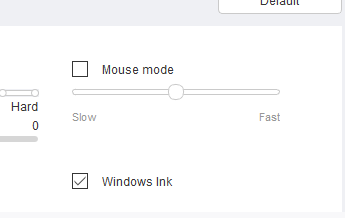
Can you check in your wacom driver app that the "windows ink" didn't get unticked?

Imaginerie_0-1679412595804.png


That happens sometimes.

Translate
Report
Community guidelines
Be kind and respectful, give credit to the original source of content, and search for duplicates before posting. Learn more
community guidelines
New Here ,
Mar 21, 2023 Mar 21, 2023
LATEST

I just checked, and yes, all of that is still turned on. It's super weird. I think it has something to do with the new update! 

Translate
Report
Community guidelines
Be kind and respectful, give credit to the original source of content, and search for duplicates before posting. Learn more
community guidelines