
Inspiring
July 2, 2013
Answered

Adobe Application Manager - Download Error on Mac 10.7.5

  • July 2, 2013
  • 1 reply
  • 3925 views

Hello,

please help.

I have this problem for more than a week now. I have contacted Adobe support almost every day, but all the solutions they suggested did not work. I have uninstalled the AAM and Creative Cloud App several times, installed again, deleted the AAMUpdater folder, the opm.db file, installed only the AAM, but I still can't access the Creative Cloud. The Programms installed before on the same computer are CS6 from the Creative Cloud in international english. The error appeared after upgrading the Creative Cloud App. The version installed now is: 1.0.0.183, and the AAM is 7.0. I have used Safari, Firefox and Chrome without success. There are no firewall or network problems because the second machine I have, an older one, running 10.6.8. connects with Creative Cloud without any problems through the same router. The computer I work with is a MacBook Pro with 10.7.5. in german. Could it be a language problem? I have used the english software on a german OS for years now... the last one beeing CS6 from the Creative Cloud.

Today, the installed software (CS6) started bringing this error while starting "Adobe Application Manager, required to verify your license, is missing or damaged."

So please help, any kind of solution is welcome... my time is running out. I am using those Apps for work. The customers are waiting... Thank you.

Petru Stendl

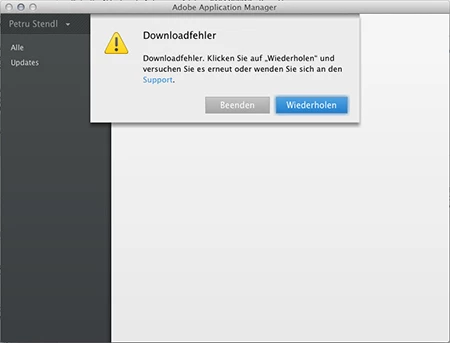
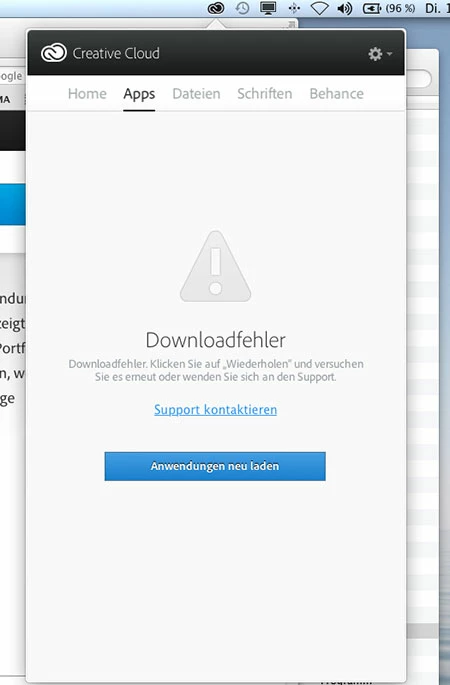
P.S. Please see the screenshots (they are in german, but I understand that the problem is international).
This topic has been closed for replies.
Correct answer intergrafos

Thank you for the update.  At this point it is likely that your download logs will need to be reviewed.  You may want to check your login items prior to contacting our support team to verify there is nothing else preventing the Adobe Creative Cloud from contacting the Internet.

Otherwise I would recommend working with our support team directly.  For the best assistance, I recommend our chat support at http://adobe.ly/yxj0t6.  Our chat representatives can provide a personalized experience to resolve the issue you have described.

I would be very interested in reviewing your interaction and seeing the final resolution.  Would you mind posting back to this discussion with your case number and how your difficulties were resolved?


Thank you.

The idea with the Live chat Support was realy good. They took control of the machine remotely and solved the problem! A modification of the permissions of some Adobe folders was necessary (read and write), after that they performed the same procedures that you also sugested. Great team! Thank you once again.

Petru Stendl

1 reply

Jeffrey_A_Wright
Community Manager
Community Manager
July 2, 2013

Intergrafos to confirm you are receiving some form of a download error when you open the Creative Cloud application is that correct?  This is on the computer running Mac OS 10.7.5?  Also what other Adobe software do you currently have installed on this computer?  Have you tried temporarily disabling your software firewall?

Inspiring
July 2, 2013

Hello, thak you for your reply.

Yes, when I open the Creative Cloud Application I see the download error from the screenshot and I can not see the apps in the Creative Cloud. I can not use it any more. This problem occurs only on the Mac running 10.7.5. On this machine I have Adobe InDesign, Photoshop, Illustrator, Bridge all CS6 and Acrobat XI, all of them are installed from the Creative Cloud.

Today I started Photoshop CS6 and I saw the other alert: Adobe Application Manager, required to verify your license, is missing or damaged. I could use the software but I wonder for how long ... it needs an activation every month... The fact is I can no longer use Creative Cloud on this computer, not to update the existing software or to install the new CC apps. This all happened last week after an update of the Adobe App. Manager. I have unistalled both AAM and the Creative Cloud for several times, reinstalled them with the same result.

I don't have any software firewall, only the router has one, but the required ports are not blocked and the other machine can connect with the Creative Cloud server.

Jeffrey_A_Wright
Community Manager
Community Manager
July 2, 2013

Intergrafos it may still be beneficial to check your software Firewall settings under the Security & Privacy preference pane.

Have you tried the following steps to allow Creative Cloud to function properly.

  1. Go to Library/Application Support/Adobe/OOBE
  2. Rename the OOBE folder to OOBE_OLD
  3. Reinstall the Adobe Creative Cloud application from https://creative.adobe.com/products/creative-cloud.

If not then please try these steps.  If so then please any specific errors you are receiving, preferably translated to English, when you try to install the Adobe Creative Cloud application.