
imameatball
Participant
November 5, 2015
Answered

Creative Cloud installer hangs on initializing installer

  • November 5, 2015
  • 1 reply
  • 2938 views

I've recently built a new computer (running Windows 10) and I'm trying to install Creative Cloud and Adobe Premiere on it. I downloaded the CreativeCloudSet-Up file from the Adobe CC Apps site and ran it. It hangs right at the start where the progress bar only has a sliver of progress and it says "initializing installer". The bar never moves and it doesn't give me an error message. If I click cancel, the program stops responding ('Not Responding' message in Windows) and I am unable to end the task in Task Manager.

This is a new computer which has no previous install of any Adobe products. It doesn't even have Flash installed.

I have tried running the CC Cleaner Tool from Adobe. I've tried installing the Adobe Application Manager (this also hangs on Updating Adobe Application Manager). Both methods yielded no results.

I'm out of options here. Anyone have a solution?
This topic has been closed for replies.
Correct answer Govardhan.V

Follow below steps :


Restart the computer once .

Disable Firewall Temporarily.


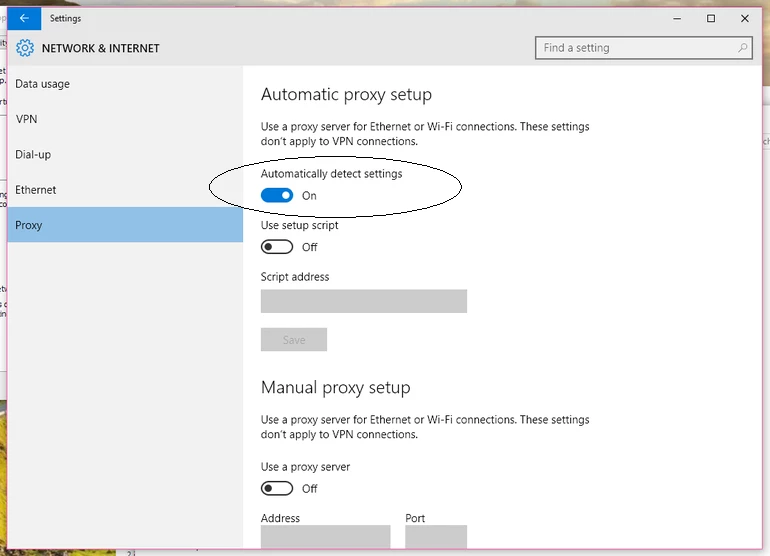
Also make sure , Automatic Proxy settings detect is ON.

Step 1 :

Open C:drive and navigate to C:\Program Files (x86)\ " Common Files" \Adobe.

Open Adobe folder and delete folders named Adobe Application Manager and OOBE.

Step 2:

Navigate to C:\Program Files (x86)\Adobe.

Open Adobe folder and if present delete Adobe Creative Cloud folder. [**important]

Unable to delete??? rename it to Adobe Creative Cloud-old.

Step 3 :

Press Windows button (located between Ctrl and Alt buttons) along with R button together at a time , you will get a run command window.

Type in below command and hit 'Enter' key.

appdata

Then navigate to Local>Adobe.

Open Adobe folder and delete folders named AAMUpdater and OOBE.

Step 4 :

Make sure Adobe Creative Cloud is not listed under Control Panel > Program and Features. list.

Then download and install Adobe Creative Cloud application and check.

https://ccmdls.adobe.com/AdobeProducts/KCCC/1/win32/CreativeCloudSet-Up.exe


1 reply

Govardhan.V
Govardhan.VCorrect answer
Participating Frequently
November 5, 2015

Follow below steps :


Restart the computer once .

Disable Firewall Temporarily.


Also make sure , Automatic Proxy settings detect is ON.

Step 1 :

Open C:drive and navigate to C:\Program Files (x86)\ " Common Files" \Adobe.

Open Adobe folder and delete folders named Adobe Application Manager and OOBE.

Step 2:

Navigate to C:\Program Files (x86)\Adobe.

Open Adobe folder and if present delete Adobe Creative Cloud folder. [**important]

Unable to delete??? rename it to Adobe Creative Cloud-old.

Step 3 :

Press Windows button (located between Ctrl and Alt buttons) along with R button together at a time , you will get a run command window.

Type in below command and hit 'Enter' key.

appdata

Then navigate to Local>Adobe.

Open Adobe folder and delete folders named AAMUpdater and OOBE.

Step 4 :

Make sure Adobe Creative Cloud is not listed under Control Panel > Program and Features. list.

Then download and install Adobe Creative Cloud application and check.

https://ccmdls.adobe.com/AdobeProducts/KCCC/1/win32/CreativeCloudSet-Up.exe


imameatball
Participant
November 5, 2015

This worked for me! Thanks a lot man! That was driving me crazy.

Govardhan.V
Participating Frequently
November 5, 2015

Great!

You are welcome