Exit
  • Global community
    • Language:
      • Deutsch
      • English
      • Español
      • Français
      • Português
  • 日本語コミュニティ
  • 한국 커뮤니티
0

.dmg file for CS 6 not working for mac [checksum error]

New Here ,
Dec 24, 2015 Dec 24, 2015

I received download link after purchasing student edition of cs6. Three links were received - InDesignFamily_8_Content_ALL.dmg, Illustrator_16_Content_LS16.dmg and DesignStandard_CS6_LS16.dmg. upon downloading and double clicking on the .dmg file for InDesign it gives checksum error, the other two links give two folders which do not have any executable file. I am unable to install even though I purchased the suite 3 days back.

DR BASHYAM

3.0K
Translate
Report
Community guidelines
Be kind and respectful, give credit to the original source of content, and search for duplicates before posting. Learn more
community guidelines

correct answers 1 Correct answer

LEGEND , Dec 24, 2015 Dec 24, 2015

Whenever you mount dmg file to start installation process Mac OS verify Check sum to verify that Disk Image file is Good to go.

Optionally you can also skip verifying Checksum , but it's not recommended  as it might lead to malfunction of Apps after installation process,

Please check once that the file size matches exactly as mentioned on the Adobe website.

Download Creative Suite 6 applications

Let us know , if the file size is correct. i.e 3.5 GB

Translate
LEGEND ,
Dec 24, 2015 Dec 24, 2015

Whenever you mount dmg file to start installation process Mac OS verify Check sum to verify that Disk Image file is Good to go.

Optionally you can also skip verifying Checksum , but it's not recommended  as it might lead to malfunction of Apps after installation process,

Please check once that the file size matches exactly as mentioned on the Adobe website.

Download Creative Suite 6 applications

Let us know , if the file size is correct. i.e 3.5 GB

Translate
Report
Community guidelines
Be kind and respectful, give credit to the original source of content, and search for duplicates before posting. Learn more
community guidelines
New Here ,
Dec 24, 2015 Dec 24, 2015

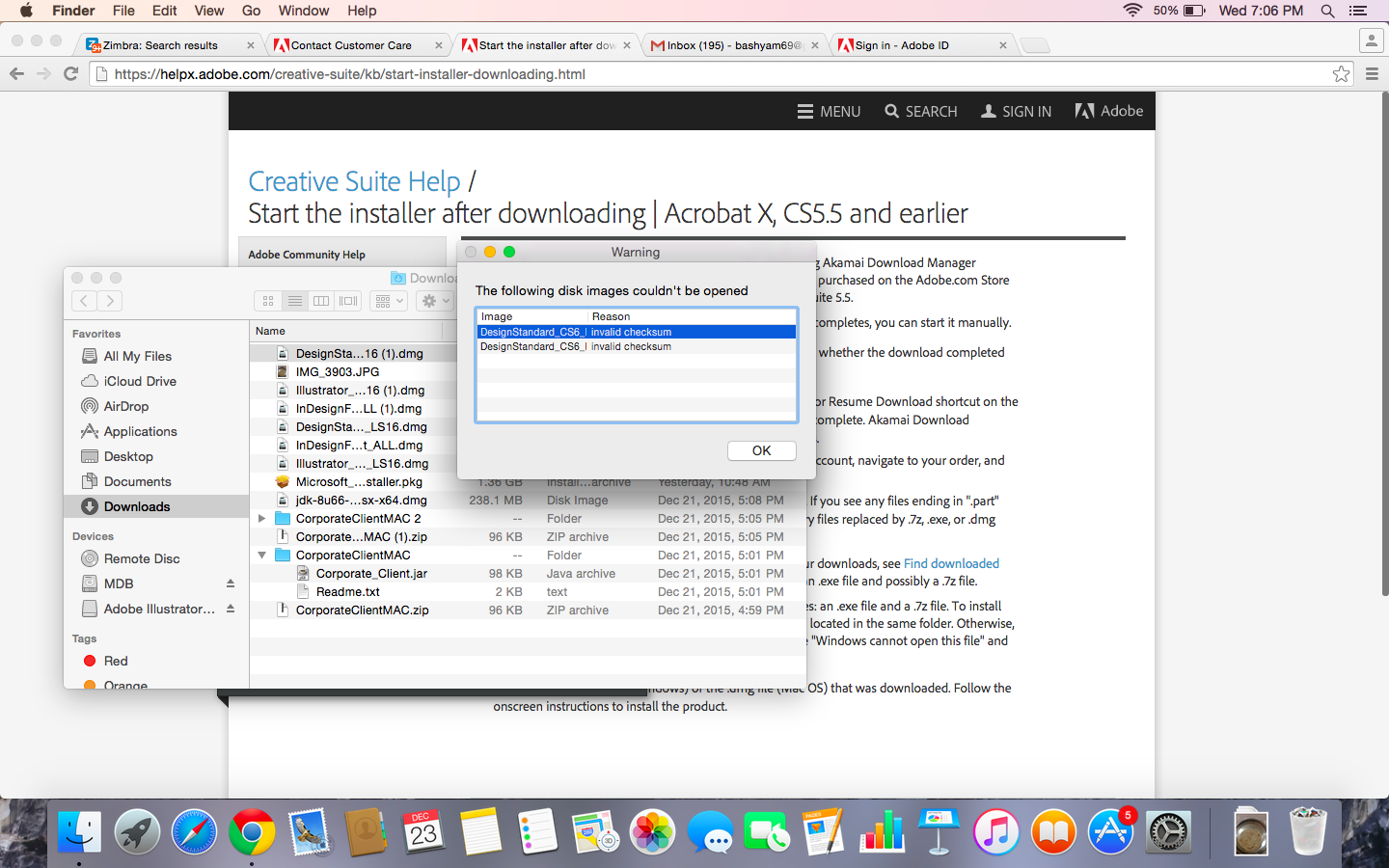
Many thanks for your prompt response. Yes the size is correct. what to do now? Unfortunately there is no way I can contact adobe. here is the error I took a screenshot off:Screen Shot 2015-12-23 at 7.06.23 PM.png

Translate
Report
Community guidelines
Be kind and respectful, give credit to the original source of content, and search for duplicates before posting. Learn more
community guidelines
LEGEND ,
Dec 24, 2015 Dec 24, 2015

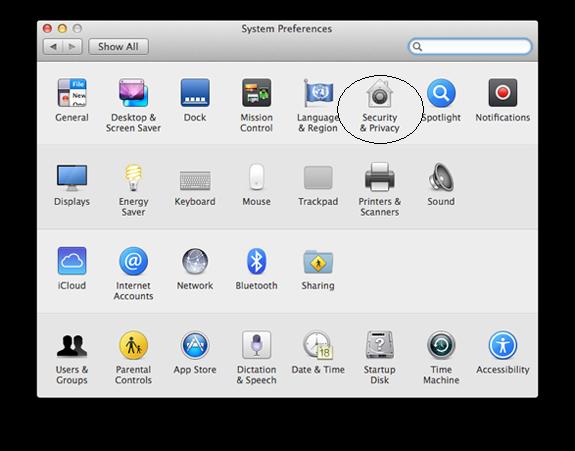
Follow below steps :

1.JPG

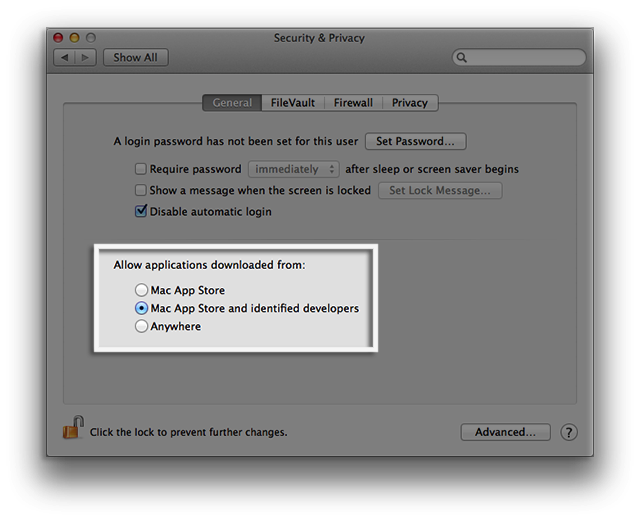
Set the Mac Gatekeeper setting to " AnyWhere" and then try to install .

By Default , it will be set to Mac and Identified developer.

Click on Allow from Anywhere

and then try to install CS 6 and check,

Note :

Later you can revert back the changes made.

Translate
Report
Community guidelines
Be kind and respectful, give credit to the original source of content, and search for duplicates before posting. Learn more
community guidelines
LEGEND ,
Dec 24, 2015 Dec 24, 2015

If you still get same error .

1) Try repairing Disk permissions from Disk Utilities or try to install from Safeboot mode.

2) Try mounting image manully from Disk Utility.

Or you may temporarily disable checksum verification and try , Do not forget to enable it again.  [ Follow this step as Final option ]

Navigate to Applications > Utilities > Disk Utility.

Click on Mac menu > Disk Utility > Preferences.
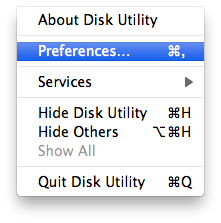
http://kb.parallels.com/Attachments/18492/Images/Screen%20Shot%202012-01-19%20at%2017.24.11.png

Uncheck  Verify Checksum:

http://kb.parallels.com/Attachments/18492/Images/Screen%20Shot%202012-01-19%20at%2017.23.43.png

Then try to install CS 6.

This issue also can be caused when the disk image checksum is not updated as per Mac OS , provided only if the downloaded file is correct in size and from valid link.

Translate
Report
Community guidelines
Be kind and respectful, give credit to the original source of content, and search for duplicates before posting. Learn more
community guidelines
New Here ,
Dec 25, 2015 Dec 25, 2015
LATEST

Many thanks once again. I decided to download the cs6 pacakge dirctely from adobe.com, and this one worked. I think the link I receeived in my mail was corrupt? But thanks a tonne.

best regards,

Translate
Report
Community guidelines
Be kind and respectful, give credit to the original source of content, and search for duplicates before posting. Learn more
community guidelines