Participant
April 24, 2016
Answered

[Locked] Where do I download discontinued Fireworks?

  • April 24, 2016
  • 5 replies
  • 52529 views

Can I download fireworks on it's own?  If so what sort of licence will it have and where can I do this please?

Correct answer jelaplan@yahoo.com

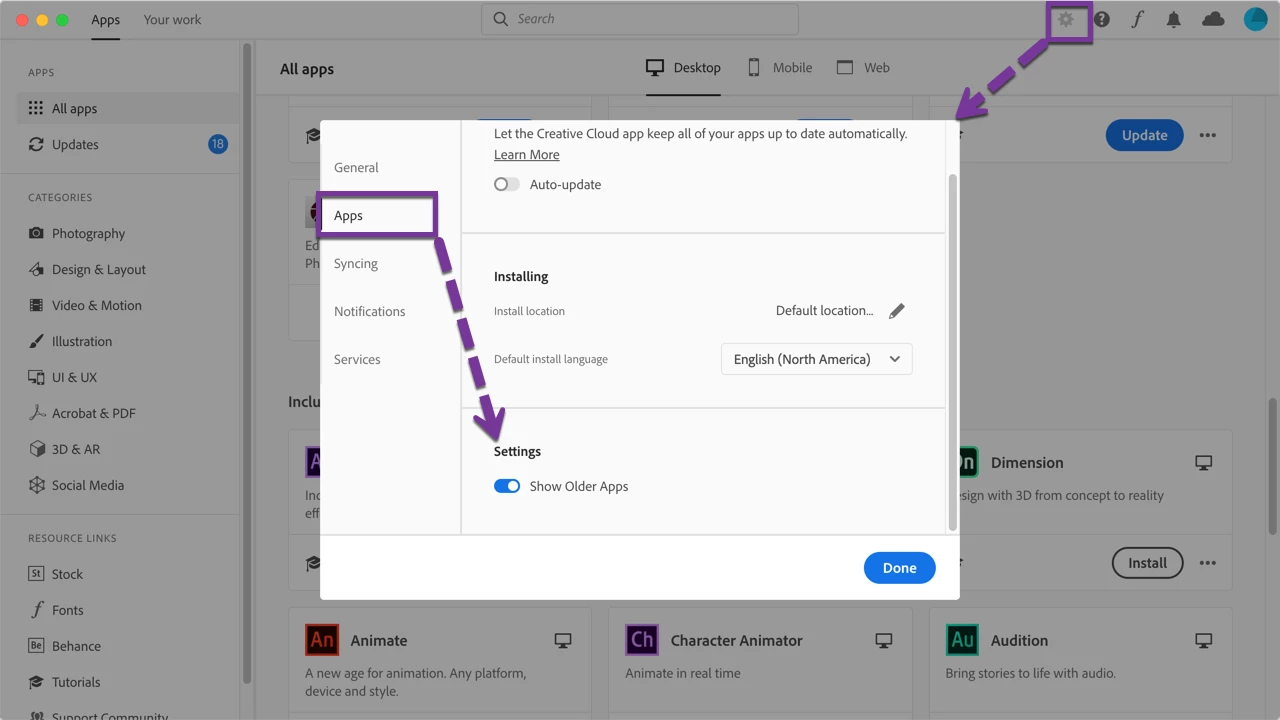
This no longer seems to work — at least there is no Show Older Apps option in my MacOS CC app.
Has something changed between December 28 and January 28?


I checked and I still see it is available. I couldn't remember exactly and it took some clicking around to find it. I hope it helps.
5 replies

JonPrice.
Participant
December 28, 2019

Yeap - this worked for me so thanks for this! Fireworks is still a great program. I'm on a PC - clicked on my Creative Cloud Desktop and clicked the Cog for settings at the top right. Then clicked Apps in the left navigation and under Settings there I switched on Show Older Apps. And I can now see and am installing Fireworks! Hoorah!

Participant
October 29, 2019

No Longer Available

Too bad, it works better than many other tools.

Participant
November 25, 2019

I contacted Adobe and was able get Fireworks by opening the Adobe CC panel from the Adobe CC icon in the header of my Mac. Then I had to clik the cog icon and open a setting panel. In that panel, there is a Apps tab and in that there is a setting for Show Older Apps. After clicking that, Fireworks shows up in the list of apps.

Nancy OShea
Community Expert
Community Expert
February 2, 2020

Same thing here. The option for "show older apps" is there, but it´s not showing up Fireworks. I tried quitting and opening again the app and nothing.


End of Life products like Fireworks and Muse are only available to paid Creative Cloud All Apps plan members.   If you have any other type of plan, it's not available.  And it goes without saying that you need an older operating system, too.  Fireworks was discontinued in 2012. 


Nancy O'Shea— Product User & Community Expert
March 3, 2017

I've been looking this for a long time. Thanks man! They should add this link at main page or download section. There is no Fireworks icon.
John Tasmaznadrukiem.com.pl

kglad
Community Expert
Community Expert
March 3, 2017

Downloadable installation files available:

Download and installation help for Adobe links

Download and installation help for Prodesigntools links are listed on most linked pages.  They are critical; especially steps 1, 2 and 3.  If you click a link that does not have those steps listed, open a second window using the Lightroom 3 link to see those 'Important Instructions'.

JWray2k
Participant
May 23, 2016

I had to look all over the site for the link to download a free trial of Fireworks.

What ended up working was going to the search box and typing fireworks there - it was the only hyperlink I was able to detect.

Here is the link:  https://creative.adobe.com/products/download/fireworks?version=12.0.0

June 10, 2016

Thank you very much man!

It is not cool that they hide fireworks!

Ned Murphy
Legend
April 25, 2016

Purchase CS6 products:

----------------------

http://www.adobe.com/products/cs6.html

Participant
April 25, 2016

Thanks Ned.  Are you saying that I can not get Fireworks on it's own?

Participant
May 4, 2016

If you can find the download for Fireworks, I'll pay you. I've just got a new laptop and am trying to install it - it seems that Adobe have decided to just remove any link to download it.

So much for "caring about their users". Dictatorship overrules paying public.