
Answered
Error 160 while installing Photoshop CC 2015.5
When trying to install Photoshop I receive the error 160 code. I have checked the registry permissions to ensure full access but it still doesn't work. Any ideas on how I can fix this?

When trying to install Photoshop I receive the error 160 code. I have checked the registry permissions to ensure full access but it still doesn't work. Any ideas on how I can fix this?
I have already allowed full control in registry however i could not find photoshop.exe
I am using windows 10 64bit
Run Adobe Cleaner tool and if present remove Adobe Photoshop cc. [ Do not select Clean all option , it will remove all installed Adobe apps ]
http://download.macromedia.com/SupportTools/Cleaner/win/AdobeCreativeCloudCleanerTool.exe
Navigate to C:> Program Files > Adobe.
If present rename or delete Adobe Photoshop CC folder.
Optional step: Run any registry/PC Cleaner tool to remove invalid reference registry keys or unnecessary left over remnant files created while attempting to install app.
Follow below steps carefully :

In the Windows search text box type as CMD , it will provide search results :
Important : Right click on " Command Prompt" option and select " Run as Administrator" option .

It will open Command Prompt window in elevated mode.
Step 2)
Now copy below command then right click on Command Prompt black screen window and select Paste option and press Enter key.
net user administrator /active:yes
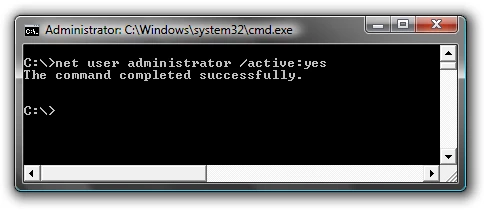
You should see a message that the command completed successfully.
Step 3)
Restart the computer and login to user account named " Administrator" and then try to install Photoshop cc again .
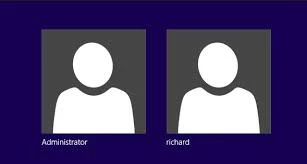
Note :
To disable Hidden Admin account you can follow above same steps and use below command .
net user administrator /active:no
Already have an account? Login
Enter your E-mail address. We'll send you an e-mail with instructions to reset your password.
 AdChoices