
Participant
September 18, 2012
Answered

How do I remove the Adobe updater from the Mac menu bar?

  • September 18, 2012
  • 3 replies
  • 173268 views

I would like to remove the Adobe Updater from my menu bar for my Mac, I found a lot of instruction to remove it for other versions of the updater, but the I can't find that option in the new CS6 updater.

If there is a way to completely stop the updater from running, that would be useful too.

I also don't understand why the updater say "4" in the menu bar, I only have Photoshop installed, and there are no update avaiable.
This topic has been closed for replies.
Correct answer kendallplant

Have you tried adjusting your proferences from within the Application Manager?

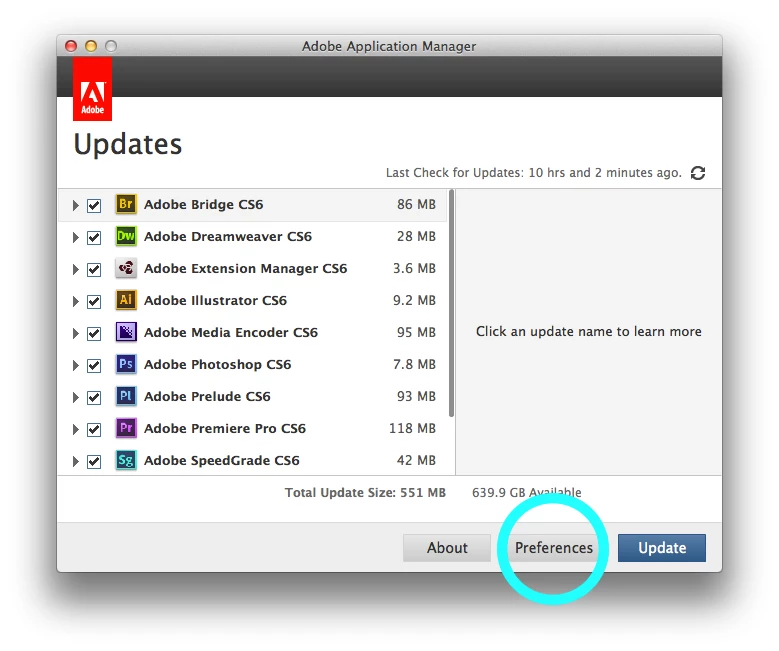
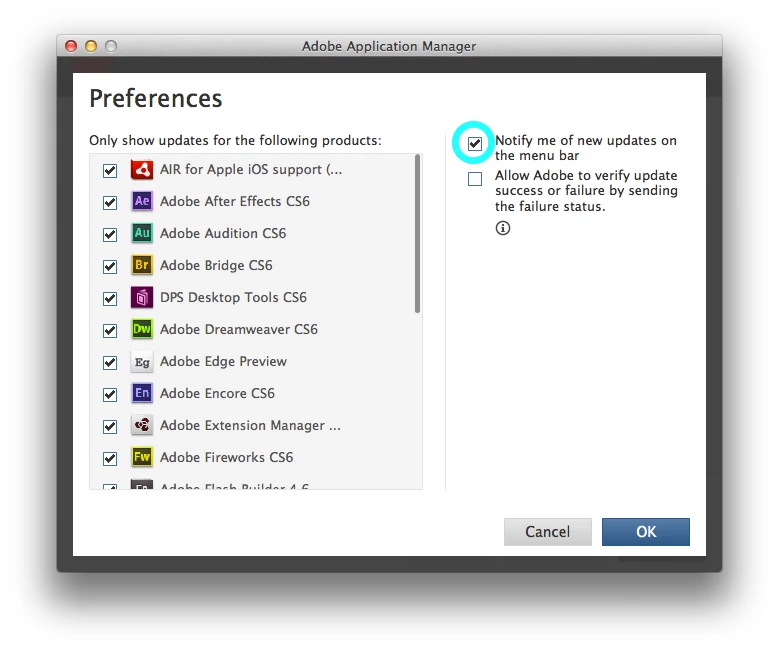
If you open up the Application Manager and click the "Preferences" button at the bottom, there should be a check box labeled "Notify me of new updates on the menu bar". If you uncheck this, the Adobe icon should disappear from your Mac's top menu bar.

3 replies

Known Participant
June 12, 2014

Great fix.  Thank you for taking the time to share yesyesyes...

Participant
July 20, 2013

i had the same problem, but after i istalled adobe cc. now, in the menu bar i have the old updater icon and the new cc icon. a click no the old icon opens the new one. so no chance to get into the preferences menu as shown above.

solution:

1) rename the new adobe cc updater in /Applications/Utilities/Adobe Creative Cloud/ACC

2) now you can start the old one again

3) nename the new adobe cc updater app back to normal file name.

hope this helps someone.

ilustrebob
Inspiring
July 24, 2013

Thanks. That worked like a charm.

kendallplant
Adobe Employee
kendallplantCorrect answer
Adobe Employee
September 19, 2012

Have you tried adjusting your proferences from within the Application Manager?

If you open up the Application Manager and click the "Preferences" button at the bottom, there should be a check box labeled "Notify me of new updates on the menu bar". If you uncheck this, the Adobe icon should disappear from your Mac's top menu bar.

scylAuthor
Participant
September 19, 2012

What if my application manager look like this?

My name appear in the red box.

EDIT: Nevermind, I found the right manager..

Message was edited by: scyl

kendallplant
Adobe Employee
Adobe Employee
September 19, 2012

Looks like you had the Creative Cloud Client open instead of the Application Manager. Were you able to resolve the issue?