


- Home
- Download & Install
- Discussions
- Re: How Do I Set the Application Manager To Instal...
- Re: How Do I Set the Application Manager To Instal...

Copy link to clipboard
Copied
I subscribed to Adobe Creative Cloud. I downloaded the Adobe Application Manager. I have a laptop with a 80GB SSD (C:) and a 1TB data drive (D:). I would like to install all the applications on my D drive, since I do not have the space on my C drive and I would like to keep that OS only.
I found the Adobe instructions on how to change the installation path for the Adobe Application Manager. I changed the path settings to install in the directory "D:\program files (x86)\adobe\" Of course that only works sometimes.
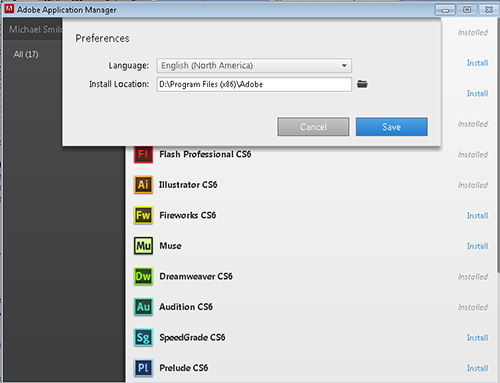
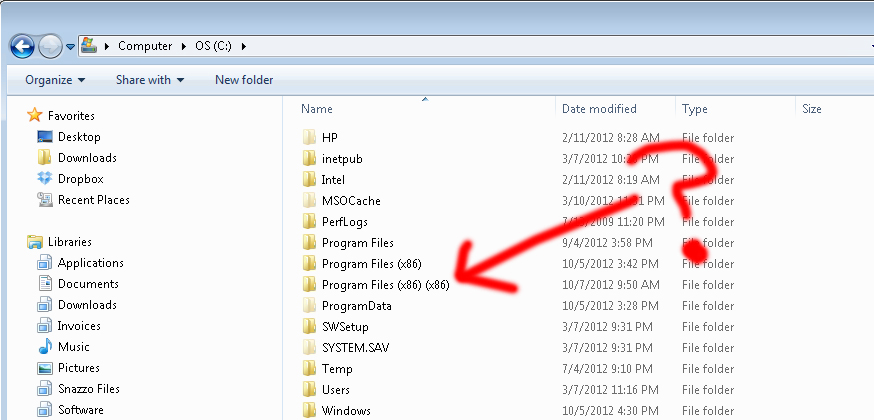
Some application were installed in the directory I specified. Some where installed in the right directory, but on the C drive. Then, I used the Adobe update in the system tray a few days ago and now Adobe is installing applications in the wrong directory on the wrong drive. "Program Files (x86)(x86)"???
Then, it is virtually impossible to get someone from Adobe to respond. Incredibly frustrating. I really don't understand how a basic function like installation can be so screwed up.
Does anyone have any recommendations?


 1 Correct answer

WHen you log into Creative Cloud, up in the top right corner there's a cog wheel > Preferences, you have 2 menu items, General and Creative Cloud, select Creative Cloud, then select Install Location.
Good luck!

 16
Replies
16
16
Replies
16


Copy link to clipboard
Copied
Hi Snazzo,
I'm not sure I have a fix but if I can recreate it, I can report it to the appropriate group.
Questions:
- What applications did you install to D:\Program Files (x86)?
- What applications are appearing in the C:\Program Files (x86)(x86)?
- Dave
Copy link to clipboard
Copied
I ended up buying a new ssd drive because I couldn't get anything to work properly. Then I uninstalled everything and had to reinstall, leaving all the applications on the c drive (ssd).
I think I installed Dreamweaver and photoshop on the d drive, then illustrator and indesign were installed on the c drive (automatically, I still had the d drive specified). Then, I received a notice that there were updates from adobe and I installed the updates, then I ended up with yet another folder with the (x86)(x86) on the c drive.
At that point, it was like multiple installations and the pc was confused on which application was the right one. File associations were not correct with coldfusion, dreamweaver and photoshop no longer open files when using the open with dialogue, and the extension manager only recognized illustrator and indesign as being installed, preventing installation of any of the dreamweaver extensions.
The applications ran fine, just components didn't work.

Copy link to clipboard
Copied
I have exactly the same issue.
My system drive is not large enough to hold all the CS6 products and I can't get anything to install on an alternative drive, regardless of the setting in the Adobe Application Manager. It just does whatever it feels like.
Therefore, I've had to pick and choose the programs I currently need as CS6 and leave the others until a fix arises.
- Peter.
(I wonder if downloading and installing the trial version of the program separately would give me better install location options, but would that affect the way updates are handled?)

Copy link to clipboard
Copied
Me too. I have a new PC that I've configured as follows:
C:\ OS only (26gb free)
H:\ Applications (118gb free)
I:\ Video / data (RAID 216gb free)
F:\ Adobe Cache files (117 gb free)
I want to install all apps on H, but AAM puts them on C:\, leaving me to only install 1 or 2 adobe apps at a time. Please fix!
====================================================================================
UPDATE: After selecting a folder on the apps drive, and saving the configuration, then exiting AAM, and repeating the process a couple times, it is now installing on the correct drive.
====================================================================================

Copy link to clipboard
Copied
I have the exact same problem. Hopefully a fix comes soon - it appears I'm succeeding in going around it by downloading the trial and then clicking something about my subscription, but that's going through a bit of work for something that should be relatively simple.

Copy link to clipboard
Copied
I have the same problem as well, and in my case I have absolutely NO space on my OS drive, and no way to replce it at this time, making CLoud 100% useless. I can't install a single one of the applications I'm paying for. Does anyone know if it's possible to get a refund, given the service is completely unusable for me?

Copy link to clipboard
Copied
I had this problem too, I use a SSD for my OS drive. I try to install everything else on other drives, but there are still quite a lot of apps that want to place things in the program files folder.
So my solution was to move the program files folder. I've now got an extra 20GB back on my SSD drive.
Sounds like a simple solution, simply move the program files folder. Most people will tell you that is impossible or you shouldn't do it etc... I think even Microsoft tell you that you shouldn't do it, but it is possible and if you don't really know what you are doing you can really mess up your Windows installation. I've been programming since the Vic20 came into this world (1980) and have been messing around with Windows since version 2 (never had access to Windows 1 lol),
even with all that knowledge moving the program files folder made me nervous.
I strongly advise that you make backups of everything important before attempting this but here is how I moved my program files folder:
1) Download a free program called shadowcopy (http://www.runtime.org/shadow-copy.htm)
That let me make a copy of my program files (and program files (x86) folders).
It takes advantage of something in Windows called volume shadow copy.
I copied C:\program files and c:\ program files (x86) to my other SSD drive (T:)
2) Ran msconfig (press the start button and type msconfig)
3) Clcked the boot tab, selected Safe Boot and the option "Alternate shell", clicked ok and then manually restarted windows
4) Windows then rebooted into safe mode with a dos prompt
5) I renamed my program files and program files (x86) folders to program files.bak and program files (x86).bak
rename "c:\program files" "c:\program files.bak"
rename "c:\program files (x86)" "c:\program files (x86).bak"
6) I then linked the program files folder to my T drive using the lesser known command mklink
mklink /d "c:\program files" "t:\program files"
mklink /d "c:\program files (x86)" "t:\program files (x86)"
7) I then ran msconfig again (simply type msconfig and press return)
8) With msconfig running click the boot tab and unselect safe mode
9) now just restart windows, Press CTRL + ALT + DELETE and you'll see the screen where you can safely restart windows
So far everything is running without any problems, MS Word got a little confused at first, I guess something wasn't copied correctly, but it did a self repair and works fine now. Everything else works fine.
Note: Get any of those steps wrong and you will have to reinstall Windows!!!

Copy link to clipboard
Copied
This is a complete mess.
While between here and http://forums.adobe.com/message/4474293 Adobe say it's a "requirement" that's complete BS. Sure maybe some DLLs need to be installed in a shared repository but there is absolutely no reason the applications can't be installed elsewhere.
Even software packagers such as Valve's Steam and Electronic Arts' Origin application are capable of installing apps to one or more alternate locations. In 2013 when there are so many personal and corporate environments with multiple drive and network mounted configurations that it's almost beyond belief that it is impossible to install applications to another drive.
I've set my profile for G:\Apps\Adobe\CS6\ but this doesn't seem to make a difference in the slightest. Funny thing is I currently have the entire Adobe CS5.5 Premium Suite still installed in G:\Apps\Adobe\CS5.5 - it seems we have gone backwards! This is just a royal mess that wreaks of incompetence. All AAM wants to do is install to C: regardless.
[Edit]
I forgot to add that to make things worse the installer does not indicate roughly how much room each application needs to install and nor does the error message tell you how much space is required. If it automatically determines this then why is the user not presented with how much is required? Sorry but this is really basic amateur User Experience stuff that should never have made it passed QA - assuming of course Adobe had any QA for this pile of trash!
Copy link to clipboard
Copied
I had this problem too!!!!!!!!!!!!!!!!!How to solve it?????
Copy link to clipboard
Copied
After I'd downloaded the installer update a few months back everything changed. Suddenly I could choose whichever path I wanted and the install worked perfectly.
Perhaps all here still experiencing this problem should check that they're using the latest installer.
Kind regards,
Peter Spence
Electric Putty Studios
<Removed by Moderator>
Copy link to clipboard
Copied
Thank you for your response.I have solved this problem.I change the installation path again and then it worked.
Though I still don't know how comes this problem,maybe just try a few times more to change the installation path.haha~
Kind regards,
Rezon Lei

Copy link to clipboard
Copied
Same problem here ...
What a shame ..
Copy link to clipboard
Copied
WHen you log into Creative Cloud, up in the top right corner there's a cog wheel > Preferences, you have 2 menu items, General and Creative Cloud, select Creative Cloud, then select Install Location.
Good luck!

Copy link to clipboard
Copied
And sometimes, sometimes, it works. But my system is proof it doesn't work all the time.
And don't get me off on Customer "Support". Yesterday I got through to the gate keepers for tech and was promised someone would call back. 26 hours later I'm still waiting.

Copy link to clipboard
Copied
Have to say LinusF I have found the exact same thing - I have set the default location and it did move Photoshop to that location. The next day I installed Illustrator and it went to where Adobe wanted it - on my C drive which is not where I need it to be. Personally I am coming to hate Creative Cloud and Adobe - its like dealing with another Microsoft...
Copy link to clipboard
Copied
Oh, no! Tell me it ain't so. (Chortle)


Get ready! An upgraded Adobe Community experience is coming in January.
Learn more
 AdChoices