
Known Participant
August 18, 2016
Answered

Photoshop CS3 [CS3 is a dead, locked]

  • August 18, 2016
  • 3 replies
  • 17065 views

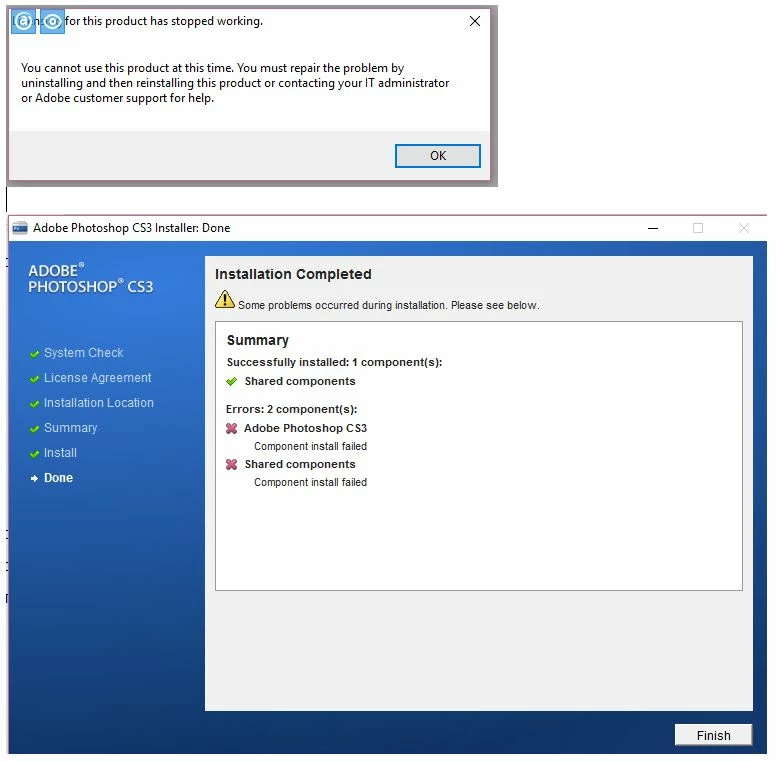
Photoshop CS3 suddenly stopped working on Windows 10, with the message: 'licensing for this product has stopped working'. The message also said I had to uninstall, then reinstall. I've now uninstalled and attempted to reinstall twice. Both times I've got a message saying it was only able to install one shared component, but couldn't install Photoshop CS3 plus other shared components. What's the solution?


If I manage to reinstall Photoshop, how will I activate it? I have the program registered for two computers, so that's all my activations used up. After Photoshop stopped working with the licensing message, I was unable to start it again to deactivate the licence before uninstalling. So I imagine that, as far as Adobe is concerned, I've used my activations up and can't do any more.


This is why no longer having access to a live Adobe technician is a big problem. I'm using Photoshop professionally and this is a serious business disruption for me.


The only thing I can think that could have precipitated the problem was that earlier on the same day Photoshop died, I had installed and ran Acronis True Image. Maybe doing that image triggered Photoshop into thinking I was trying to clone the installation to install on a third computer? But that would be crazy...


Photoshop was installed on my C: drive and I've wondered if installing it on my 😧 drive partition might work. But I prefer to have it on C: and haven't tried that solution.


(This is only part of my current Adobe problems - the other problem was that my other computer (Windows 7) that ran Photoshop and InDesign was getting really scratchy and I reinstalled Windows 7. Foolishly, I forgot to first deactivate my Adobe products. And now I can't reactivate them. I'll do a separate post for this though. But again - where is a live technician when you need one!)
 

This topic has been closed for replies.
Correct answer

So I was able to resolve the error that I was having with minimal effort. I ran Process Monitor and found that there was an application called AGSServices.exe that was getting lots of errors trying to connect to the following folder: C:\Program Files (x86)\Common Files\Adobe\Adobe PCD\cache. I deleted the cache.db file in that folder and the next time I opened up photoshop it asked me to reenter the license information. Presto! That fixed it. In order to delete the cache.db file, I had to go into safemode but you could probably delete it without going into safemode if you have not tried to open an adobe product since a restart.

I guess the cache.db file got corrupted. Hopefully this helps someone who is having a similar issue.

3 replies

Bani Verma
Community Manager
Community Manager
August 29, 2016

Hi,

As the error message says "Licensing for this product has stopped working" i would suggest you all to try the troubleshooting shared in the below links and see if that helps:

Error: "Licensing has stopped working" | Windows

Error: "Licensing has stopped working" | Mac OS

You are welcome to update this discussion in case you need further assistance.

johnmacgAuthor
Known Participant
August 29, 2016

What a huge set of things to do and try to understand!

It seems to me that these solutions assume that you actually have an installed version of Photoshop. As I have said several times, I don't have Photoshop installed at all. And I'm not the only one who was hit by this situation earlier this month. The licensing error message we got (see my opening message in this discussion) said to uninstall Photoshop and then reinstall it, before addressing the licensing issue.

The problem is that after we uninstalled, we couldn't reinstall Photoshop CS3.

Incidentally, at the end of the link you mentioned, there's a list of circumstances under which this licensing error can occur. My situation is similar to that reproduced below, in that Photoshop has already been running for some time (a year) before the problem occurred. However my machine conditions are very different. I have a 2Tb hard drive and 16Gb of RAM.

  • If the application previously started successfully at least once, or if it has been in heavy use, the issue is likely related to a system resource.  (Causes include low memory, low disk space, or simultaneous launch of several programs.) The result could be a temporary failure in the licensing system or corruption of the permanent licensing data.
Bani Verma
Community Manager
Community Manager
August 30, 2016

Just to confirm have you tried deleting the folders given in "Solution 8" in the above shared help document?, if not i would recommend you to delete the below mentioned folders:

C:\Program Files\Common Files\Adobe\Adobe PCD

C:\Program Files\Common Files\Adobe\caps

C:\Program Files\Common Files\Adobe\backup

C:\Program Data\Adobe\SLStore  ***( Program Data is a hidden folder please see, Show Hidden Files and Folders in Windows 7, 8.x, 10, or Vista )

After this you may download a fresh setup of Adobe Photoshop CS3 from here and install: Download Adobe Creative Suite 3 products.

Let us know if this helps.

Correct answer
August 28, 2016

So I was able to resolve the error that I was having with minimal effort. I ran Process Monitor and found that there was an application called AGSServices.exe that was getting lots of errors trying to connect to the following folder: C:\Program Files (x86)\Common Files\Adobe\Adobe PCD\cache. I deleted the cache.db file in that folder and the next time I opened up photoshop it asked me to reenter the license information. Presto! That fixed it. In order to delete the cache.db file, I had to go into safemode but you could probably delete it without going into safemode if you have not tried to open an adobe product since a restart.

I guess the cache.db file got corrupted. Hopefully this helps someone who is having a similar issue.

gener7
Community Expert
Community Expert
August 28, 2016

Sounds like you found something here. so if this clears johnmacg's problem, I'll see it is credited as the correct answer for future reference.

Gene

johnmacgAuthor
Known Participant
August 28, 2016

No it doesn't resolve my problem. This fix works on an actual installation of Photoshop. The problem I and others have had, is that we've got the 'licensing for this product has stopped working' message. That message said to uninstall Photoshop,  and then reinstall. But we can't reinstall.

Please don't press the correct answer button yet!

John T Smith
Community Expert
Community Expert
August 18, 2016

CS3 is SO OLD that you may never get it to install or run on Win10

An idea that MAY work to install and/or run old programs in Windows 10... works for some, not for others

-http://www.tenforums.com/tutorials/15523-compatibility-mode-settings-apps-change-windows-10-a.html

-or Run as Administrator http://forums.adobe.com/thread/969395 to assign FULL permissions may help... says Encore, but sometimes required for ALL Adobe programs (this is NOT the same as using an Administrator account)

Also read Will Adobe CS3 work in Windows 10?

johnmacgAuthor
Known Participant
August 18, 2016

CS3 is not all that old and it's perfectly adequate for my publishing business. I ran it without a hitch  for 12 months on Windows 10 before it stopped working yesterday. The error messages were to do with licensing, not the ability of CS3 to run in Windows 10.

johnmacgAuthor
Known Participant
August 23, 2016

Hello,

Just curious if you found any fix to this problem.  The same thing happened to me yesterday.  I had Illustrator open and running fine the day before, was forced to restart my computer due to a Design Space (Cricut) plugin I had to download and since then none of my adobe products will work (CS3 Web Premium, Captivate, Soundbooth)...don't know if the plugin or restart is coincidence to this problem or not.  I tried everything suggested here: Error: "Licensing has stopped working" | Windows finally ending on uninstalling and reinstalling.  I uninstalled but now when I try to reinstall from the disc, it goes no further than saying its initializing after selecting to install Web Premium.  I also have the license installed on two computers but was going to handle that hurdle when I got to it.  I also found this post but haven't tried the steps here incase this is helpful to you: http://www.kevinohara.com/how-to-fix-cs3-licensing-has-stopped-working .


I had a look at the compatibility mode possibilities that were suggested, but I can't even investigate that option if I can no longer install Photoshop CS3.

I made contact with Adobe, but they insist that CS3 is incompatible with Windows 10 and offered no solutions other than upgrading to the Creative Cloud. Photoshop CS3 ran faultlessly for a year before dying last week.

I found somewhere else on the web someone with the same complaint as me: He ran Photoshop CS3 successfully for some time in Windows 10 and then all of a sudden it stopped working and like me he cannot reinstall. It happened to him within a few days of it happening to me, and I'm left wondering if Adobe has engineered this issue so that we will be forced buy an upgrade that we do not want.

I don't want to pay an ongoing rental for a Creative Cloud suite, just so I can have a Photoshop that works on my computer. I want to continue to use my standalone versions of Photoshop, InDesign and Acrobat that over the years, with updates, have cost me thousands of dollars and have been working fine in Windows 10. They are more than capable of high-level desktop publishing work.