
Participant
July 26, 2017
Answered

Uninstall adobe apps

  • July 26, 2017
  • 1 reply
  • 767 views

I was cleaning up my mac, starting from software and utilities that I don't use.

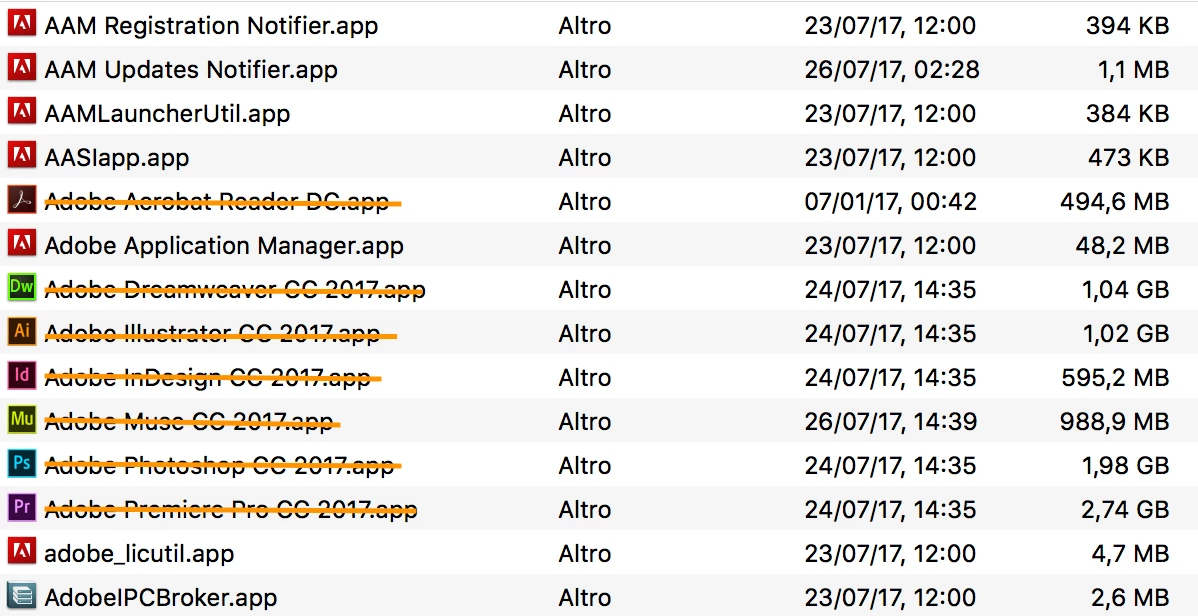
Managing Adobe apps I found more than what I aspected. Which one of them can I safely uninstall without compromising the integrity of the other apps?

I want to say that I don't use and I don't need the cloud part, I save everything local and than I backup everything with a third part service, and the updates service as well.

Thanks a lot for the support 🙂
    This topic has been closed for replies.
    Correct answer kglad

    if you use those programs, leave those alone.  those are the executable program files that you lined out.

    if you no longer use them:

    uninstall everything cc including preferences, https://helpx.adobe.com/creative-cloud/help/uninstall-remove-app.html

    then uninstall the cc desktop app, https://helpx.adobe.com/creative-cloud/help/uninstall-creative-cloud-desktop-app.html

    clean your computer of cc files per http://www.adobe.com/support/contact/cscleanertool.html

    1 reply

    kglad
    Community Expert
    kgladCommunity ExpertCorrect answer
    Community Expert
    July 26, 2017

    if you use those programs, leave those alone.  those are the executable program files that you lined out.

    if you no longer use them:

    uninstall everything cc including preferences, https://helpx.adobe.com/creative-cloud/help/uninstall-remove-app.html

    then uninstall the cc desktop app, https://helpx.adobe.com/creative-cloud/help/uninstall-creative-cloud-desktop-app.html

    clean your computer of cc files per http://www.adobe.com/support/contact/cscleanertool.html

    Participant
    July 26, 2017

    Thank you!

    kglad
    Community Expert
    Community Expert
    July 26, 2017

    you're welcome.