Exit
  • Global community
    • Language:
      • Deutsch
      • English
      • Español
      • Français
      • Português
  • 日本語コミュニティ
  • 한국 커뮤니티
1

3D mapped art quality is horrible!

Community Beginner ,
Feb 09, 2024 Feb 09, 2024

Frustrated...  3D-mapped art quality is horrible in the new 3D workspace. The mapped art was so much better quality in the old workspace.  Why???  Yes... I have my render settings high and doc. raster effects are set to 300ppi.  What is the deal?

TOPICS
Bug , Performance
1.2K
Translate
Report
Community guidelines
Be kind and respectful, give credit to the original source of content, and search for duplicates before posting. Learn more
community guidelines
Adobe
Community Expert ,
Feb 09, 2024 Feb 09, 2024

Did you activate the Raytracing and also clicked on Render in that little popup?

Translate
Report
Community guidelines
Be kind and respectful, give credit to the original source of content, and search for duplicates before posting. Learn more
community guidelines
Community Beginner ,
Feb 09, 2024 Feb 09, 2024

Yep

Translate
Report
Community guidelines
Be kind and respectful, give credit to the original source of content, and search for duplicates before posting. Learn more
community guidelines
Community Beginner ,
Feb 09, 2024 Feb 09, 2024

Old Workspace vs New...

Screenshot 2024-02-09 at 3.18.10 PM.pngScreenshot 2024-02-09 at 3.18.31 PM.png

Translate
Report
Community guidelines
Be kind and respectful, give credit to the original source of content, and search for duplicates before posting. Learn more
community guidelines
Community Expert ,
Feb 09, 2024 Feb 09, 2024

Can you share this sample Illustrator file with the dog (both old and new)?

Translate
Report
Community guidelines
Be kind and respectful, give credit to the original source of content, and search for duplicates before posting. Learn more
community guidelines
Community Beginner ,
Feb 09, 2024 Feb 09, 2024

It had to be an illustrator bug or programming issue because I have a classroom full of kids coming up with the same exact results in illustrator 2024.  Either that, or we are missing a step in the process.

Translate
Report
Community guidelines
Be kind and respectful, give credit to the original source of content, and search for duplicates before posting. Learn more
community guidelines
Community Expert ,
Feb 09, 2024 Feb 09, 2024

Please share one of those files.

Translate
Report
Community guidelines
Be kind and respectful, give credit to the original source of content, and search for duplicates before posting. Learn more
community guidelines
Community Beginner ,
Feb 13, 2024 Feb 13, 2024
Translate
Report
Community guidelines
Be kind and respectful, give credit to the original source of content, and search for duplicates before posting. Learn more
community guidelines
Community Expert ,
Feb 13, 2024 Feb 13, 2024

Your objects are tiny

In the document raster effects settings anti-alias is turned off

And the resolution is very low

There is transparency in the symbol

Raytracing wasn't turned on


But all of this isn't causing it.


What happens when you start with a fresh file? Do not use any of that content.

Translate
Report
Community guidelines
Be kind and respectful, give credit to the original source of content, and search for duplicates before posting. Learn more
community guidelines
Community Beginner ,
Feb 13, 2024 Feb 13, 2024

I did copy them to a new doc.  That must have reset those settings because I triple-checked every setting.  It is happening with a new doc as well.  Also, I have a classroom of kids with the same results.

Translate
Report
Community guidelines
Be kind and respectful, give credit to the original source of content, and search for duplicates before posting. Learn more
community guidelines
Community Expert ,
Feb 13, 2024 Feb 13, 2024

Do not copy them. What happens when you create it new?

Translate
Report
Community guidelines
Be kind and respectful, give credit to the original source of content, and search for duplicates before posting. Learn more
community guidelines
Community Beginner ,
Feb 13, 2024 Feb 13, 2024

Same result.  Did you try it on your machine?  I  tried it on an iMac and a PowerBook and in different versions of Illustrator.  All with the same results.

Translate
Report
Community guidelines
Be kind and respectful, give credit to the original source of content, and search for duplicates before posting. Learn more
community guidelines
Community Expert ,
Feb 13, 2024 Feb 13, 2024

I'm trying it on a Macbook and using the default symbols. They are of caused rasterized, because it's a raster based effect, but they do not look horrible.

Translate
Report
Community guidelines
Be kind and respectful, give credit to the original source of content, and search for duplicates before posting. Learn more
community guidelines
Community Beginner ,
Feb 13, 2024 Feb 13, 2024

Why does it look good in Classic Mode?  Did they change the underlying programming in the new workspace?  I notice it will not recognize transparency in the stroke or fill of a shape in the new version as well.  Seems like 3D took a step back.  I like the new interface, just wish it had the same capabilities.

Translate
Report
Community guidelines
Be kind and respectful, give credit to the original source of content, and search for duplicates before posting. Learn more
community guidelines
Community Expert ,
Feb 13, 2024 Feb 13, 2024

It's a completely new effect. The old one is most of the time vector based

The new one is most of the time raster based. But still it shouldn't look as your example.

Translate
Report
Community guidelines
Be kind and respectful, give credit to the original source of content, and search for duplicates before posting. Learn more
community guidelines
Community Expert ,
Feb 09, 2024 Feb 09, 2024

Indeed, Christian.


How about sharing a sample Illustrator file as already requested above?


Certainly helpful for inspection.

Translate
Report
Community guidelines
Be kind and respectful, give credit to the original source of content, and search for duplicates before posting. Learn more
community guidelines
Community Beginner ,
Feb 09, 2024 Feb 09, 2024

I certainly will on Tues.  Files are at school.  Thanks for the help.

Translate
Report
Community guidelines
Be kind and respectful, give credit to the original source of content, and search for duplicates before posting. Learn more
community guidelines
Community Expert ,
Feb 13, 2024 Feb 13, 2024

I agree, even with high quality ray tracing 600 ppi raster settings, the newer 3D effect gives a lower quality than the faster Classic one (that previews even better with CPU Preview).

Translate
Report
Community guidelines
Be kind and respectful, give credit to the original source of content, and search for duplicates before posting. Learn more
community guidelines
Community Expert ,
Feb 13, 2024 Feb 13, 2024

@Ton Frederiks  schrieb:

I agree, even with high quality ray tracing 600 ppi raster settings, the newer 3D effect gives a lower quality than the faster Classic one (that previews even better with CPU Preview).


True. But the file in this case is really special. You can do what you want, but it doesn't get better. Really weird. 

Translate
Report
Community guidelines
Be kind and respectful, give credit to the original source of content, and search for duplicates before posting. Learn more
community guidelines
Community Expert ,
Feb 13, 2024 Feb 13, 2024

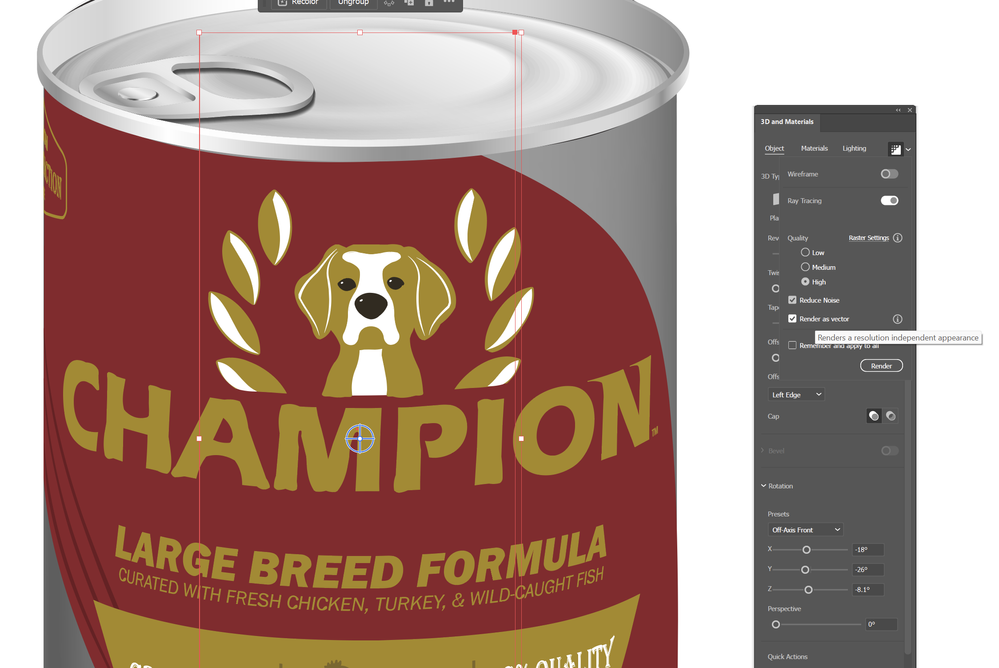
Most of it seems fine with 'render as vector' on, except the 'Champion' text for reasons I can't determine:
DougARoberts_0-1707840598807.png


Translate
Report
Community guidelines
Be kind and respectful, give credit to the original source of content, and search for duplicates before posting. Learn more
community guidelines
Community Expert ,
Feb 13, 2024 Feb 13, 2024
LATEST

Yes partially better with render as vector, but then the image part disappears.

Translate
Report
Community guidelines
Be kind and respectful, give credit to the original source of content, and search for duplicates before posting. Learn more
community guidelines