


mirza5313
Known Participant
July 26, 2017
해결됨

6x11" post card setup Illustrator

  • July 26, 2017
  • 3 답변들
  • 850 조회

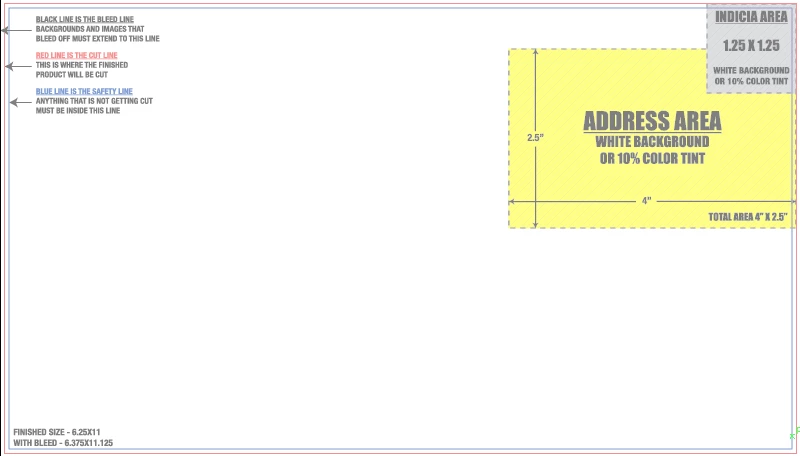
I have a 6x11" double sided post card that will be mailed after printing, I am new in Illustrator marking and bleed things I really need help to make according to printing company's requirements please see what I have done but don't know how to make address area?

HERE is my .ai file

Can any one help?
이 주제는 답변이 닫혔습니다.
최고의 답변: Monika Gause

That just marks the area in which you have to put the address (your client's address).

This area should not have any background other than white or a 10% color tint (maximum)

So this is not about what to put there, but rather what to avoid.

3 답변

Inspiring
July 26, 2017

Don't hesitate to show your design to your local postmaster.  You can also get templates from usps.com that can show areas where they need for barcodes ( along the bottom, for instance ).

JonathanArias
Legend
July 26, 2017

Monika is right, you void the right hand side area they marked. thats all

Monika Gause
Community Expert
Community Expert
July 26, 2017

That just marks the area in which you have to put the address (your client's address).

This area should not have any background other than white or a 10% color tint (maximum)

So this is not about what to put there, but rather what to avoid.

mirza5313
mirza5313작성자
Known Participant
July 28, 2017

Thanks, Monika I just figured out that area, I am in confusion regarding how to mark that area they indicate for me?

Monika Gause
Community Expert
Community Expert
July 28, 2017

I don't understand the question. In that area is the address of the business you are designing this for (your client). You don't need to mark it. Just put the address there and then watch out that you keep the space empty of any dark elements.

Maybe you should really go to the post office and them explain to you how these forms work?