Exit
  • Global community
    • Language:
      • Deutsch
      • English
      • Español
      • Français
      • Português
  • 日本語コミュニティ
  • 한국 커뮤니티
0

Adobe AI files are forcefully opening in Adobe XD

Community Beginner ,
Oct 27, 2018 Oct 27, 2018

After 2019 version update all the AI files are being opened in XD. Also, we are not able to change the default app to AI.
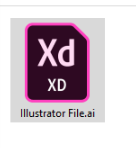
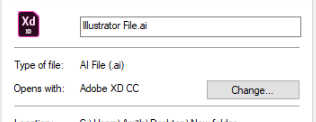
1.png2.png

1.7K
Translate
Report
Community guidelines
Be kind and respectful, give credit to the original source of content, and search for duplicates before posting. Learn more
community guidelines

correct answers 1 Correct answer

Contributor , Nov 17, 2018 Nov 17, 2018

The same thing has happened to me in various shades... Sometimes, it fixes itself - like after the latest PS update - sometimes it has to be done manually.

This link should help in resetting file associations:

How to Change File Associations in Windows

Translate
Adobe
Community Expert ,
Oct 27, 2018 Oct 27, 2018

Search bar at the top of http://www.microsoft.com/en-us/default.aspx to find Microsoft articles on setting file associations

Translate
Report
Community guidelines
Be kind and respectful, give credit to the original source of content, and search for duplicates before posting. Learn more
community guidelines
Community Beginner ,
Oct 27, 2018 Oct 27, 2018

Sorry, but it is not a Microsoft issue I feel. Because this is happening only after CC 2019 update.

Translate
Report
Community guidelines
Be kind and respectful, give credit to the original source of content, and search for duplicates before posting. Learn more
community guidelines
Community Expert ,
Oct 27, 2018 Oct 27, 2018

I'm on Windows 7 on my office computer and there it is also impossible to change file associations. This is a configuration problem in Windows as the exact same computer with a fresh OS works perfect.

ABAMBO | Hard- and Software Engineer | Photographer
Translate
Report
Community guidelines
Be kind and respectful, give credit to the original source of content, and search for duplicates before posting. Learn more
community guidelines
Community Beginner ,
Oct 27, 2018 Oct 27, 2018

Actually, It's happening in 2 different computers running Windows 10 and CC 2019. Not an OS related problem.

Translate
Report
Community guidelines
Be kind and respectful, give credit to the original source of content, and search for duplicates before posting. Learn more
community guidelines
Adobe Employee ,
Nov 16, 2018 Nov 16, 2018

Moving to Illustrator​

Translate
Report
Community guidelines
Be kind and respectful, give credit to the original source of content, and search for duplicates before posting. Learn more
community guidelines
Community Expert ,
Nov 16, 2018 Nov 16, 2018

Amith.in​ have you tried to change/refresh your System-Rights, after the Update?

Translate
Report
Community guidelines
Be kind and respectful, give credit to the original source of content, and search for duplicates before posting. Learn more
community guidelines
Contributor ,
Nov 17, 2018 Nov 17, 2018

The same thing has happened to me in various shades... Sometimes, it fixes itself - like after the latest PS update - sometimes it has to be done manually.

This link should help in resetting file associations:

How to Change File Associations in Windows

Translate
Report
Community guidelines
Be kind and respectful, give credit to the original source of content, and search for duplicates before posting. Learn more
community guidelines
Community Beginner ,
Nov 17, 2018 Nov 17, 2018

Thanks this worked.

Translate
Report
Community guidelines
Be kind and respectful, give credit to the original source of content, and search for duplicates before posting. Learn more
community guidelines
Contributor ,
Nov 17, 2018 Nov 17, 2018
LATEST

Welcome.... Glad you got it sorted out.

Translate
Report
Community guidelines
Be kind and respectful, give credit to the original source of content, and search for duplicates before posting. Learn more
community guidelines