


Inspiring
April 13, 2023
해결됨

Best way to convert 50 pages of EPS to AI?

  • April 13, 2023
  • 3 답변들
  • 5530 조회

Hi,

I designed a Wire-O spiralbound book in InDesign. Because it's spiral bound, it's 50 pages (that's total, front and back). The client had initially told me to send it in InDesign but now they want me to convert it to AI. The artwork in the book is raster, CMYK. 


What is the best way for me to do this? I have converted it as PDF to EPS so far. I need to not mess up the raster art. I would prefer it all to come out in one file, like a multipage AI file, but it's OK if it's 50 separate files, just annoying.


I could download Illustrator but I also see a lot of free online converters, do any of those work OK, does anyone know?

Is there a protocol to send files to create a book (again, it is spiral bound, so the pages are all separate)--such as do I include the bleed marks, slug, etc.? The client knows nothing so I cannot ask. 

Thanks!
 

이 주제는 답변이 닫혔습니다.
최고의 답변: Brad @ Roaring Mouse

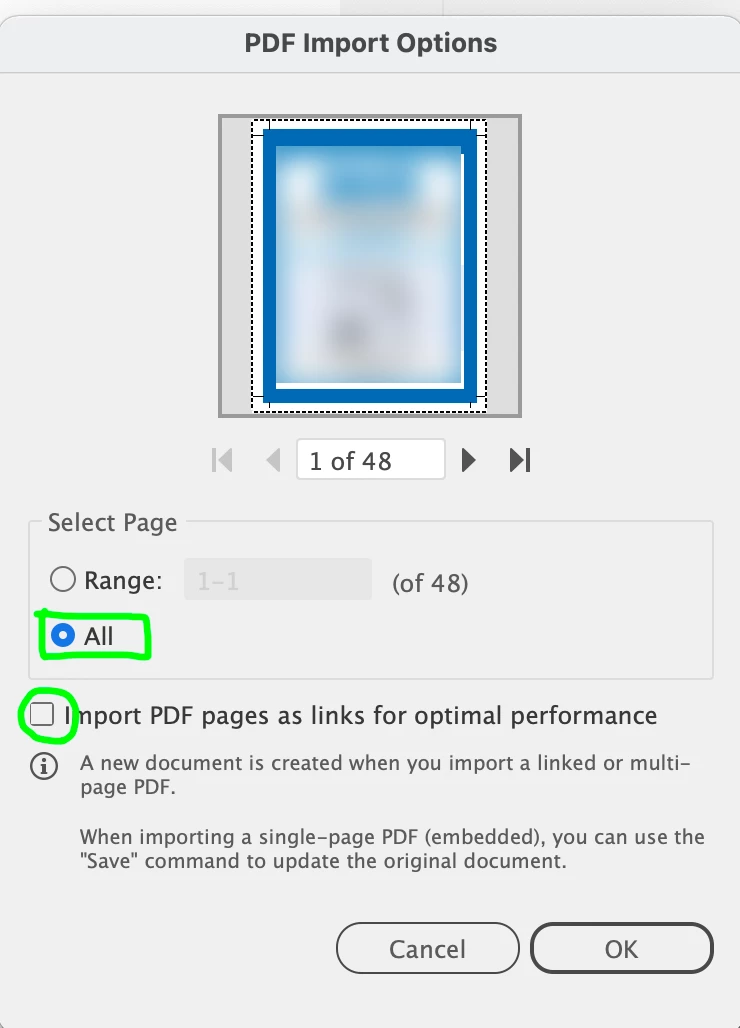
You can do it all in one shot if you open the PDF with All pages checked and the Linked option unchecked. This will give you an Illustrator file with all the pages as artboards inside one document.

The stupid thing here, besides the actual request to do this, is THEY could do that just as easily.


3 답변

Brad @ Roaring Mouse
Community Expert
Community Expert
April 13, 2023

You can do it all in one shot if you open the PDF with All pages checked and the Linked option unchecked. This will give you an Illustrator file with all the pages as artboards inside one document.

The stupid thing here, besides the actual request to do this, is THEY could do that just as easily.


vixler작성자
Inspiring
April 13, 2023

Thanks yes, I will try that. I did do the linked and was able to save a multipage document "with linked files" but I will try it without checking "linked."

One issue was that a warning box said my document raster effects were going to be 72dpi. The document and art are all 300 dpi. The Documents Raster Effects Settings in AI are at 300. So I'm trying to figure out the issue there.

Monika Gause
Community Expert
Community Expert
April 13, 2023

Basically at this stage of the job, it's just not a good idea. I don't know why those Chinese printers always want to have AI files, but just "converting" from EPS or PDF to Illustrator files might not get you the right kind of thing. 


The client needs to know that this is the equivalent of doing most of the job again. You could place all the pages of the PDF into an AI file and send them that (together with the PDF you placed). But the printer might not like that, becasue they want things native in Illustrator (for whatever reason).

Imaginerie
Community Expert
Community Expert
April 13, 2023

I didn't know about chinese printers. I never had those. Everytime I finally spoke to the printer in one of those jobs, they were all wanting a PDF. Good to know!

Community Expert
April 13, 2023

Uh, I really like using Adobe Illustrator, but multi-page layout is not its strong suit. InDesign is a far more appropriate choice for laying out a 50 page document. Aside from an INDD file (and package of assets) the second best option would be a multi-page PDF. I'm puzzled by the client requesting the document in Illustrator AI format (especially if the client "knows nothing"). It doesn't make a lot of sense. Is the client going to do the print work themselves? Are they trying to import the artwork into another page layout or graphics application? If not, then a PDF should be good enough for the client to proof.


Multi-page PDF files can be imported into Illustrator on multiple art boards. But various things in a PDF can "break" when placed into Illustrator. Some of this depends on the nature of the art. One downside with using EPS is it does not support transparency. If you already created the layout in InDesign I would fight pretty hard to keep the work in that application environment.

vixler작성자
Inspiring
April 13, 2023

Yes they are either printing it themselves or using a printing company, I'm not sure, but they are producing it. I only have one contact, and when I ask printing questions she always says she can't answer--this hss been an experience--they didn't know the margins, specs, anything--I finally bought the book they want to emulate anf measured it with a ruler. I don't know how they do things, it's in China and maybe AI is how it's done there. I have been sending low-res PDFs for them to go over, I've offered the INDD file and high-res PDF, but they want me to convert it all to AI. I don't know much about production. Guess I'll try the multiple artboards, thanks for the info!

vixler작성자
Inspiring
April 14, 2023

So they were taking advantage, you should have added some $$$ for the indesign job. As much as you're desperate for it (and don't worry all of us are to a certain extend). It probably doesn't worth compromising your sanity. You could say lesson learned, and leave it behind. But next time you need a bullet-proof contract and any addition means adding to the final bill. (and asking for being paid a part upfront, or setting up an escrow system).

I know all my answers so far haven't been helpful regarding the Indesign to Illustrator issue, but I somehow feel like it's my duty to prevent freelancers being ripped, and at the end disheartened.
Call it my life mission if you want 😁
Keep the faith, and cover your bases. They hired you, they needed you, you're worth respect.💗


Thanks, I needed to hear that. I saw red flags but to me it was to get back in the game after a long time, and it kind of sounded (emphasis on "sounded")  fun. I will be more strict next time,  and try for better clients. It was an experience ...