


Participant
June 22, 2020
해결됨

Bildnachzeichner mit Stapelverarbeitung - "weiß ignorieren" wird in der Aktion nicht beachtet :(

  • June 22, 2020
  • 3 답변들
  • 1829 조회

Hallo zusammen. 

Auch wenn ich Illustrator immer mehr schätze und lieben lerne, komme ich manchmal nicht weiter:


Bei der Bildnachzeichner-Funktion gibt es ja die Möglichkeit, weiße Flächen zu ignorieren. Diese Option "weiß ignorieren" ist mit einem Haken zu aktivieren. Bei der einzelnen Anwendung funktioniert das problemlos.


Erstelle ich aber eine Aktion für die spätere Stapelverarbeitung von etlichen JPGs, wird diese Option scheinbar nicht gespeichert. selbst wenn ich die Aktion einmal abspiele, wird das Bild zwar wie gewünscht nachgezeichnet, jedoch bleiben weiterhin die weißen Flächen - Bei der Stapelverarbeitung eben genau dasselbe. Aber genau diese möchte ich eben herausfiltern.


Ich habe auch versucht, ein eigenes, individuelles Bildnachzeichner-"Profil" mit eigenen Optionen zu erstellen, und diese dann beim Aufnehmen der Aktion anzuwenden - aber auch hier werden weiße Flächen beim Abspielen der Aktion leider immer noch beibehalten. Kann das wirklich sein, dass diese Option "weiß ignorieren" nur für einzelne Fälle gedacht ist, jedoch in der Stapelverarbeitung nicht funktionieren? Das kann ich mir nicht vorstellen.


Was kann ich hier tun? Gibt es alternativlösungen, um aus 2000 schwarzweiß-JPGs automatisiert Vektorgrafiken OHNE weiße Flächen zu erstellen?
이 주제는 답변이 닫혔습니다.
최고의 답변: CarlosCanto

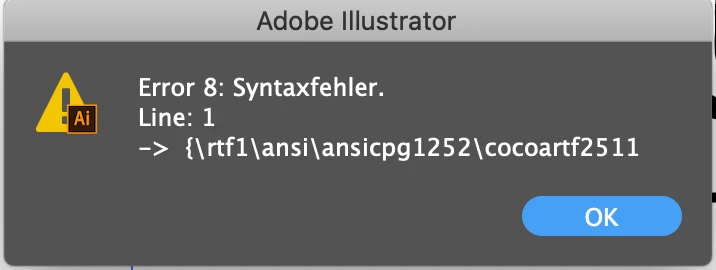
Thank you very much! I got the Skript and tried but unfortunately it won't work: 


you saved it accidentally as Rich text, it needs to be saved as plain text. 

3 답변

CarlosCanto
Community Expert
Community Expert
June 25, 2020

Hello, here's the script.

- Close Illustrator

- install the script in your Scripts Folder

- start Illustrator

- record an Action to Run the IgnoreWhite script

- place the action in between Tracing and Expand Tracing commands you already recorded

- play your action


// check Ignore White setting, to be used in an Action Set. Place in between Tracing and Expand Tracing
selection[0].tracing.tracingOptions.ignoreWhite = true;

let me know how it goes or if you need assitance installing or running the script

Participant
June 25, 2020

Wow, thats great! it works! 🙂 

Thank you very much! because of you i can save a lot of time now! 🙂

CarlosCanto
Community Expert
Community Expert
June 26, 2020

you're welcome, glad to hear the script helps.


Carlos

CarlosCanto
Community Expert
Community Expert
June 23, 2020

can we see a screeshot of your Actions panel? 


I can set "ignore white" with a script, the script will need to be incorporated into the action set

Participant
June 23, 2020

hey, yes. how can i make such a script, i am not a programmer or IT specialist 😄 never did that before. and how can i incoporate that script into an action? oh that would be so great, if this worked!!! 😮 here is my simple action as screenshot

Monika Gause
Community Expert
Community Expert
June 22, 2020

Geht es über Adobe Bridge? Von dort aus kann man in Stapelverarbeitung nachzeichnen.