


- Home
- Illustrator
- Discussions
- Can't change Illustrator version after 2017 update
- Can't change Illustrator version after 2017 update

Copy link to clipboard
Copied
Hi all,
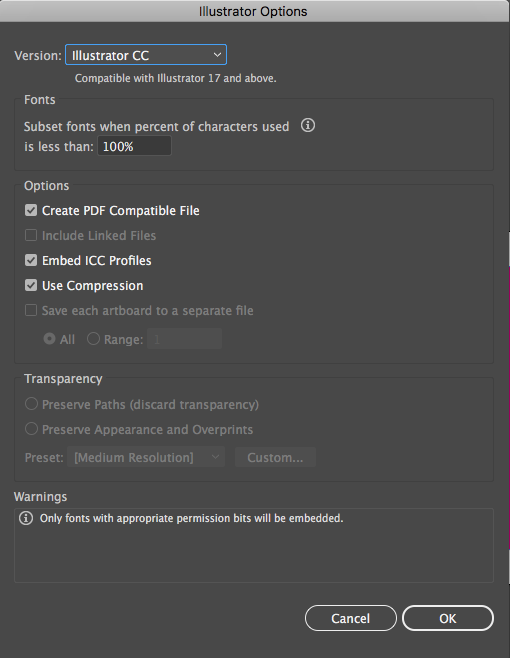
After my Mac was updated with 2017 Illustrator CC I can no longer change the version in the save dialog.
Is this normal?
How do I send files to someone still using CS6?
thank you for reading


 1 Correct answer


Have you updated your wacom driver since going to Sierra?


Explore related tutorials & articles
 8
Replies
8
8
Replies
8


Copy link to clipboard
Copied
are you saying that the drop down list does nothing, or contains no other options?
Copy link to clipboard
Copied
Yes before I could click and change to all the previous versions of Illustrator. But since the upgrade clicking the box only changes the color and there are no more options like before.
I have tried restarts, and even was checking my trackpad click functions but everything is normal. Except Illustrator.
should I uninstall Illustrator and reinstall it?

Copy link to clipboard
Copied
Sounds like the next step to find out where the problem is.
Copy link to clipboard
Copied
What happens when you use the down cursor key and the blue line is around Illustrator CC as shown in your pic. You can use tab to get there if needed.
What version Mac OS are you running?
More thorough Reset your preferences.
Quit Illustrator
Finder >> Shift Command G
~/Library/Preferences/Adobe Illustrator 21 Settings/en_US*/Adobe Illustrator Prefs
rename Adobe Illustrator 21 to Adobe Illustrator 21 old
Reset your other preferences
Quit Illustrator
Finder >> Shift Command G
~/Library/Application Support/Adobe/Adobe Illustrator 21/
rename Adobe Illustrator 21 to Adobe Illustrator 21 old
Do you have any third party plug ins or software that affects your system (eg: avast antivirus)
Copy link to clipboard
Copied
hi guys and thank you for suggestions,
I reset preferences but no luck
I am using a Mac Pro 2010 with latest MacOS SIerra
no third party software or virus except for
Dropbox, Wacom driver, Carbon Copy Cloner, Teamviewer and VNC
here is a video of save box dialog, you can see me clicking it and it just changes to a dark color
also I try tabbing and cursor down but nothing changes,
Copy link to clipboard
Copied
I just tried deleting both CS6 and CC versions of Illustrator with remove preferences and re download and install
and no luck. Same thing
Copy link to clipboard
Copied
Have you updated your wacom driver since going to Sierra?
Copy link to clipboard
Copied
updated Wacom driver and problem solved,
I honestly was not expecting a Wacom driver to fix this but thank you to all


Get ready! An upgraded Adobe Community experience is coming in January.
Learn more
 AdChoices