
Franky Spills
Known Participant
February 25, 2022
Question

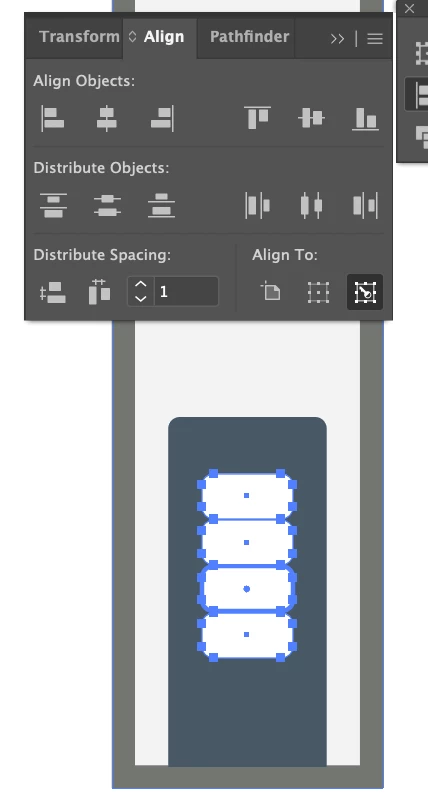
Cannot Distribute evenly by set distance with Align

  • February 25, 2022
  • 4 replies
  • 541 views

Hello.


I'm trying to distribut by a set distance.  My document is set to inches.


I've picked 4 objects and have a key object selected.  When I type "1" into the distance... it seems to move it an arbitrary amount. I thought it would be 1" but it distributes them by .01... If I type 1" or 1in or 1 in.  Illustrator doesn't seem to understand what i'm trying to do and defaults back to just 1.  I guess my question is what is the unit of Measure I am entering and how do i change it to inches, or cm or mm or whatever unit I need?


Thanks!
 

This topic has been closed for replies.

4 replies

Dan Rodney
Community Expert
Community Expert
March 18, 2022

Someone else has had the same issue https://community.adobe.com/t5/illustrator-discussions/distribute-spacing-illustrator-first-launch-bug/td-p/12821812


I just tried it in 26.1 and it worked on first launch. So maybe the bug has been fixed.

— Adobe Certified Expert & Instructor at Noble Desktop | Web Developer, Designer, InDesign Scriptor
tromboniator
Community Expert
Community Expert
February 26, 2022

Yeah, I'm pretty sure it's a bug. Of course, now that I want it to happen it won't, but even earlier today regardless of unit settings to the contrary, Distribute Spacing was stuck on points. When I set general units to inches (or cm, or mm, it doesn't matter), whatever value I enter, and even if I enter the units with the value, it returns a spacing of points, although it doesn't display the units. Switching the units to points and checking the spacing in the Transform panel confirms that the value is correct but the units are invariably points. Repeatedly changing units and activating the spacing button several times (seems to be a random number of times) finally resets the panel so that it delivers the correct units.


No, I have not yet reported the problem through Uservoice, as I thought it might have been related to other glitches I was encountering, and my problem alone, but I think I have cleared up the rest of the issues, and now I see that its not just me.


So to recap, the problem is real, exactly as @Dan Rodney  describes, and the units are points, and after a night's sleep and try it again, reporting it if it persists.


Thanks,
Peter


Dan Rodney
Community Expert
Community Expert
February 26, 2022

I just tried this and had the same problem... with a 1 and no type of units specified. It "should" say a unit of measure there! Try changing your units to another type (like cm) and back to inches. Try starting the align again, deselect and reselect. I don't know what exactly it was that got the units to come back into my Align panel, but after playing around a little it now says 1 in in that field. Something was being buggy though.

— Adobe Certified Expert & Instructor at Noble Desktop | Web Developer, Designer, InDesign Scriptor
Monika Gause
Community Expert
Community Expert
February 25, 2022

Is align to pixels turned on?

Or align to grid?

Franky Spills
Known Participant
February 26, 2022

Align to pixels and Align to grid?  i didn't even know I could do that.  Where is that setting?


I have smart guides on.... but that's all i can think of...