


dennisg24167369
Participant
September 26, 2019
질문

Change "Export for screens" default save location in Illustrator

  • September 26, 2019
  • 2 답변들
  • 2422 조회

Is there a way to change my default export location for Illustrator CC 2019s "export for screens" dialogue?

When i use "export for screens" the default export location is one specific folder on my desktop, if i move that folder or put it in the trash, the default export location will change accordingly to "follow" the location of the folder.

For reference, im on MacOS Mojave 10.14 and (the newest) Illustrator 23.0.6
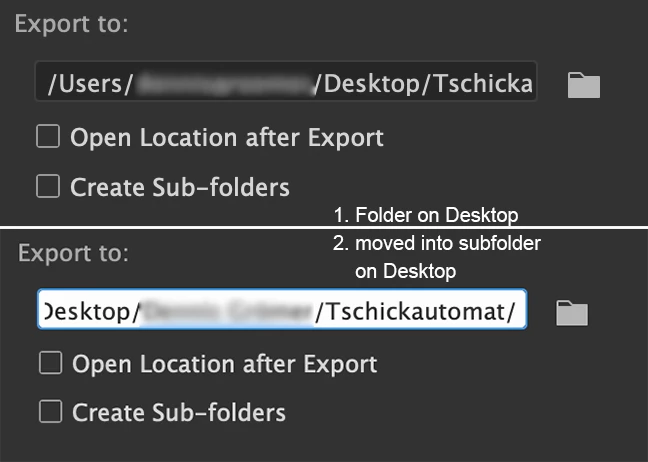
small disclaimer, the problem might occur because my mac-user has a slightly corrupted file system, stems from changing the username and using a different adobe ID – but maybe im just missing something so i'll ask anyways


{Renamed by MOD}

이 주제는 답변이 닫혔습니다.

2 답변

Srishti Bali
Community Manager
Community Manager
September 26, 2019

Hi there,


Thanks for reaching out. As of now, Export for Screens dialog always exports to the last location. I will pass on your feedback to our product team and you can do that too by upvoting it here: https://illustrator.uservoice.com/forums/333657-illustrator-feature-requests/suggestions/37007605-change-export-for-screens-save-path-default-to-f as suggested by Monika.


The UserVoice pages are monitored by the respective Engineering and Product Management teams and is one of the best ways of sharing issues and suggestions so they can be implemented in future releases.


Regards,

Srishti

dennisg24167369
Participant
September 27, 2019

Hello Srishti,

thanks for your reply.  
Unfortunately, Illustrator does NOT in default export to the last used location for me. It has always chosen this one specific folder for months now.

Srishti Bali
Community Manager
Community Manager
October 1, 2019

Have you tried changing it manually? If yes, then please Resetting Preferences (https://helpx.adobe.com/illustrator/using/setting-preferences.html#setting_illustrator_preferences) and check how it works.


Please note that resetting preferences will remove all the custom settings and Illustrator will launch with default settings. You can also take a backup of the folders in case you want to. Location is mentioned in the article.  


Regards!


Monika Gause
Community Expert
Community Expert
September 26, 2019