Participant
May 4, 2023
Answered

Clipping Mask Glitch/Lag? (Illustrator 2023)

  • May 4, 2023
  • 3 replies
  • 2884 views

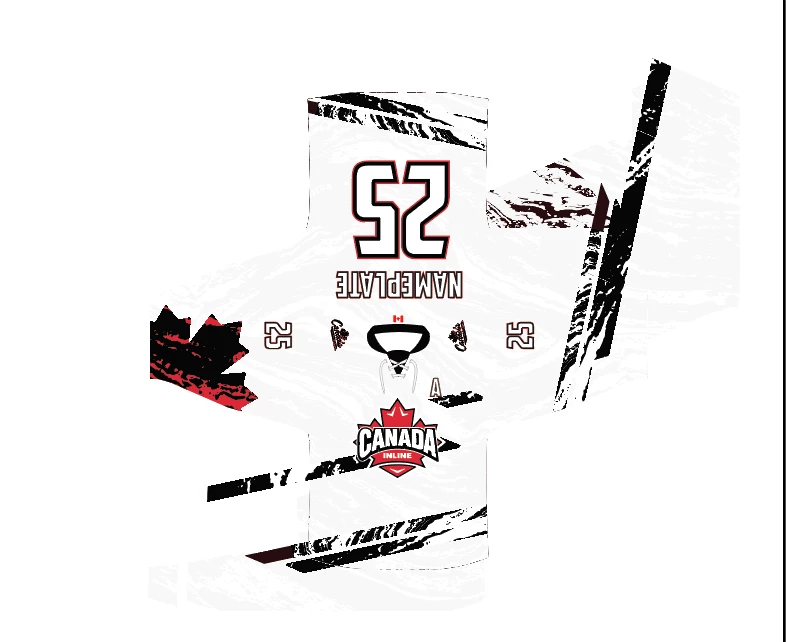
I recently updated to Creative Cloud 2023 for Illustrator and ever since I updated I have been having glitch/lag issues with my clipping masks. I work with some pretty complex vector patterns at times but this never used to happen on 2021. Anyone experienced similar issues? It is making it nearly impossible to do my work as pieces of the pattern that are supposed to be hidden by the mask keeping popping up on the artboard inside and outside of my projects. It's happening not only on my complicated designs but also with basic stripes/lines/colors.


Any help is appreciated!

-Ethan



This topic has been closed for replies.
Correct answer Monika Gause

Hey Mokina,

It does seem to go away and when I switch to view Preview on CPU instead of GPU. If I am being honest, I'm not entirely sure what that means, but it seems to do the trick. 

Any additional advice, is GPU important?

-Ethan


The GPU is fast, but inprecise. So you actually want to work with GPU turned on. But if you need to check something, use the CPU if the GPU view looks wrong.

3 replies

Participant
May 12, 2023

I'm not sure what's happening with Illustrator right now. It's shockingly laggy and masking is all over the place. I wireframed in Figma and putting UI together in AI. I think I'll migrate to Figma for UI based on this performance...

Monika Gause
Community Expert
Community Expert
May 12, 2023

@default7mpttjt3bvq2  schrieb:

I'm not sure what's happening with Illustrator right now. It's shockingly laggy and masking is all over the place. I wireframed in Figma and putting UI together in AI. I think I'll migrate to Figma for UI based on this performance...


Please create a new thread on the forum and describe your exact steps so someone can try and even guess what you are doing.

Participant
May 12, 2023

Have you tried using masks recently? The problem will soon become apparent if you have.

Anubhav M
Community Manager
Community Manager
May 5, 2023

Hello @Ethan28280563tuij,


We understand that encountering technical issues can be frustrating. Would you mind trying the suggestions shared in this help article (https://helpx.adobe.com/illustrator/kb/optimize-illustrator-performance.html) and checking if it helps?

If not, kindly share some more details, like the exact version of the OS/Illustrator, system config (CPU/GPU/Memory), a sample file (https://community.adobe.com/t5/illustrator-discussions/share-your-files-in-6-simple-steps/td-p/12967531), and a screen recording of the problem (https://community.adobe.com/t5/illustrator-discussions/screen-record-an-issue-on-windows-amp-macos-for-sharing/td-p/12967727), as suggested by Monika so that we can investigate this further.


Looking forward to hearing from you.


Thanks,

Anubhav

Participant
May 4, 2023

Another example (giant versions of the numbers on the jersey, in all white just appearing).

Monika Gause
Community Expert
Community Expert
May 5, 2023

So it worked in the previous version?


Please tell us about your hardware. And your system.

Does it get better when you go to View > Preview on CPU?

Participant
May 5, 2023

Hey Mokina,

It does seem to go away and when I switch to view Preview on CPU instead of GPU. If I am being honest, I'm not entirely sure what that means, but it seems to do the trick. 

Any additional advice, is GPU important?

-Ethan