- Página inicial
- Illustrator
- Discussões
- Re: Colors become dull when exporting to PNG
- Re: Colors become dull when exporting to PNG

Copiar link para a área de transferência
Copiado
I'm having an issue with Illustrator CC 2017.
When i use export to create a PNG file, it comes out with dull colors. However, when i use Save for web the PNG comes out in nice colors.
For example:
The result i want:

(created with Save for Web)

(Exported to PNG)
This one looks dull compared to the other.
About my setup:
- The color mode of the document is set to RGB, not CMYK.
- I have Appearance of Black set to Display All Blacks as Rich Black and Output All Blacks as Rich Black.
Thanks for your time.


 2 respostas corretas

Edit -> Assign Profile. My guess is that you have AdobeRGB assigned. For work that will be mainly viewed on-screen, you should assign sRGB.
Save for Web will automatically convert to sRGB, whereas Export preserves the colour numbers, which will appear differently when viewed on most monitors, which are closer to sRGB.


I have a different answer. Don't go to > Save As
Instead use > Eport > Quick Export as PNG
Ps 24.1.1

Explorar tutoriais e artigos relacionados
 11
respostas
11
11
respostas
11


Copiar link para a área de transferência
Copiado
"Rich Black" is only relevant for CMYK. The rest simply sounds like the usual lack of color management vs. a poorly adjusted monitor. You need to work on that rather than anything else.
Mylenium

Copiar link para a área de transferência
Copiado
This is about as helpful as an elephant in a minefield. Thanks, guy.

Copiar link para a área de transferência
Copiado
I felt you!


Copiar link para a área de transferência
Copiado
Hi @Eldion,
Sorry about the trouble. I would like to know if you have tried the steps shared by @Danny Whitehead.? If these steps don't help, I will request you to please share a few more details like:
- OS and version of Illustrator
- Is the issue related to a specific document?
- Could you please share the document with us? It would be really helpful. You can upload it to the Creative Cloud (https://helpx.adobe.com/in/creative-cloud/help/share.html) and share the download link.
- Where are you saving the files (Network Drive/ System HDD/ Shared Folder on System/ External HDD)?
- When did this start happening? Are there any recent changes made to your system? For example, any antivirus, system updates, or web extensions installed recently.
- Which color space are you working in?
- In which application are you previewing the exported PNG?
- Check the color used in the document are process colors and has no warning (See attached Screenshot)

We are here to help. We just need more info.
Thanks & Regards,
Anshul Saini

Copiar link para a área de transferência
Copiado
Copiar link para a área de transferência
Copiado
Edit -> Assign Profile. My guess is that you have AdobeRGB assigned. For work that will be mainly viewed on-screen, you should assign sRGB.
Save for Web will automatically convert to sRGB, whereas Export preserves the colour numbers, which will appear differently when viewed on most monitors, which are closer to sRGB.
Copiar link para a área de transferência
Copiado
You were right. That really helped. Thank you!
Copiar link para a área de transferência
Copiado
I have a different answer. Don't go to > Save As
Instead use > Eport > Quick Export as PNG
Ps 24.1.1

Copiar link para a área de transferência
Copiado
This is what I needed
Copiar link para a área de transferência
Copiado
That Quick export appears to be gone - None of that profile/color settings stuff worked for me - after 45 minutes of swearing I tried exporting a JPG and the color held - no idea - completely exasperating.


Copiar link para a área de transferência
Copiado
Quick Export is a Photoshop option.
Illustrator does not embed a color profile, other apps (including Illustrator) are just guessing what kind of RGB profile is used and assume sRGB.
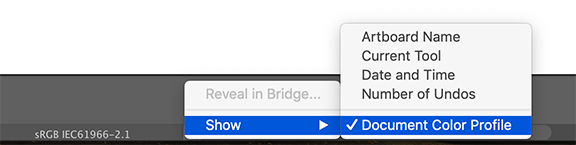
Check in Illustrator what the color document profile is and assign that in Photoshop to the exported png.


Encontre mais inspiração, eventos e recursos na nova comunidade da Adobe
Explore agora
 AdChoices