



Copy link to clipboard
Copied
How do I copy the name of the linked file? I have dozens of missing links and need to search my hd to find them. The files names are long and there would be countless hours wasted trying to make sure each one I searched for was correct.
I've tried in every window I can find, but it won't let me select the text, anywhere. Very frustrating, to say the least.
Thanks


 3 Correct answers


go to File->File Info...to bring up the XMP window, then on the list on the left select Raw Data. Then search for a file name. You will only get the first match and you won't be able to find a next match. But you can copy and paste the whole xml data and paste it into a text editor for better search tools.


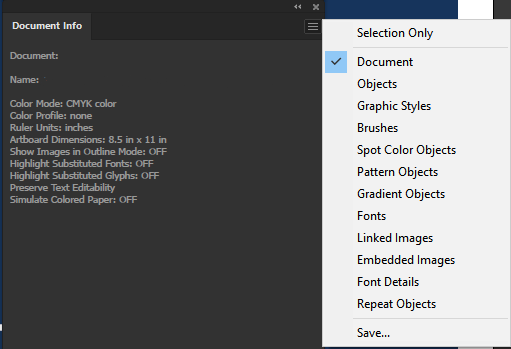
you could also Ctrl+A to select all, open the "Document Info" Panel, switch to "Linked Images" in the Flyout Menu, then click on "Save..." to save the list to a text file.


It is not very elegant, but you can go to the Document Info panel, uncheck selection only and save it as a text file.

Explore related tutorials & articles
 8
Replies
8
8
Replies
8

Copy link to clipboard
Copied
go to File->File Info...to bring up the XMP window, then on the list on the left select Raw Data. Then search for a file name. You will only get the first match and you won't be able to find a next match. But you can copy and paste the whole xml data and paste it into a text editor for better search tools.
Copy link to clipboard
Copied
you could also Ctrl+A to select all, open the "Document Info" Panel, switch to "Linked Images" in the Flyout Menu, then click on "Save..." to save the list to a text file.
Copy link to clipboard
Copied
It is not very elegant, but you can go to the Document Info panel, uncheck selection only and save it as a text file.
Copy link to clipboard
Copied
Carlos was a bit faster 🙂
Copy link to clipboard
Copied
just by 2 seconds 🙂

Copy link to clipboard
Copied
There no longer seems to be a save option

Copy link to clipboard
Copied
Copy link to clipboard
Copied
Ah, thanks, I was looking at the links panel where I used to be able to copy that info.


Get ready! An upgraded Adobe Community experience is coming in January.
Learn more
 AdChoices