Inspiring
October 13, 2020
Answered

Count of Selected Anchorpoints

  • October 13, 2020
  • 4 replies
  • 7735 views

Where in the Illustrator Interface can I see a count of selected Anchorpoints ?


So when I make a marquee selection using the Lasso tool on 2 overlapping anchor points, I can see info like ` 2 anchor points selected ` or something like that.

Correct answer Gustavo Del Vechio

Hi

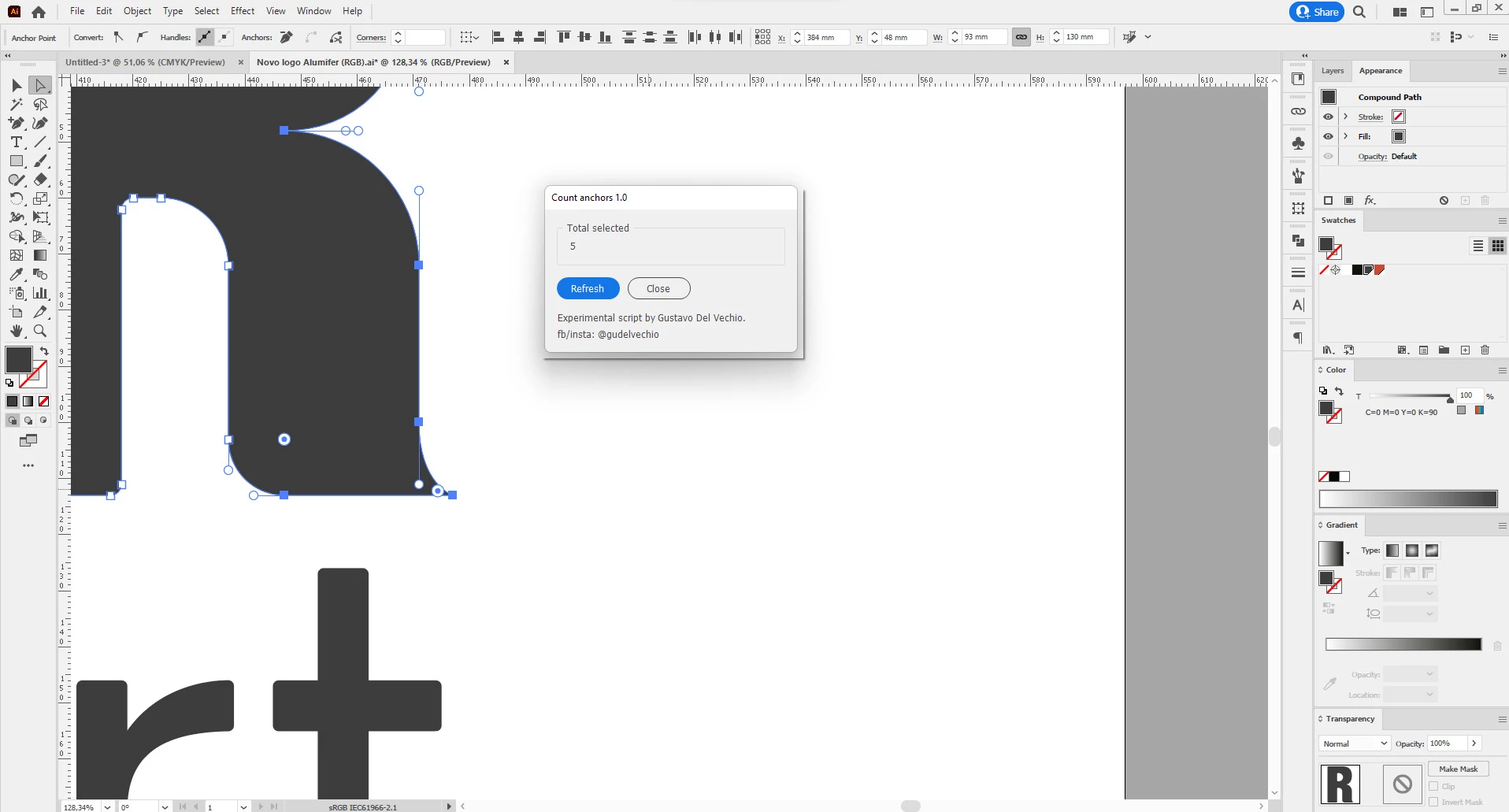
I read this post yesterday and tried to create an script to count anchors. Obviously I did not make much tests against all kinds of Illustrator objects (I´ve just written today), but, selecting simple paths or selecting anchors with Direct Select Tool should count properly.


You could try by downloading the script from my dropbox: https://www.dropbox.com/s/0zble31oxppbmnd/illustrator_count_anchors.zip?dl=0


I tried to create a floating panel, so it could be placed aside the artboards and you could acess this anytime you want. 


Again, it's just an experimental script to help. Let me know if this does work or not work!!


P.s.: this time, in order to count anchors, a refresh button in panel must be pressed. Perhaps there's a way to the panel interactivelly update automatically the counting of anchors based on selection, but I must make some tests to prove if this behaviour is really possible.


But, it's an starting point at least 🙂

Tell me if this is useful for you.

Gustavo.


4 replies

Gustavo Del VechioCorrect answer
Inspiring
May 21, 2022

Hi

I read this post yesterday and tried to create an script to count anchors. Obviously I did not make much tests against all kinds of Illustrator objects (I´ve just written today), but, selecting simple paths or selecting anchors with Direct Select Tool should count properly.


You could try by downloading the script from my dropbox: https://www.dropbox.com/s/0zble31oxppbmnd/illustrator_count_anchors.zip?dl=0


I tried to create a floating panel, so it could be placed aside the artboards and you could acess this anytime you want. 


Again, it's just an experimental script to help. Let me know if this does work or not work!!


P.s.: this time, in order to count anchors, a refresh button in panel must be pressed. Perhaps there's a way to the panel interactivelly update automatically the counting of anchors based on selection, but I must make some tests to prove if this behaviour is really possible.


But, it's an starting point at least 🙂

Tell me if this is useful for you.

Gustavo.



NestorKRS
Participating Frequently
August 6, 2022

Hola Gustavo,

First, thanks for this genius option, it's a good to have feature.
It seems to me, that your plugin is not able to count grouped lines which has more than 1100 anchorpoints

May I ask, if you developed this amazing product further, or it is still available only in the 1.0 version?

Thanks again, 
Have a great day
Nestor

Inspiring
August 8, 2022

Hi Nestor


Thank you a lot for your feedback. The script is still in version 1.0, since my use is very simple...for counting a selected number of anchors. So it fit my needs!


Do a test for me, please: if you ungroup the lines, then select them and ask the script to count anchors...does it work?


Good day for you!

Gustavo.

Kurt Gold
Community Expert
Community Expert
October 14, 2020

user620,


someone marked my answer as correct.


I can understand that it may be a bit vexing because you are the person who posted the initial request.


Therefore I just unmarked it as such thing.

user620Author
Inspiring
October 20, 2020

For the given answers, yours is the best. So I can't agree more with the person who marked it correct.

As a newbie to Adobe forums, I didn't know anyone besides the OP could mark a post as correct. Hence posted a reply about possible intervention by Artificial Intelligence.


Besides, I found the simplify menu item very useful in my workflow. Thanks.


Kurt Gold
Community Expert
Community Expert
October 13, 2020

- Direct select some anchor points.
- Object menu > Path > Simplify
- In the Simplify dialog turn on the preview.
- Get the number of selected anchor points where it says "Original:"

- Cancel the dialog.

user620Author
Inspiring
October 14, 2020

Does the Forum have builtin Artificial Intelligence Support, Cuz the above message was marked as the correct answer, before I had a chance to visit the Forum. ?

Monika Gause
Community Expert
Community Expert
October 14, 2020

Moderators can mark posts as correct. As can some other people.

Monika Gause
Community Expert
Community Expert
October 13, 2020

The document info panel unfortunately doesn't count only selected points.

Maybe there's a script.

Until then: the plugin VectorScribe does:

Disposition_Dev
Legend
August 31, 2022

somewhat trivial with a script.. a quick bit of pseudo-code:


var totalPoints = 0;

function digRecursivelyToFindPathPoints()

    for each item in selection

        if item.typename === "PathItem"

            totalPoints += item.pathPoints.length

        else if item.typename === "CompoundPathItem"

            duplicate item to a sandbox layer

            break compound path and ungroup all resulting children until nothing is left but simple pathItems

            for each pathItem in the compoundPath

                totalPoints += pathItem.pathPoints

            remove sandbox layer and duplicated artwork

        else if item.typename === "GroupItem"

            pass this item back into the recursive function

alert("there are " + totalPoints + " path points in the current selection.


The above would give all of the anchor points given one or more selected objects.. But it doesn' thelp with identifying which pathPoints are selected.. fortunately there is indeed a "selected" property of the pathPoint object, so we could simply add another loop to check each pathpoint of a selected path to see if the point itself is selected..


This isn't terribly efficient though, as it's entirely possible for a shape to have many thousands of anchor points, and I'm not sure how to optimize this beyond checking every single one of them.. But at the very least, selecting one pathPoint of a pathItem does place that whole pathItem into the document.selection array.. So we would only be checking pageItems that actually do have something selected and ignoring the rest... So that's a bit of efficiency gain i guess.