
Known Participant
January 16, 2025
Question

Create a stroke from an outlines path

  • January 16, 2025
  • 2 replies
  • 1837 views

Hi, I'm still using an old AI version, but I don't think it matters here:


I'm involved in recreating a logo (that some unknown designer created, and the original Vector art is lost), based on a (hi-res) JPG... The logo is loosely based on Avant Garde font, BUT STILL NEEDS SOME ADJUSTMENTS AND TWEEKINGS. 


Doing those changes causes the lines' THICKNESS not to be totally consistent, which is what one expects a logo to be...


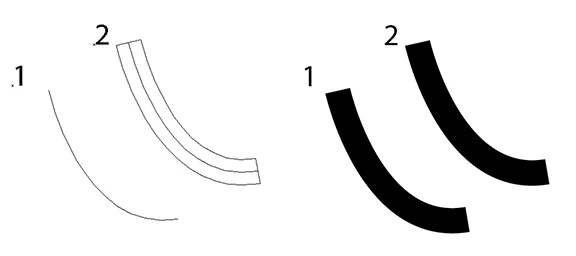
So my question is, please see below, just like creating a stroke (1), giving it a certain thickness, and then doing an "outline stroke" to get #2, I'm looking for just THE OPPOSITE, take a path (my traced logo), like #2, AND TURN IT INTO A SINGLE STROKE. Then I will give all the letters the appropriate thickness — and then outline them. That way all the letters in the logo will be at a consistent thickness, as a logo is expected to be.


Can this be  done?


Thanks for your input!
 

2 replies

Jacob Bugge
Community Expert
Community Expert
January 16, 2025

Amikoe,


Have yous considered cleaner ways such as redrawing on top of the locked JPEG and aided by the actual Avant Garde font oe simply starting over based on the Avant Garde font as in the original, either way maybe using a combination of new stroked paths and new/existing filled paths as covenient, until the final outlining (of each part)?


That might make yous (or at least you) happier and the logo better, hopefully even in a shorter time.


AmikoeAuthor
Known Participant
January 16, 2025

Yes, I've been using the font, but the logo was not created using that font, it's just a font that I have (and I have thousands of fonts...) that seems close enough, but still needs tweaking. Straight lines are easy, of course, but curved lines are a challenge, so I was just curious, instead of spending hours on this, if there's a simpler trick... 

pixxxelschubser
Community Expert
Community Expert
January 18, 2025

Amikoe, may I ask how the time to create the logo compares to the time you think you would need to make the Image Trace version tolerable (if at all possible)?


Which (wrong) image are you referring to?


The ability to edit posts, after clicking the More button under the susmitted post, requires a certain level of forum participation.


I am unsure which, but at least one of our friends knows. @pixxxelschubser ?


quote

… The ability to edit posts, after clicking the More button under the susmitted post, requires a certain level of forum participation.


I am unsure which, but at least one of our friends knows. @pixxxelschubser ?


By @Jacob Bugge


Hi Jacob,
You are absolutely right.
But only Adobe knows the exact ‘magic formula’.

(Since the recent changeover of the profiles, it has also become completely impossible for us to make a ‘forecast’ based on the existing contributions. Sorry)

Monika Gause
Community Expert
Community Expert
January 16, 2025

If that is really just as simple as you are showing here, you can try this: https://community.adobe.com/t5/illustrator-discussions/new-year-new-strokes/m-p/12628630


If not, then the long answer is no.

AmikoeAuthor
Known Participant
January 16, 2025

The image I'm getting is below, and I don't see any "Import stroker_1.aia" in the list of actions: