



Copy link to clipboard
Copied
Is there a way to do this? Is there a script out there that can create individual Symbols from individual layers?
EDIT: I pasted this in the wrong forum so i moved it over here.


 1 Correct answer

Do you know I just posted and as I did I thought moveToBeginning wheres thats come from…?
var doc = app.activeDocument;
var lays = doc.layers;
for ( var i = 0; i < lays.length; i++ ) {
var grp = lays.groupItems.add();
var items = lays.pageItems;
for ( var j = items.length-1; j > 0; j-- ) {
items
.move( grp, ElementPlacement.PLACEATBEGINNING ); };
doc.symbols.add( grp );
};


Explore related tutorials & articles
 24
Replies
24
24
Replies
24

Copy link to clipboard
Copied
Yes it can be done… I've done this in past scripts for web usage ( makes them load quicker or so I was informed )
Make a new symbol from the page items, delete them then place and position the symbol…
Copy link to clipboard
Copied
Ok.. i dont know how to script at all so would there possibly be a link to a script that i can run and convert every layer to a symbol?
Or a script to convert EPS file in a folder into symbols?
Copy link to clipboard
Copied
ok as i've been researching i see Scripting reference has Layers and Symbol items
and it seems i could say layers.pageitems or layer.pathitems
is that correct?
Copy link to clipboard
Copied
// script.name = turnActiveLayerIntoSymbol.jsx;
// script.description = creates a symbol out of all pageItems in the active layer;
// script.required = an open doc with at least one pageItem;
// script.parent = Carlos Canto // 3/28/11;
// script.elegant = false;

var doc =app.activeDocument;
var layer = doc.activeLayer;
var grp = layer.groupItems.add(); // add a group

for (i=layer.pageItems.length-1; i>=1 ; i--) // loop backwards
    {
        layer.pageItems.moveToBeginning(grp); // add each pageItem to the group
     }

doc.symbols.add(grp);
Carlos wrote this script and it does almost everything i was looking for... is there a way to add a loop or a repeat to do it to every layer in the document til its done..
Copy link to clipboard
Copied
Can you explain further what you want this to do… Most of the time when Im asked to script AI with symbols its for web usage… Do you just want symbols creating and adding to the symbols palette of a document or do you need symbols creating from layer content then replacing the layer content with symbol instances? Just some more background info would help…
Edit:
OK so it would appear that replacing content is not what you wanted… Just symbols… You just need to add a second loop if that is the case…
Copy link to clipboard
Copied
Yes basically i have 300 or more signs that i use for more then one customer i wanted to create a symbol library. so i have already used the script "distributetolayers" so all the signs are on individual layers and i wanted to run a script that would create a symbol from every layer.
The above script does exactly what i want but it stops after doing the active layer (thats probably because of var layer = doc.activeLayer;) line item.
I want it to go through all 300 layers creat a symbol library and then i will save that library.
Copy link to clipboard
Copied
so how do i add a second loop?
Copy link to clipboard
Copied
OK, I didn't bother to test this so let me know…
var doc = app.activeDocument;
var lays = doc.layers;
for ( var i = 0; i < lays.length; i++ ) {
var grp = lays.groupItems.add();
var items = lays.pageItems;
for ( var j = items.length-1; j >= 1 ; j-- ) {
items
.moveToBeginning( grp ); };
doc.symbols.add( grp );
};
Copy link to clipboard
Copied
it gives me
Error 2 Items is Undefined
Line 13
-> items
grp);
I'm not sure what that means
Copy link to clipboard
Copied
Do you know I just posted and as I did I thought moveToBeginning wheres thats come from…?
var doc = app.activeDocument;
var lays = doc.layers;
for ( var i = 0; i < lays.length; i++ ) {
var grp = lays.groupItems.add();
var items = lays.pageItems;
for ( var j = items.length-1; j > 0; j-- ) {
items
.move( grp, ElementPlacement.PLACEATBEGINNING ); };
doc.symbols.add( grp );
};
Copy link to clipboard
Copied
I really want to know how to do this! Can you add a Handle to ignore Hidden or Locked Layers?
Copy link to clipboard
Copied
Of cause… Although I think Carlos is having a ( moment ) due to the lack of CS6 improvements… Started making his own…
Whats hidded or locked though the layers themselves or the content?
Copy link to clipboard
Copied
The layers themselves
Copy link to clipboard
Copied
Again I didn't test this here…
var doc = app.activeDocument;
var lays = doc.layers;
for ( var i = 0; i < lays.length; i++ ) {
if ( lays.locked != false || lays.visible != false ) {
var grp = lays.groupItems.add();
var items = lays.pageItems;
for ( var j = items.length-1; j > 0; j-- ) {
items
.move( grp, ElementPlacement.PLACEATBEGINNING );
};
doc.symbols.add( grp );
};
};


Copy link to clipboard
Copied
Hi Mark, thanks for taking care of this while I was having "my moment"  ...I'm still not over it yet.
moveToBeginningwheres thats come from…?
almost totally undocumented, one reference on page 16 in CS4 Reference (page 15 in CS5)....works fine here on Windoze.
Copy link to clipboard
Copied
Carlos, Im going to take a look at that… Do you know I have a script sample created by someone else that uses similar syntax… And I've thought before now where are these commands their using come from… I thought it may derive from earlier versions of JavaScript in AI.
Copy link to clipboard
Copied
Copy link to clipboard
Copied
please post the script you're using and a file that's throwing the error.
thanks
carlos
Copy link to clipboard
Copied
- var doc = app.activeDocument;
- var lays = doc.layers;
- for ( var i = 0; i < lays.length; i++ ) {
- if ( lays.locked != false || lays.visible != false ) {
- var grp = lays.groupItems.add();
- var items = lays.pageItems;
- for ( var j = items.length-1; j > 0; j-- ) {
- items
.move( grp, ElementPlacement.PLACEATBEGINNING ); - };
- doc.symbols.add( grp );
- };
- };
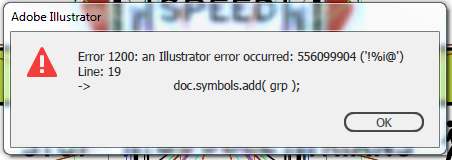
Gives me this error

I opened 36 files each on their own artboard and i thought that this script was supposed to add them to the symbol library
EDIT: OK FIGURED OUT THAT EACH item was imported as a "placed" item... once i "embeded" the EPS Objects, then the script worked perfectly, however can i ask that the script make each symbol name the same as the layer name instead of "Symbol 1" or "symbol 2"??
Copy link to clipboard
Copied
cool,
to name your symbols change line 19 to the below code and add one more line after it.
var mySymbol = doc.symbols.add( grp );
mySymbol.name = lays.name;
Copy link to clipboard
Copied
Carlos that worked perfectly

Copy link to clipboard
Copied
Who knows how to make the script create dynamic symbols by default, rather than static?
Maybe someone knows the way how to turn all static symbols into dynamic at once?
Copy link to clipboard
Copied
Manually the default type of symbol is dynamic, so record and action to add a symbol, run it with a script.
Copy link to clipboard
Copied
Whatever I do, this script creates static characters.


Get ready! An upgraded Adobe Community experience is coming in January.
Learn more
 AdChoices