


Copy link to clipboard
Copied
I am trying to create a vector half tone that I can send through my film processor, but it will only recognize line art when I send it to print a film.
My question is, is there a way to create a vector half tone effect that I can somehow convert to line art so that my processor is able to output a film besides creating it in PS and then importing with a live trace?


 1 Correct answer


Try with Phantasm from Astute Graphics >> https://astutegraphics.com/plugins/phantasm
Here's a small tutorial: https://youtu.be/zAyGd3n4Z7g


Explore related tutorials & articles
 18
Replies
18
18
Replies
18


Copy link to clipboard
Copied
With line art you are referring to 1 bit images? Or to vector paths?
Copy link to clipboard
Copied
Both kind of. The system only recognizes black and white. Black is my print area and White being a no print area. I normally create my artwork and designs with Vector paths and then just use only pure black and white to send them through.
When I create a layout for a design and then send it to my rip station it will only recognize black and white line art. It's an older system that runs off of brisque on the rip station. If I send a gradient to the system it sees the gradient as a "color" and does not recognize it as the vector line art and will not print it through my processor.
I'm trying to create a gradient with halftones and then converting the halftone dots so the system can recognize it.
I hope that makes sense. I can convert the gradient to a halftone with the pixelete, but then trying to convert the halftone to vector paths so my processor will recognize it is where I am stuck. Is it possible to convert it with out raterizing and then trying to do a image trace? ( tried that and the dots did not turn out well)

Copy link to clipboard
Copied
First, fill your art or pieces of art that need the halftone effect first with a gradient fill. Next, choose the Effect menu, select Pixelate, then "Color Halftone". You can play around with the radius and angles to achieve the result you want.
Copy link to clipboard
Copied
Try with Phantasm from Astute Graphics >> https://astutegraphics.com/plugins/phantasm
Here's a small tutorial: https://youtu.be/zAyGd3n4Z7g
Copy link to clipboard
Copied
Thank you, I have actually looked in to this before. Do you know if you use this, if you switch to outline view can you see the outline of the halftone dots or no?
Copy link to clipboard
Copied
If you expand the effect it will be paths.
Copy link to clipboard
Copied
Is this only if you are using the Phantasm plugin?
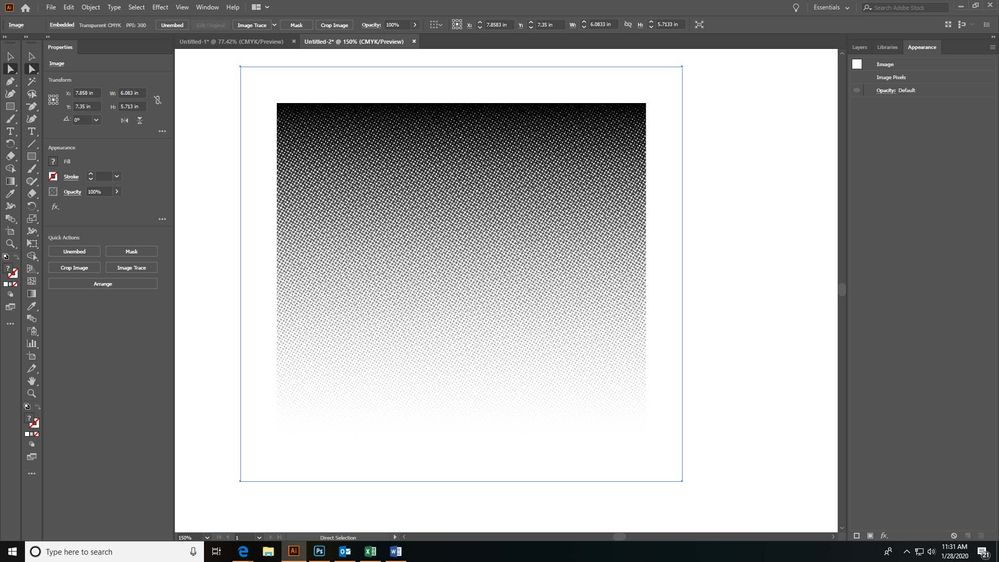
I tried Effect>Pixelete>Halftone
Radius was 8, angle sett all to 30 since I only need black and white.
When I go to Object> Expand is grayed out and I am anot able to select it. This is with out haveing Phantasm.
Copy link to clipboard
Copied
Object > Expand appearance
Copy link to clipboard
Copied
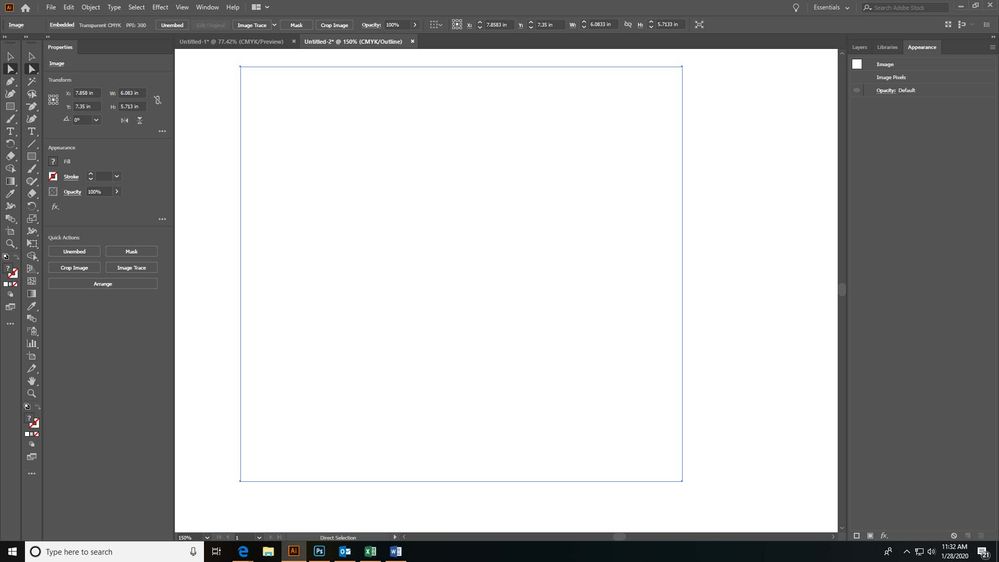
I tried the Expand Appearance, but when I do that it just expands it out to a larger white box around the halftone gradient. When I switch to the outline view it only shows the outline of the box not the outline of all the halftone dots. Did I miss a step or do something out of order?
Copy link to clipboard
Copied
Are you sure you used Phantasm?
Copy link to clipboard
Copied
No this is without using the Phantasm plugin. Will this only work with the plugin?
Copy link to clipboard
Copied
The Illustrator effect is pixel based.
Copy link to clipboard
Copied
Ok, Thank you for all of your help! I just wanted to make sure before we purchased the Phantasm plugin that it would work for what we are trying to achieve in converting them to paths.
Copy link to clipboard
Copied
As far as I know you can try before you buy
Copy link to clipboard
Copied
More of a detailed explanation.
The system only recognizes black and white. Black is my print area and White being a no print area. I normally create my artwork and designs with Vector paths and then just use only pure black and white to send them through.
When I create a layout for a design and then send it to my rip station it will only recognize black and white line art. It's an older system that runs off of brisque on the rip station. If I send a gradient to the system it sees the gradient as a "color" and does not recognize it as the vector line art and will not print it through my processor.
I'm trying to create a gradient with halftones and then converting the halftone dots so the system can recognize it.
I hope that makes sense. I can convert the gradient to a halftone with the pixelete, but then trying to convert the halftone to vector paths so my processor will recognize it is where I am stuck. Is it possible to convert it with out rasterizing and then trying to do an image trace? ( tried that and the dots did not turn out well)
Copy link to clipboard
Copied
Please check the following video:
https://www.dropbox.com/s/i7ccbqvba7atj6u/Phantasm_Halftone.mp4?dl=0

Copy link to clipboard
Copied
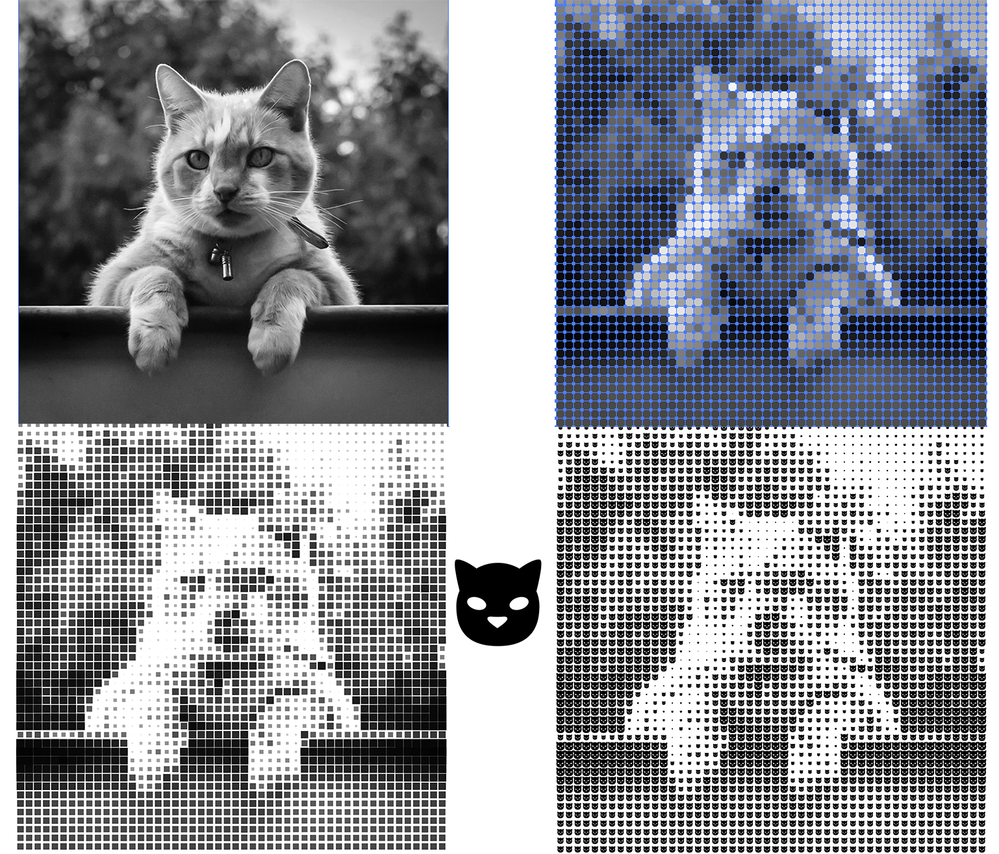
Hi! I saw your tutorial and it is almost exactly what I really want, How can i change the circle dot by another symbol such as my logo or certain characters... below is the image i want to do.
Many thanks


Copy link to clipboard
Copied
You could try this:
Use Object > Create Object Mosaic on an embedded grey image (be careful with the number of tiles).
Ungroup the result.
You need 2 scripts:
Resize by Luminance: this will resize the tiles based on their grey values
https://github.com/johnwun/js4ai/blob/master/sizeByLuminance.jsx
Zamena Size, this will replace the tiles with the topmost object and keep their size.
http://illustrator.hilfdirselbst.ch/dokuwiki/en/skripte/javascript/zamena_size


Get ready! An upgraded Adobe Community experience is coming in January.
Learn more
 AdChoices