



nguyenr79788692
Participant
September 25, 2019
해결됨

Does anyone know how to change color palette/panel of AI to make it looks like that of Photoshop?
  • September 25, 2019
  • 4 답변들
  • 1037 조회

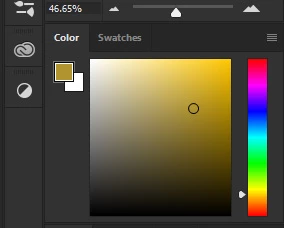
My AI once had the color panel like that of Photoshop ( as you can see in the image). But when i changed the version, it disappeared. Now it's really hard for me to work with the new color panel one. I really want to change it back. Could someone help me to solve this problem please? Many thanks!
    이 주제는 답변이 닫혔습니다.
    최고의 답변: Mike_Gondek10189183

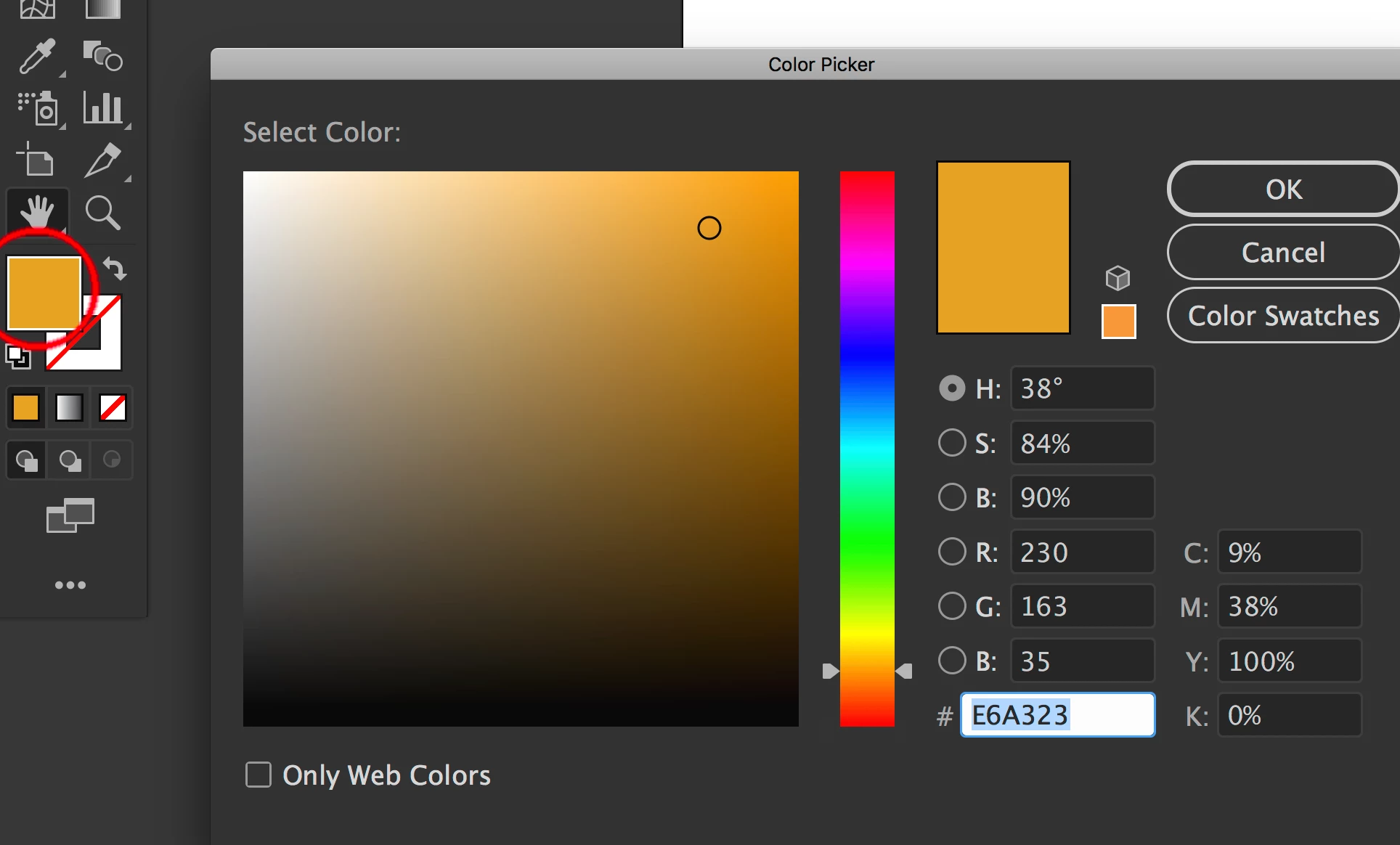
    If what you  are showing is in photoshop, then Ton may be referring to the H Button of Hue in HSB. If you still need help can you show how Illustrator is appearing to you.


    Double click the fill swatch in illustrataor (circled in red) to enter the color picker, as you may be in the color panel. Hard to say without seeing your screen.

    4 답변

    nguyenr79788692
    Participant
    September 26, 2019

    nguyenr79788692
    Participant
    September 26, 2019
    Sorry for the crop. But i'm not mentioning the color picker. :((
    Monika Gause
    Community Expert
    Community Expert
    September 26, 2019
    As said: there might be plugins that provide a different color picker for Illustrator.
    Ton Frederiks
    Community Expert
    Community Expert
    September 25, 2019

    Yes, I was referring to the H button that Mike showed in his screendump.

    Mike_Gondek10189183
    Community Expert
    Community Expert
    September 25, 2019

    If what you  are showing is in photoshop, then Ton may be referring to the H Button of Hue in HSB. If you still need help can you show how Illustrator is appearing to you.


    Double click the fill swatch in illustrataor (circled in red) to enter the color picker, as you may be in the color panel. Hard to say without seeing your screen.

    nguyenr79788692
    Participant
    September 26, 2019
    I just already show it you can come check.
    Ton Frederiks
    Community Expert
    Community Expert
    September 25, 2019

    try to check the H button

    nguyenr79788692
    Participant
    September 25, 2019
    Thanks but what do you mean? H is the hand tool
    Monika Gause
    Community Expert
    Community Expert
    September 25, 2019
    The H button works in the color picker. The color panel cannot be changed. There might be plugins.