Exit
  • Global community
    • Language:
      • Deutsch
      • English
      • Español
      • Français
      • Português
  • 日本語コミュニティ
  • 한국 커뮤니티
0

Edit & modify text for labels

New Here ,
Oct 15, 2023 Oct 15, 2023

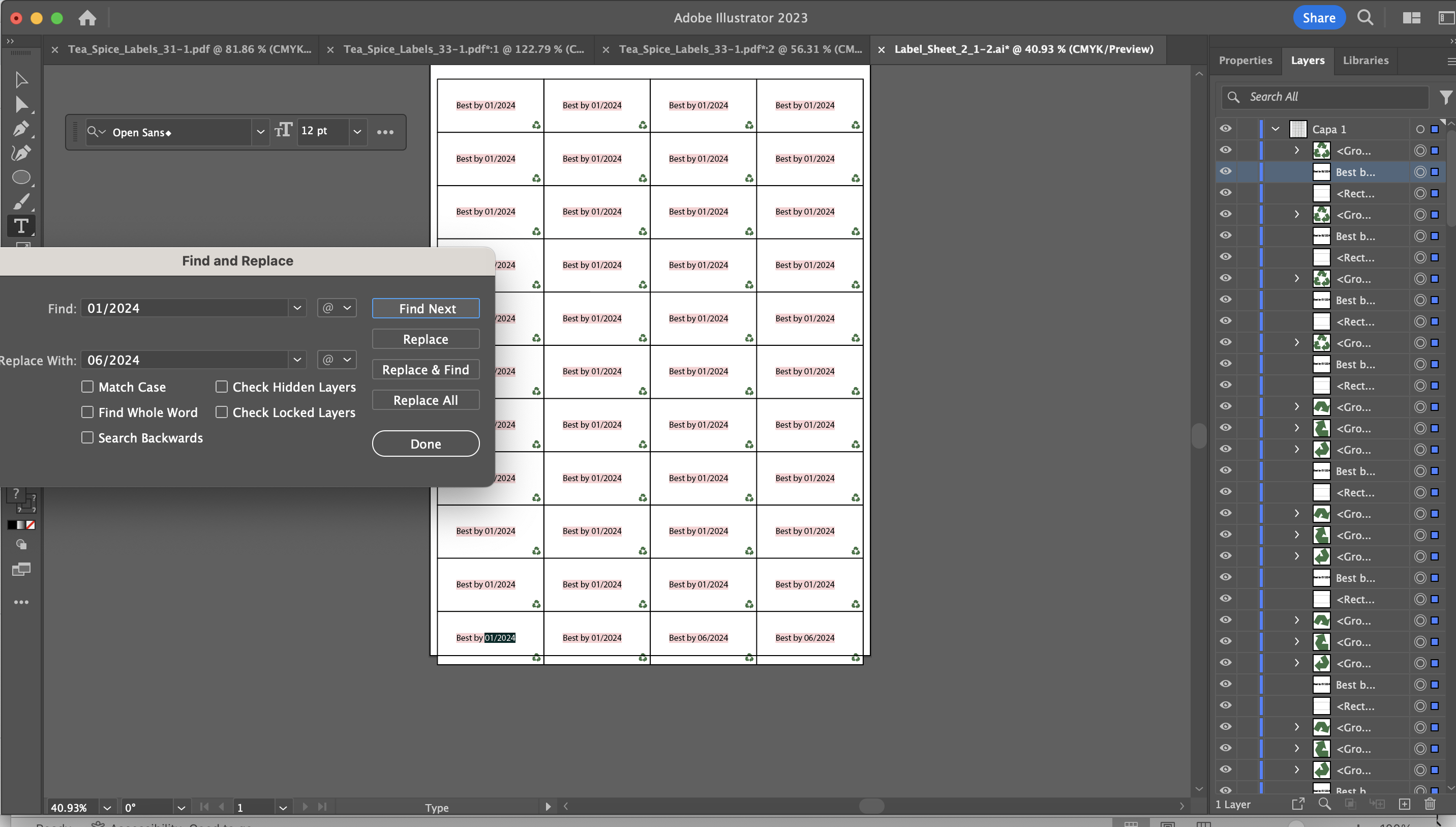
A freelancer made this file for me. I am not very familiar with Illustrator and am Trying to change this text in all labels in one time not one by one. Could you please help,

Many thanks!

TOPICS
How-to
845
Translate
Report
Community guidelines
Be kind and respectful, give credit to the original source of content, and search for duplicates before posting. Learn more
community guidelines
Adobe
Community Expert ,
Oct 15, 2023 Oct 15, 2023

They are all single text objects? Not symbols? Not an effect? Not the repeat function?

Can you open the layers panel, click on one of those texts on the artboard and then click on the magnifier glass in the Layers panel and show us a screenshot?


Translate
Report
Community guidelines
Be kind and respectful, give credit to the original source of content, and search for duplicates before posting. Learn more
community guidelines
New Here ,
Oct 16, 2023 Oct 16, 2023

Hello , thank you for the reply. Here is a scshot of Layer Panel

Translate
Report
Community guidelines
Be kind and respectful, give credit to the original source of content, and search for duplicates before posting. Learn more
community guidelines
Community Expert ,
Oct 16, 2023 Oct 16, 2023

Thank you. So everyting is single, not connected, not easy to change the text.

What I would do:

1. Measure the distances.

2. Delete all but the one in the topf left

3. Do this: https://youtu.be/Ro2e2J9fs_0

Sorry for German interface. What you need is: Effect > Distort & Transform and Window > Appearance

Translate
Report
Community guidelines
Be kind and respectful, give credit to the original source of content, and search for duplicates before posting. Learn more
community guidelines
New Here ,
Oct 16, 2023 Oct 16, 2023

ok Thanks let me try it and get back to you:)

Translate
Report
Community guidelines
Be kind and respectful, give credit to the original source of content, and search for duplicates before posting. Learn more
community guidelines
New Here ,
Oct 16, 2023 Oct 16, 2023

Ton figured it out with find and replace.Thanks for your time and i will use the video probably:)

 

Translate
Report
Community guidelines
Be kind and respectful, give credit to the original source of content, and search for duplicates before posting. Learn more
community guidelines
Community Expert ,
Oct 15, 2023 Oct 15, 2023

Looks like the font is missing, but that should not prevent you from editing the text (if it is not locked).

Can you check the Appearance panel for a Transform Effect and Type > Find/Replace font ?

Translate
Report
Community guidelines
Be kind and respectful, give credit to the original source of content, and search for duplicates before posting. Learn more
community guidelines
New Here ,
Oct 16, 2023 Oct 16, 2023

Hello Thanks for the reply. I did a scrshot of the followings, does that help. I am trying to change the date from 01/2024 to 06/2024

Translate
Report
Community guidelines
Be kind and respectful, give credit to the original source of content, and search for duplicates before posting. Learn more
community guidelines
Community Expert ,
Oct 16, 2023 Oct 16, 2023

What happens if you do not select anything and use Edit > Find and Replace > Find  > Replace All?

Translate
Report
Community guidelines
Be kind and respectful, give credit to the original source of content, and search for duplicates before posting. Learn more
community guidelines
New Here ,
Oct 16, 2023 Oct 16, 2023

great it worked , thank you so much !!

Translate
Report
Community guidelines
Be kind and respectful, give credit to the original source of content, and search for duplicates before posting. Learn more
community guidelines
Community Expert ,
Oct 16, 2023 Oct 16, 2023
LATEST

Good to hear that worked for you.

Translate
Report
Community guidelines
Be kind and respectful, give credit to the original source of content, and search for duplicates before posting. Learn more
community guidelines
Community Expert ,
Oct 16, 2023 Oct 16, 2023

Can you do an Edit > Find and Replace?

Translate
Report
Community guidelines
Be kind and respectful, give credit to the original source of content, and search for duplicates before posting. Learn more
community guidelines
New Here ,
Oct 16, 2023 Oct 16, 2023

it does not work unless I do it wrong

Translate
Report
Community guidelines
Be kind and respectful, give credit to the original source of content, and search for duplicates before posting. Learn more
community guidelines