Exit
  • Global community
    • Language:
      • Deutsch
      • English
      • Español
      • Français
      • Português
  • 日本語コミュニティ
  • 한국 커뮤니티
0

equidistant circles

Participant ,
Dec 08, 2020 Dec 08, 2020

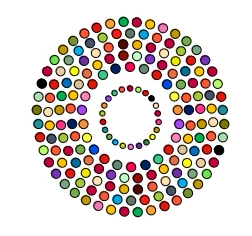
How can I create the circles in this image so that they are equidistant from each other and are alligned along invisible concentric circles?

 

concentric%20circles

TOPICS
Draw and design
1.3K
Translate
Report
Community guidelines
Be kind and respectful, give credit to the original source of content, and search for duplicates before posting. Learn more
community guidelines

correct answers 1 Correct answer

Community Expert , Dec 09, 2020 Dec 09, 2020


@pixxxelschubser  wrote:


… Have you tried to expand appearance? …


Translate
Adobe
Community Expert ,
Dec 08, 2020 Dec 08, 2020

There are a few different approaches from this thread that might help: https://community.adobe.com/t5/illustrator/radial-pattern-copy/m-p/11239581?page=1

Translate
Report
Community guidelines
Be kind and respectful, give credit to the original source of content, and search for duplicates before posting. Learn more
community guidelines
Advocate ,
Dec 08, 2020 Dec 08, 2020

Mirror Me from Astute Graphics: https://astutegraphics.com/plugins/mirrorme


Or use Transform again 

I used a star as a guide and used my center point of the star as the rotation anchor and the points of my star as equal distance guides.

1. With the circle selected click on the anchor.

2. Grab the shape and rotate it to the point you want. Rotated the circle as a copy  (Opt drag or Alt-drag)

3. Do not deselect the copy. Just go to Object> Transform and Choose Transform Again (Command-D or Ctrl+D)

4. Do this as many times as you need to complete the shape.

Screen Shot 2020-12-08 at 1.27.25 PM.png

Translate
Report
Community guidelines
Be kind and respectful, give credit to the original source of content, and search for duplicates before posting. Learn more
community guidelines
Participant ,
Dec 08, 2020 Dec 08, 2020

I used https://community.adobe.com/t5/illustrator/radial-pattern-copy/m-p/11239581?page=1

and was able to produce this.

Logo.jpg

But I need to color each circle with a variety of colors, and have the circles independent so that they can be animated outside of Illustrator. Suggestions?

Translate
Report
Community guidelines
Be kind and respectful, give credit to the original source of content, and search for duplicates before posting. Learn more
community guidelines
Community Expert ,
Dec 08, 2020 Dec 08, 2020

May be the script Vary Hues / Randomize Colors by John Wundes could help a little.

Translate
Report
Community guidelines
Be kind and respectful, give credit to the original source of content, and search for duplicates before posting. Learn more
community guidelines
Participant ,
Dec 08, 2020 Dec 08, 2020

John's script will not work because I cannot isolate a circle to color it. Or to move it independent of all circles on the path.

Translate
Report
Community guidelines
Be kind and respectful, give credit to the original source of content, and search for duplicates before posting. Learn more
community guidelines
Community Expert ,
Dec 09, 2020 Dec 09, 2020

Are these circles paths?

Or scatter brushes?

Or effects?


Have you tried to expand appearance?


Sorry. To little informations.

Translate
Report
Community guidelines
Be kind and respectful, give credit to the original source of content, and search for duplicates before posting. Learn more
community guidelines
Participant ,
Dec 09, 2020 Dec 09, 2020

My goal is to implement this image in Illustrator. It was produced manually in Microsoft Office by a colleague.

concentric circles.jpg

The Illustrator version must have independent circles that can be colored, and the result can be animated in Animator including moving each circle independently.

Following recommendations in threads above, I used scatter brush to create the following.There are 4 concentric invisible paths, each holding visible circles created by scatter brush.

Logo.jpg

However, I cannot work out how to give a color to each circle, nor can I move one circle without moving all of the circles on the path. Suggestions for adjusting the scatter brush implementation, or suggestions of other approaches?

Translate
Report
Community guidelines
Be kind and respectful, give credit to the original source of content, and search for duplicates before posting. Learn more
community guidelines
Community Expert ,
Dec 09, 2020 Dec 09, 2020
LATEST


@pixxxelschubser  wrote:


… Have you tried to expand appearance? …


Translate
Report
Community guidelines
Be kind and respectful, give credit to the original source of content, and search for duplicates before posting. Learn more
community guidelines